Backup Types by Driver Matrix
Portworx Backup uses different drivers to create backups and allows you to create different types of backups based on your preferences and needs. You can customize the backup configuration based on your requirements, and Portworx Backup offers adaptability for future changes. You can opt to create a KDMP or CSI driver-based backup, or a backup that utilizes both of these drivers, and customize the selection of volume snapshot class (VSC) with provisioner-level VSC selection. You can also take a direct KDMP backup at the backup level for cross-cloud backups and restores.
Portworx Backup supports the following types of backups utilizing different drivers:
-
Portworx cloud snapshot: applies only if Portworx is your storage platform, utilizes Portworx driver to create a backup
-
Direct KDMP: utilizes KDMP driver to create a backup and holds good for cross-cloud backups and restores
-
CSI snapshot: uses storage providers CSI driver to create a snapshot
-
CSI snapshot + offload snapshot to backup location (KDMP driver): utilizes CSI driver to create a backup and KDMP driver to offload the backup to backup location (S3 or NFS)
note- The backup behavior outlined in the matrices applies to manual, scheduled, namespace, and VM backups for the drivers listed.
- Portworx by Everpure recommends that you create a snapshot class mapping backup instead of a cross-cloud backup, because CSI snapshots are faster and more efficient than backups created by the KDMP driver. Trigger a cross-cloud backup only if you want to create a backup on one cloud and restore it on a different cloud environment.
The illustration and the table below describe the backup behavior for different options you choose in the web console during backup creation for the supported provisioners.
This matrix applies only for fresh installation of Portworx Backup version 2.7.0 and above.
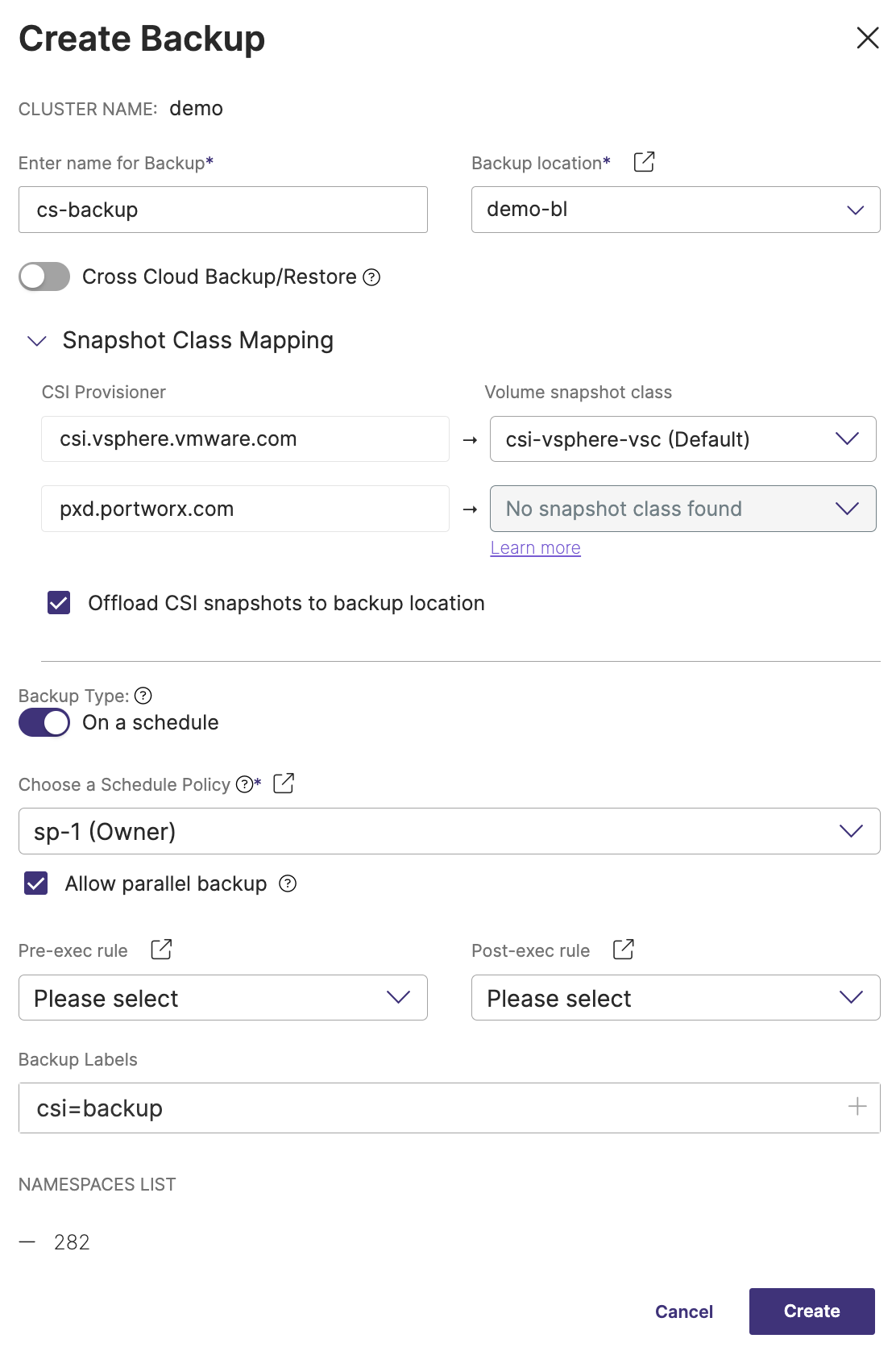
CSI backup matrix
The following table explains the type of backup that gets triggered when you choose different options under Snapshot Class Mapping for CSI Provisioner, Volume snapshot class and Offload CSI snapshots to backup location fields in the Create Backup window:
| Provisioner | Volume snapshot class (vsc) option | Offload to backup location option selected | Backup type triggered |
|---|---|---|---|
| Portworx | Disabled (always) | Yes/No | Portworx cloud snapshot |
| Non-Portworx | No vsc (disabled) | Yes | Direct KDMP backup |
| No | Backup creation fails | ||
| Non-Portworx | Default single vsc (auto-populated) | Yes | CSI snapshot + offloads snapshot to backup location (KDMP backup) |
| No | CSI snapshot | ||
| Non-Portworx | Non-default single vsc (auto-populated) | Yes | CSI snapshot + offloads snapshot to backup location (KDMP backup) |
| No | CSI snapshot | ||
| Non-Portworx | Non-default multiple vscs' (in the drop-down) | Yes | CSI snapshot + offloads snapshot to backup location (KDMP) |
| No | CSI snapshot |
Backup driver matrix
The following matrix provides a comparison of different backup types supported by Portworx Backup, highlighting the drivers used and how resources and volumes are managed for each backup type. It serves as a quick reference to understand the behavior of backups across different scenarios, including cross-cloud backups, snapshots, and cloud-integrated storage solutions.
| Backup Type | Driver | Resources | Volumes | Classic mode | Federated mode |
|---|---|---|---|---|---|
| Cross-cloud | KDMP | Backed up to backup location | Backed up to backup location | Supported | Not supported |
| Snapshot class mapping | CSI | Backed up to backup location | Remains locally as local snapshot on the application cluster | Supported | Supported |
| Snapshot class mapping + Offload to backup location | CSI+KDMP | Backed up to backup location | Backed up to backup location + Remains locally as local snapshot on the application cluster | Supported | Not supported |
| Cloudsnap | PXD (Portworx driver) | Backed up to backup location | Backed up to backup location | Supported | Supported |
FADA volumes are backed up using the Cloudsnap (PXD) backup type — not as native CSI snapshots — whether or not Portworx Enterprise has the FA/FB driver enabled. FADA backup and restore on Portworx Enterprise clusters with the FA/FB driver enabled requires Portworx Backup 3.1.1, Stork 26.4.1, and Portworx Enterprise 3.7.0 or later. For details, see Backup and Restore FADA Volumes. For how to enable the FA/FB driver on Portworx Enterprise, see Enable FA/FB driver on Portworx Enterprise in the Portworx Enterprise documentation.
KDMP backup matrix
The following table explains the type of backup that gets triggered in different cloud environments when the storage provider supports the CSI snapshot mechanism:
| Cloud storage provider | Storage type | Backup mechanism |
|---|---|---|
| AWS | EBS |
|
| EFS |
| |
| Azure | Disk |
|
| File share |
| |
| IBM | IBM storage |
|
| GCP | Google disk |
|
| Google file |
| |
| OCP | OCP storage |
|
The Azure file CSI driver supports CSI snapshot restore for (SMB) Azure file volumes starting from CSI driver version v1.30.2. For CSI driver versions earlier than v1.30.2, ensure to create a cross-cloud backup and not a CSI snapshot for a successful restore.
Before you initiate a generic, KDMP, or cross-cloud backup, ensure that sufficient buffer storage is available in your application cluster. The restore PVC size buffer is configurable through the KDMP_RESTORE_PVC_SIZE_PERCENTAGE parameter in the kdmp-config ConfigMap. For details, see Configure kdmp-config ConfigMap parameters and KDMP restore.
Everpure volume types
Portworx provisions several Everpure volume types. The following table summarizes the backup mechanism for each, based on whether the volume type supports native snapshots:
| Everpure volume type | StorageClass backend | Container storage solution | Native snapshot support | Backup mechanism |
|---|---|---|---|---|
| FlashArray Direct Access (FADA) | pure_block | Portworx Enterprise | Yes (Portworx cloud snapshot) | Portworx cloud snapshot (CloudSnap/PXD). See Backup and Restore FADA Volumes. |
| FlashArray Direct Access (FADA) | pure_block | Portworx CSI | Yes (CSI snapshot) | CSI snapshot, or Direct KDMP for filesystem PVCs. See Backup and Restore FADA Volumes. |
| FlashArray File (FA Files) | pure_fa_file | Portworx Enterprise or Portworx CSI | No | Direct KDMP only — enable Cross Cloud Backup/Restore in the Create Backup window. See Create a Cross Cloud Backup and Backup and Restore FA Files Volumes. |
| FlashBlade | pure_file | Portworx Enterprise or Portworx CSI | No | Direct KDMP — enable Cross Cloud Backup/Restore. See Create a Cross Cloud Backup. |
The Direct KDMP mechanism used for FA Files and FlashBlade volumes is available in Classic mode only. Because KDMP-based backups are not available in Federated mode, FA Files (pure_fa_file) and FlashBlade (pure_file) volumes cannot be backed up when Portworx Backup runs in Federated mode. See Federated Mode Specifications: Constraints.
FlashArray File (FA Files) volumes are provisioned using FlashArray CSI integration through either Portworx Enterprise 3.7.0 or later, with FlashArray CSI integration configured on the StorageCluster, or Portworx CSI. For provisioning details, see the Portworx FlashArray CSI documentation. Backup and restore of FA Files volumes with Portworx Backup requires Portworx Backup 3.1.1, Portworx Enterprise 3.7.0, and Stork 26.4.1.
KDMP backup behavior for upgrades
Assume that you are on Portworx Backup version 2.6.0 or earlier, with cloud native driver installed on your application clusters. When you upgrade to Portworx Backup version 2.7.0 or later from previous versions, the existing manual backups are not affected.
The backups that are scheduled (to be created in the future) with the cloud native driver:
-
Get migrated to CSI snapshots along with the offload to backup location option if a volume snapshot class is available
-
Use the KDMP driver to create a direct KDMP backup if a volume snapshot class is not available
Scheduled backups that were created using cloud native driver before the upgrade will only get migrated. Scheduled backups created with other drivers remain unchanged.