Backup Types by Driver
This topic describes the various types of backups supported by Portworx Backup when different provisioners and drivers are involved in the backup creation phase. For more information on the types of backups that get triggered for the various options you choose in the web console during the backup creation operation for Portworx Backup 2.7.0 and later, see Backup type matrix.
Backup type availability in Federated mode: The KDMP-based backup types described in this topic include Direct KDMP and CSI local snapshots with KDMP offload. These backup types are not supported in Federated mode. Federated mode supports only object store backup locations (Azure Blob Storage, AWS S3, and Google Cloud Storage); NFS backup locations are not supported. For the full list of Federated mode constraints, see Federated mode specifications. For a comparison of the operation modes, see Operation Modes. Federated mode must be installed as a new deployment; converting an existing Classic mode deployment to Federated mode is not supported. See Install Portworx Backup in Federated Mode.
Backup types
Portworx Backup allows you to configure the following types of backups based on the driver associated with the backups in the system:
-
Portworx (Portworx cloud snapshots)
-
Native CSI (on premises or on cloud)
-
CSI local snapshot with KDMP (local snapshots with offload to back up location) (Classic mode only)
-
Direct KDMP (Applicable to Classic mode only)
notePortworx Backup currently supports VolumeBlock mode only on Portworx Enterprise.
Portworx cloud snapshots
Under the extent-based mode, Portworx compares contiguous ranges of blocks, called extents, to determine the difference between the local snapshot and the previously uploaded cloud snapshot.
Portworx uses this metadata to calculate the difference between snapshots for upload and does not need to store previous snapshots for comparison. Portworx reduces the footprint of the locally stored cloud snapshot data significantly. However, Portworx must also upload this metadata to the cloud alongside the cloud snap data, resulting in slightly larger uploads.
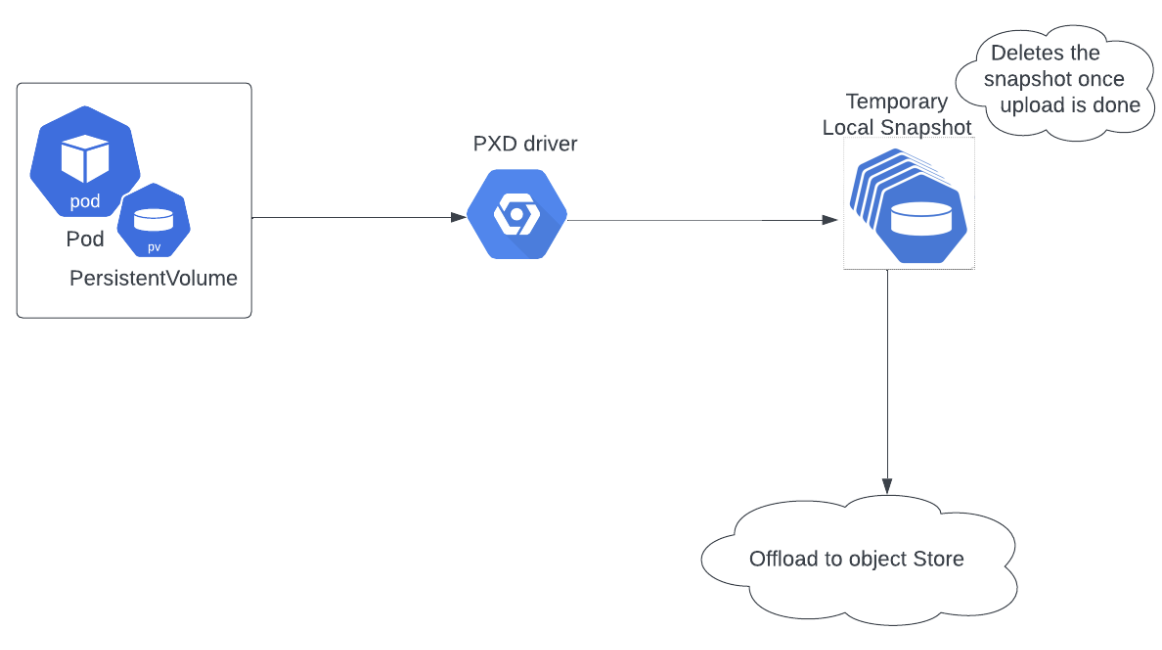
While taking extent-based snapshots, Portworx performs the following tasks:
- Takes a snapshot
- Downloads extent data for the previous snapshot from the cloud
- Compares extents, scans for changed blocks
- Uploads the changes and new snapshot metadata
- Deletes the local snapshot
FADA (FlashArray Direct Access) volumes are backed up using the Portworx CloudSnap method described here, not as native CSI snapshots. This applies to FADA volumes on Portworx Enterprise clusters, with or without FA/FB driver enabled. For prerequisites and behavior, see Backup and Restore FADA Volumes.
Native CSI snapshot (on-premises)
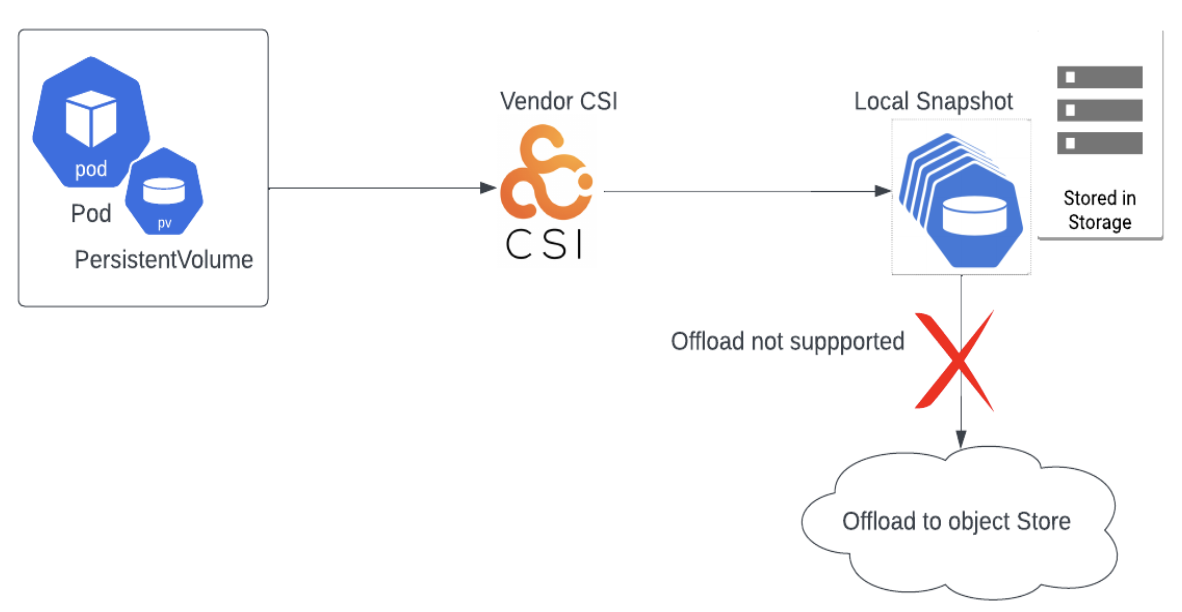
Portworx Backup utilizes the storage provider's CSI driver to create a local snapshot on the array. This default behavior is applicable to all CSI storage providers, including Portworx CSI, Dell, NetApp, and so on.
To trigger a native CSI snapshot backup, in the Create Backup window:
- Disable Cross Cloud Backup/Restore toggle button
- Map your provisioner with Volume Snapshot Class (VSC) if applicable
- Disable Offload to backup location
Native CSI snapshot (on-cloud)
Portworx Backup uses the cloud storage provider's CSI driver to trigger a local snapshot. Depending on the driver and the underlying storage, the resulting snapshot may be stored on the cloud disk or at the storage-array level. This default behavior is applicable to all CSI storage providers (AWS, GKE, AKS and so on).
- Disable Cross Cloud Backup/Restore toggle button
- Map your provisioner with VSC if applicable
- Disable Offload to backup location
When a KDMP backup is used
KDMP-based backups are supported only for PVCs in filesystem mode.
A KDMP backup is used in the following scenarios:
-
Using non-Portworx storage platforms
If your environment uses a storage platform other than Portworx Enterprise:
-
Storage provider does not support CSI snapshots
For storage providers that do not support CSI snapshots, Portworx Backup performs a direct KDMP backup. In this case, select the Cross Cloud Backup/Restore option in the Create Backup window.
-
Storage provider supports CSI snapshots with offload
If CSI snapshots are supported and you choose to offload the backup to a backup location (S3 or NFS), KDMP is used along with the selected Volume Snapshot Class (VSC).
-
-
Cross-cloud and cross-region operations
When performing Cross-cloud and cross-region backup and restore operations
-
3-2-1 backup strategy
When configuring backups to follow the 3-2-1 backups strategy
3-2-1 backup strategy
The 3-2-1 backup strategy is a data protection best practice that recommends maintaining:
- 3 total copies of your data
- 2 copies on different types of storage media
- 1 copy stored offsite or in a separate location
Portworx Backup supports this strategy using a combination of local snapshots and offloaded backups with the KDMP driver.
When you use CSI local snapshot with KDMP (local snapshots with offload to back up location), Portworx Backup creates three copies of your data:
| Copy | Location | Storage type |
|---|---|---|
| Copy 1 | Original application data on persistent volumes (PVs) on the application cluster | Primary cluster storage (SAN, NAS, or cloud disk) |
| Copy 2 | CSI local snapshot on the storage array or cloud disk | Snapshot storage (separate from primary PVs) |
| Copy 3 | Offloaded backup in the configured backup location (S3-compatible object store or NFS share) | Object storage or NFS (offsite or separate infrastructure) |
This setup meets all three requirements of the 3-2-1 strategy:
- Three copies (original data + snapshot + backup)
- Two different media types (block/file storage and object storage or NFS)
- One offsite copy (the backup location)
For configuration steps and guidance on extending this strategy with multiple backup locations, see Configure a 3-2-1 backup strategy.
CSI local snapshot with KDMP
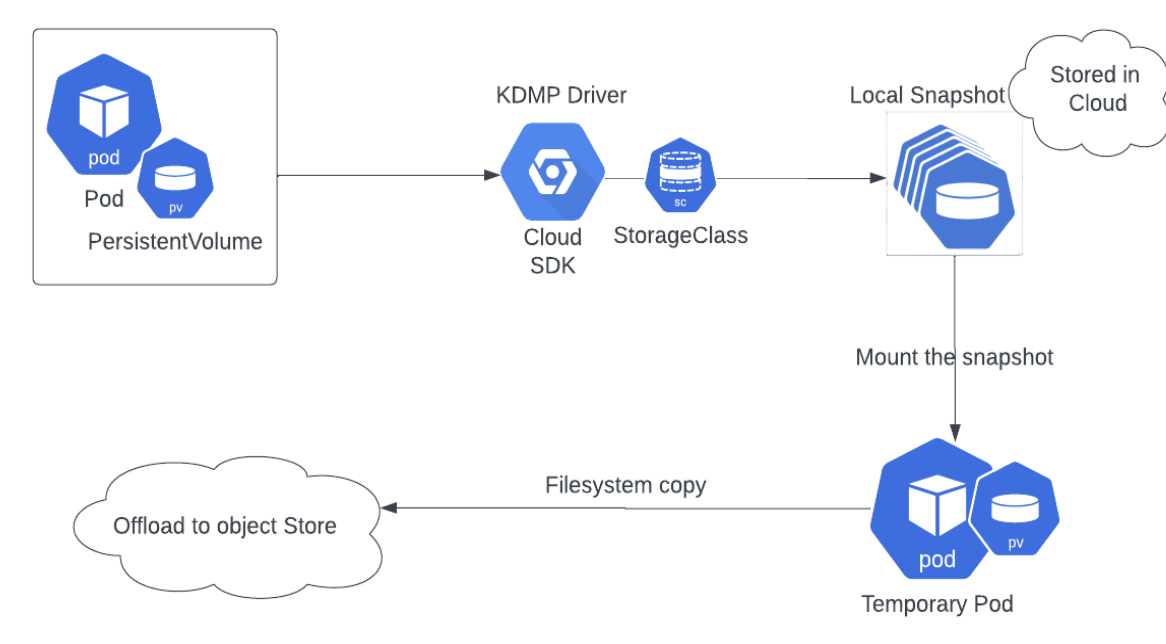
In Portworx Backup, the CSI driver takes local snapshots and later offloads or uploads those snapshots to S3-compliant object stores or NFS-based backup locations using the KDMP driver.
In this case, Portworx Backup performs the following tasks:
a. Takes available snapshot storageclass information
b. Creates a local snapshot using CSI driver
c. Uses KDMP driver to attach the mount point of the PV on the worker node
d. Copies the file system contents to object store (S3 or others) or NFS backup location
To trigger a CSI local snapshot with KDMP, in the Create backup window:
- Disable Cross Cloud Backup/Restore toggle button
- Map your provisioner with volume snapshot class (VSC) wherever applicable
- Enable Offload to backup location
For more information on how to create a CSI local snapshot with KDMP backup, see Snapshot class mapping backup.
Direct KDMP/generic
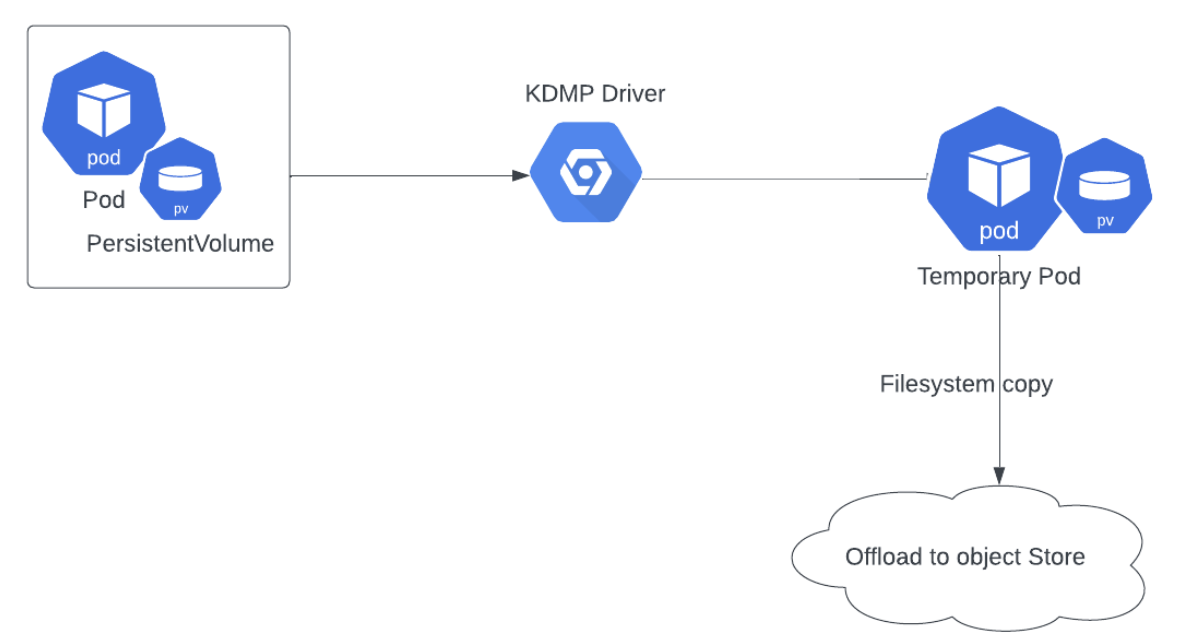
This backup type uses the KDMP driver to attach the mount point of the PV on the worker node and copy the file system contents to object storage.
When a direct KDMP backup or generic backup occurs
Enabling the Cross Cloud Backup/Restore option in the Create Backup window of the web console is what triggers a direct KDMP (generic) backup. You enable this option in the following scenarios:
- The storage provider does not support CSI snapshots. In this case, a direct KDMP backup is the only available option, so you enable Cross Cloud Backup/Restore.
- You are backing up FlashArray File (FA Files) volumes (
pure_fa_file), which do not support native cloudsnap or CSI snapshots and must be protected using the Direct KDMP (generic) mechanism. For step-by-step instructions specific to FA Files volumes, see Backup and Restore FA Files Volumes. - You are performing a cross-cloud or cross-region backup or restore operation.
In both scenarios, enabling Cross Cloud Backup/Restore is the trigger; the scenarios above are the reasons you enable it. This is consistent with the When a KDMP backup is used section.
For more details, see Cross Cloud backup/restore.