Introduction to Portworx Backup
This section provides an overview of Portworx Backup, explains how it works and its architecture, and describes the supported cluster deployments for backup and restore operations. It also outlines the supported configuration methods—REST APIs, CLI, and UI.
Portworx Backup supports two operation modes — Classic mode and Federated mode — each designed for different deployment scenarios and security requirements. The mode you choose affects installation, cluster onboarding, credential management, and supported storage. If you are unsure which mode applies to your environment, see Operation Modes before proceeding.
Product overview
Portworx Backup (PX-Backup) is a Kubernetes backup solution that enables you to back up and restore applications, KubeVirt virtual machines (VMs), and their data across multiple clusters and environments, whether on-premises or in the cloud.
Portworx Backup provides the following benefits:
-
Centralized management of backup and restore operations
Portworx Backup works with Portworx Central (a web console that centralizes various features or products including Portworx Backup into a single user interface), allowing administrators or other users to manage backups and restores of multiple Kubernetes clusters through a web console, CLI, or REST API. -
Role-Based Access Control and Encryption of data for enhanced security and ransomware protection
Portworx Backup supports multi-tenancy, which enables authorized users to connect through authorization providers to create and manage backups for clusters and applications for which they have permissions, without contacting administrators. -
Dedicated repository of backups and restores summary
Portworx Backup maintains a repository of available application backups and enables users to restore them to a destination cluster. Portworx Backup also maintains the restore summary that provides detailed information about each restore operation. Portworx Backup synchronizes its framework with backup locations on a regular basis to check for the availability of new backups. (In Federated mode, backup location synchronization is handled locally by Stork on each application cluster, rather than by the Portworx Backup server.) -
Easy migration of applications across environments
Portworx Backup enables you to migrate the applications across clusters, clouds, and regions. -
Common platform for containers and VMs backup
Portworx Backup enables you to manage backups of containerized applications and VMs running on Kubernetes from a single workspace. Backup type and storage support vary by operation mode; see Operation Modes for details.
Portworx Backup architecture
The architecture below represents Classic mode. In Federated mode, the Portworx Backup server runs on a dedicated backup cluster and sends instructions to application clusters, while Stork on each cluster handles all backup operations locally. For more information, see Federated Mode Specifications.
The following figure provides the Portworx Backup architecture:
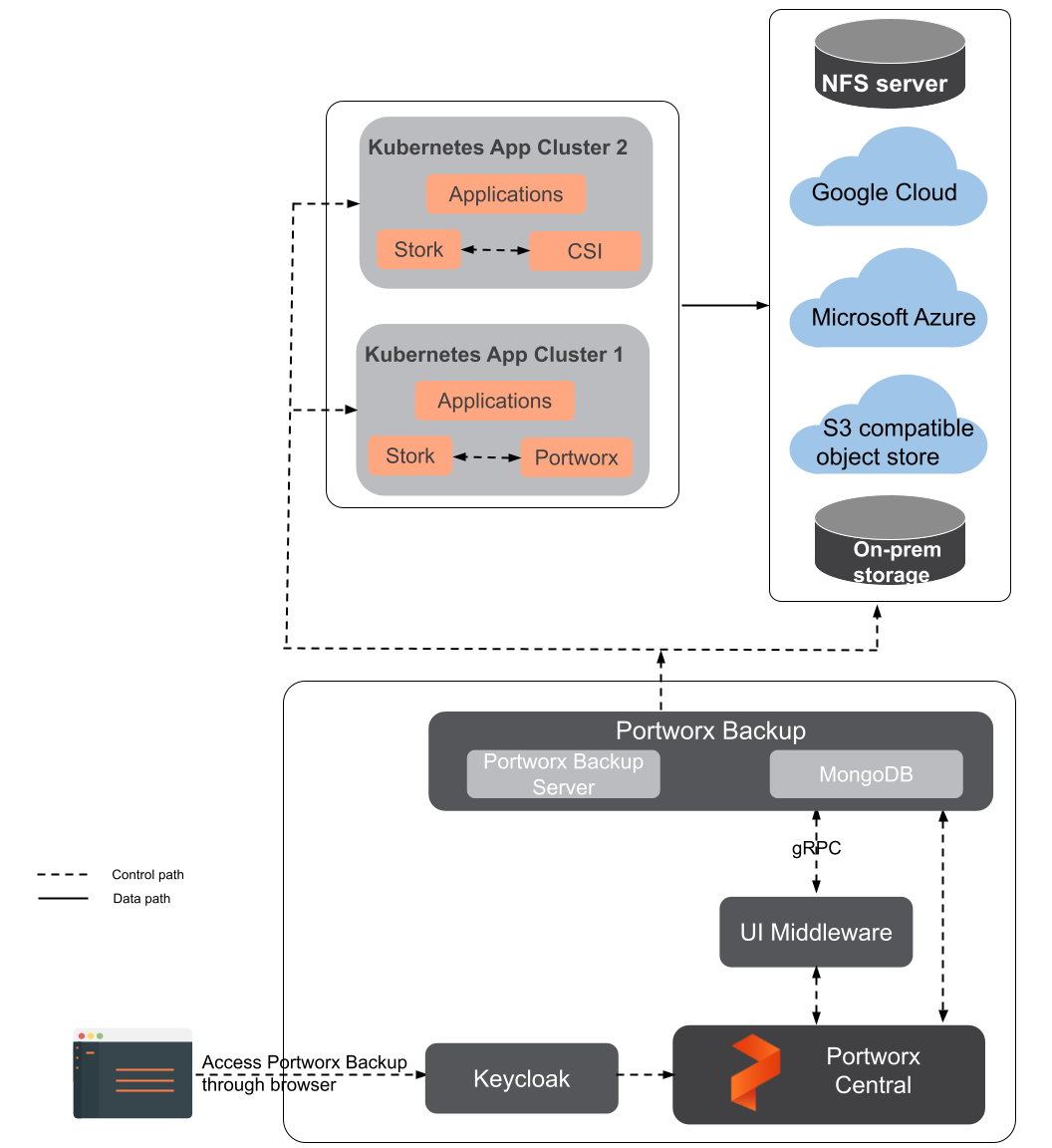
Portworx Backup architecture involves the following components:
-
Portworx Backup Server Portworx Backup server is built on the Google Remote Procedure Call (gRPC) framework and offers performance benefits by reducing latency. With protocol buffers and binary serialization, gRPC divides the payload and enables faster communication, increasing the performance of Create, Read, Update, Delete (CRUD) operations of Portworx Backup. The server implements the basic CRUD operations on the Portworx Backup objects to handle the operations of data protection. Additionally, CRUD abstracts the complexity of data storage and allows users to focus on the web console tasks. Portworx Backup Server communicates with Stork to create application-level backups by creating the backup location and application backup CRDs, and Stork monitors these CRDs on each user’s cluster. Portworx Backup Server also monitors the status of application backups and application restores on these clusters.
-
Portworx Central The Portworx Central portal provides a web interface to deploy Portworx Backup on a cluster. It allows you to choose the required version of the backup, namespace, storage class, external OIDC details, and so on to facilitate a quick installation with the spec generator.
Portworx Central on-premises is a graphical web console that allows you to monitor and manage your Portworx clusters.
-
Keycloak Portworx Backup Server communicates with an external OIDC service (Okta, Keycloak, Active Directory, Auth0, and so on) to validate and authorize tokens that are used for the API calls. The Keycloak component is installed as part of the Portworx Central deployment. Portworx does not support use of an external Keycloak component, but the internally managed Keycloak component can be configured to add compatible external OIDC providers either during installation or post-installation.
-
NFS server NFS enables you to share your files and directories with the intended audience over a network, consuming less storage space with a shared directory. Portworx Backup's Stork component communicates directly with the NFS server through PVCs. You can add a file share that resides on your on-premises or on-cloud NFS server as a backup location and back up all your data to the NFS file share.
-
MongoDB
An open-source NoSQL database that stores data in a flexible JSON format. For more information, see MongoDB documentation. -
On-Prem-Storage
An on-premises or enterprise storage system integrated through Container Storage Interface (CSI) to provide persistent volumes for stateful container workloads.
Portworx Backup functioning
Portworx Backup enables you to create granular backups of the application using namespace and label selectors. You can back up an entire namespace or use label selectors to select certain resources to back up. This selection method also helps preserve associated configuration and pod data, ensuring that you can leverage your backup data after restore. For example, Portworx Backup can back up a MySQL deployment containing pods, PVCs, and volumes tagged with a app = mysql label. You can apply labels to your namespaces, resources, and their backups as key-value pairs using the CLI, and with the Portworx Backup web console you can filter them when needed to create a backup. With this mechanism, Portworx Backup can back up stateful applications as easily as stateless ones. For more information on how labels work, see Labels in Portworx Backup.
You can create a schedule for your backups by creating an independent schedule policy that defines when backups must be created and how many rolling copies they should retain. After creating schedule policies, you can associate them with multiple backups. For more information, see Add Schedule Policies.
Portworx Backup rules help you eliminate manual preparation tasks and minimize interruptions to your cluster during backup operations. You can create pre-exec (freeze) or post-exec (unfreeze/thaw) rules that run before and after backups are taken. As with schedule policies, you can associate rules with multiple backups. For more information, see Add Backup Rules.
Supported deployments for backup and restore operations
Portworx Backup supports specific Kubernetes platforms, including managed and cloud deployments. For the full list of supported platforms and versions, see Software Requirements. It integrates with the following major categories of storage providers:
- Amazon Web Services (AWS) S3
- S3 compatible object store
- Microsoft Azure
- Google Cloud Platform
- Network File System
- Amazon Elastic File System (EFS)
- Google Cloud Filestore
- Microsoft Azure file share
Portworx Backup supports taking backup on the following backup targets:
| Block storage (Data being backed up from) | File storage (Data being backed up from) |
|---|---|
|
|
The following are some examples of Kubernetes native resources that Portworx Backup can back up:
- ClusterRole
- ClusterRoleBinding
- ConfigMap
- Custom Resource Definition (CRD)
- Custom resources
- DaemonSet
- Deployment
- Ingress
- Persistent Volume (PV)
- Persistent Volume Claim (PVC)
- Role
- RoleBinding
- Service
- Secret
- ServiceAccount
- Stateful applications
The Portworx Backup web console displays a platform-dependent list of resources it can back up for each type of cluster. Additionally, even for the same platform, the resource list depends on the applications of the namespace.
For information on supported backup types, see Backup Types.
Supported configuration methods for backup and restore operations
You can use the following methods for configuration and administration-related operations in Portworx Backup:
-
Use Rest APIs
Portworx Backup offers two APIs, a backup API and a backend API. Both APIs are organized around REST and return responses in JSON format. You can leverage the Portworx Backup API to create, delete, schedule, and restore backups. You can use the Portworx Backup backend API to create, manage, and assign roles to users. For more information, see REST APIs. -
Use Portworx Backup Web Console
Portworx Backup provides a central user interface to perform configuration and administration activities for backup and restore operations. You can monitor and manage most key operations of Portworx Backup. For more information, see Portworx Backup Web Console Specifications. -
Use Portworx Backup CLI
Portworx Backup provides CLI to perform the configuration and administration-related activities for backup and restore operations. For more information, see Portworx CLI Documentation.
Essential concepts and terminologies
Backup Cluster Any Kubernetes cluster where you deploy Portworx Backup.
Application Cluster
Any Kubernetes cluster on which you perform backup and restore operations using Portworx Backup. You can back up all applications and resources available on an application cluster. Portworx Backup supports the addition of any Kubernetes cluster that is network accessible. With Portworx Backup, you can back up, restore, and monitor all Kubernetes clusters. When a cluster is created, by default, the owner or the creator of the cluster can access it. Portworx Backup supports auto-discovery of clusters for AWS cloud accounts.
For more information, see Discover EKS Clusters.
Application clusters also create and manage Stork resources on the cluster.
Cloud Storage
Cloud Storage acts as a backup target to provide storage for the backups you create through Portworx Backup and helps you retrieve them when needed. You can add a cloud-based S3 compliant object store or cloud-based NFS backup location in Portworx Backup to back up your data on it. For more information, see Object store backup location and NFS backup location.
Portworx Backup supports object lock for cloud-based S3 compliant object store backup locations to secure your critical data. You can retrieve data from these backup targets when needed with low latency.
Cloud Storage provides storage for your unstructured data and helps you store any amount of data and retrieve it when needed. You can add a cloud-based object store or block store backup location in Portworx Backup and back up your data to those cloud-based targets. You can retrieve data from these backup targets with low latency. For more information, see Cloud Storage.
Datastore Database where Portworx Backup stores objects related to the cluster, such as backup location, schedule policies, backup, restore, and backup schedules. Portworx Backup uses MongoDB as the datastore starting from version 2.0.0. The Portworx Backup pod writes the metadata of backup object data to the MongoDB datastore. MongoDB runs with 3 replicas for high availability. This datastore is installed as part of the Portworx Backup deployment. Portworx Backup does not support use of an externally managed database as the datastore.
For Federated mode terminologies, platform requirements, and architecture details, see Federated Mode Specifications.
The following topics provide more information about Portworx Backup operations and working mechanisms:
Get started
Ready to deploy Portworx Backup? Follow these steps:
- Choose your operation mode. Decide whether Classic mode or Federated mode fits your environment, security requirements, and cluster scale.
- Review the requirements. Check the installation requirements for your environment.
- Install Portworx Backup:
- Install in Classic mode — the standard deployment for most environments.
- Install in Federated mode — for large-scale, multi-cluster, or service provider (Gardener) environments.
- Protect your applications. After installation, add your clusters, configure backup locations, and create and restore backups.