Dynamic Pool Failover
Dynamic pools contain volumes with replication factor 1 (repl=1) and rely on FlashArray for data redundancy.
Dynamic pool failover allows Portworx to move eligible storage pools between Kubernetes nodes during node failures, maintenance, upgrades, and administrator-initiated operations.
During relocation, Portworx detaches the pools from the source node and attaches it to a healthy node.
This topic explains how pool failover works, how Portworx selects destination nodes, and how to manage pool migrations.
How dynamic pool failover works
When Portworx moves a dynamic pool, it performs the following operations:
- Identifies the eligible dynamic pools on the affected node.
- Selects a healthy destination node that meets the pool placement requirements. For more information, see Select a destination node.
- Marks the pool offline and detaches the FACD from the source node.
- Attaches the FACD to the destination node and brings the pool online.
- Makes the volumes in the pool available on the destination node.
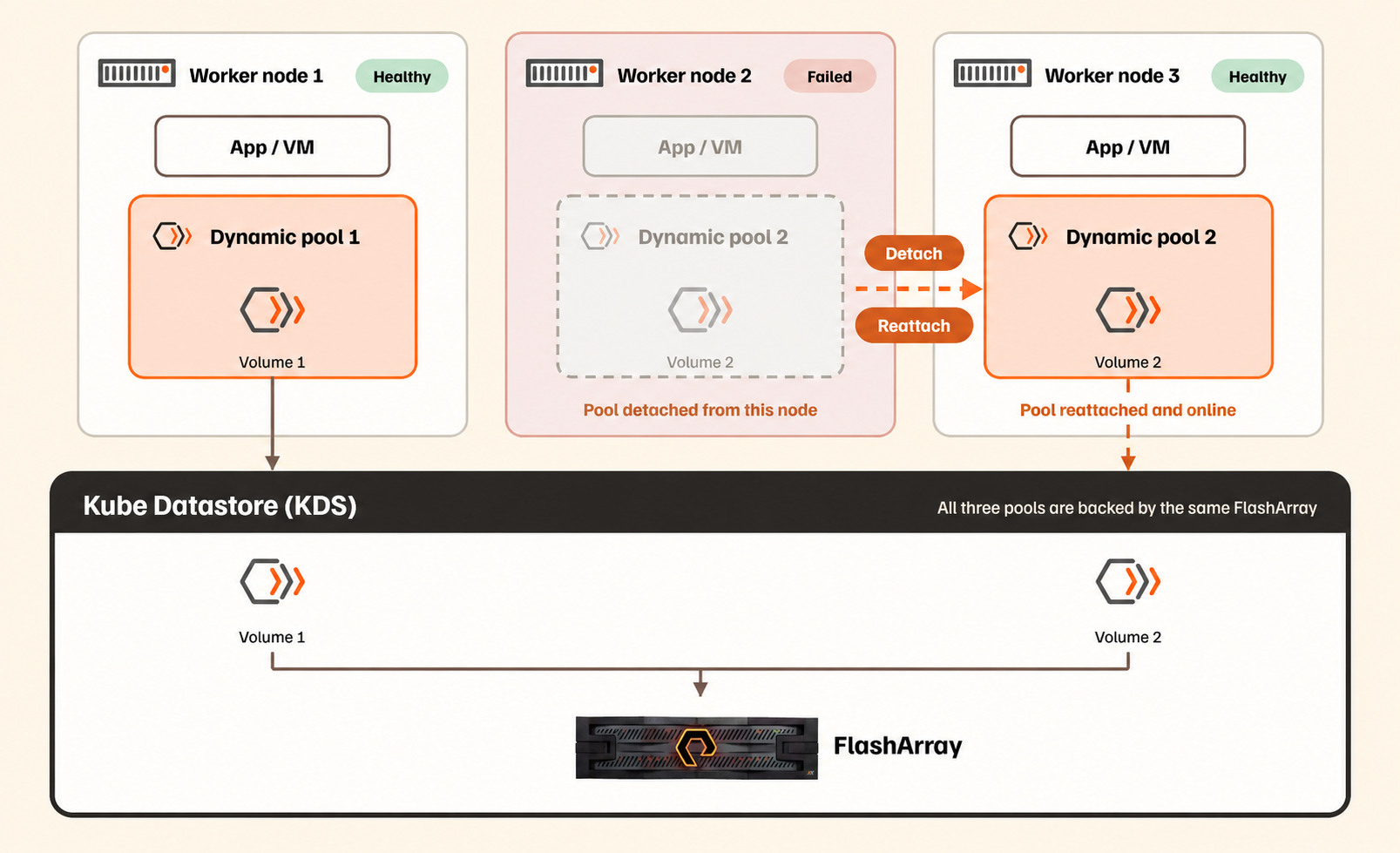
Dynamic pool failover workflow
The volume data remains on FlashArray and is not copied between nodes. Portworx does not rebuild another replica. Therefore, failover duration depends primarily on the detach and attach operations rather than the amount of data stored in the pool.
If a multipath path fails during pool migration, the pool can remain offline for more than a minute, even if other paths are healthy. This happens because volume group activation on the destination node waits for the 60-second SCSI command timeout before multipath removes the failed path. The pool comes online after the failed path is removed.
After the conditions that triggered failover are resolved, rebalance restores the cluster to a balanced state. For more information, see Dynamic pool rebalance.
Portworx can initiate pool migration in the following situations:
| Trigger | Behavior |
|---|---|
| Unexpected node failure | Portworx detects the unavailable node and moves eligible pools to healthy nodes. |
| Node reboot or shutdown | Portworx attempts to detect the planned shutdown and initiate pool relocation without waiting for the standard node-down timeout. |
| Portworx upgrade | The Portworx Operator relocates eligible pools before restarting Portworx on the node. |
| OpenShift Container Platform (OCP) upgrade | Portworx relocates eligible pools before the node restarts during a rolling OCP upgrade. |
| Administrator request | Portworx moves selected pools to a specified or automatically selected destination. You can use this option before planned maintenance. |
| Rebalance | Portworx moves pools to improve placement across the cluster. |
Controlled and uncontrolled pool failover
Portworx Enterprise supports controlled and uncontrolled pool failover.
-
Stopping Portworx on a node by using the
px/service=stoplabel does not trigger pool failover. The pools on that node remain unavailable until Portworx restarts. Workloads on other nodes that use these pools can experience I/O errors or become paused. -
Before planned node maintenance, such as a reboot or shutdown, pause dynamic pool rebalance and migrate the pools to other nodes. Do not rely on automatic failover. For the commands, see Controlled failover.
-
A node drain alone does not trigger pool migration. While pools remain on the node, the Portworx PodDisruptionBudget (PDB) can block the drain. Do not remove or bypass the PDB, because this can cause downtime for volumes with a replication factor of 1. Before you drain the node, run
pxctl service pool migrate --node <node-id>to migrate its pools to other eligible nodes.
Controlled failover
Controlled failover moves pools while the source node is healthy. It occurs during planned operations, such as upgrades, rebalance, and administrator-initiated migrations.
-
Upgrades: During a rolling Portworx Enterprise or OpenShift Container Platform (OCP) upgrades, Portworx relocates eligible pools before restarting the node. For more information, see Non-disruptive upgrades.
-
Rebalance: Portworx moves eligible pools to improve placement and keep related pools together according to their affinity group assignments. For more information, see Dynamic pool rebalance.
-
Administrator-initiated migration: You can manually move pools between nodes for maintenance or placement changes.
Before manually migrating pools, pause rebalance to prevent Portworx from moving them again according to their affinity group assignments:
pxctl cluster options update --pause-dynamic-pool-rebalance=trueUse the following commands to migrate pools:
Action Command Migrate all eligible pools from a node pxctl service pool migrate --node <node-id>Migrate specific pools pxctl service pool migrate --node <node-id> --pools <uuid1,uuid2>Migrate pools to a selected node pxctl service pool migrate --pools <uuid1,uuid2> --dest-node <target-node-id>View pool migration plans and intents pxctl service pool migrate listView pool migration status pxctl service pool migrate status [--source-node-id <node-id>] [--pool <pool-uuid>] [--plan-id <plan-id>] [--intent-id <intent-id>]
Uncontrolled failover
Uncontrolled failover occurs when a node becomes unavailable unexpectedly, such as during a node failure or power outage. Portworx detects the failure and moves dynamic pools to healthy nodes. Workload I/O can be interrupted until the pools come online.
When a node reboots or shuts down, Portworx attempts to record a failover intent in KVDB by using a systemd-logind delay inhibitor. This allows surviving nodes to begin pool relocation without waiting for the node-expiry timeout. If Portworx cannot record the intent, fast node-down detection triggers failover.
Node selection during pool migration
During pool migration, Portworx Enterprise selects a target node using a filtering and scoring process. This ensures that pools move only to suitable nodes and that workload impact is minimized.
A destination node must meet the following requirements:
- Be healthy and report Kubernetes
Ready. - Have no disk, memory, or PID pressure.
- Not be cordoned, in maintenance, or being autoscaled.
- Be in the same zone as the source node.
- Have a metadata device.
- Meet the applicable volume placement requirements.
- Have an available pool slot.
- Remain within the volume attachment limit.
- Have no offline storage pools.
Portworx does not consider CPU utilization when selecting a destination node for pool migration.
In a disaggregated cluster, explicitly labeled storageless nodes do not receive metadata devices and cannot host dynamic pools.
If Portworx cannot select an eligible destination, it raises the PoolFailoverPlanFailed alert.
Exclude a node from pool migration
Cordon a node to prevent Portworx from selecting it as a destination for pool failover, rebalance, or manual migration.
You might exclude a node when:
- You are migrating pools away from the node and do not want Portworx to select it as a destination for subsequent migrations.
- You plan to take the node down for maintenance.
To exclude a node:
-
Cordon the node:
kubectl cordon <node-name> -
Perform the pool migration or maintenance operation.
-
Uncordon the node:
kubectl uncordon <node-name>
Cordoning a node affects only its eligibility as a migration destination. It does not move pools currently hosted on the node or prevent the node from serving as the source of a pool migration.
Failover sequencing and concurrency
Portworx processes controlled pool failover plans one at a time per destination node, to prevent multiple pools from attaching to the same destination node simultaneously. This reduces contention for FlashArray attachment resources. Plans targeting different destination nodes run in parallel. Because pools moving to the same destination are processed sequentially, total migration time increases with the number of pools assigned to each destination node.
Controlled failover includes CLI-initiated migrations, rebalance, and Portworx upgrades.
Planned node reboots and uncontrolled node failures are not sequenced; their pool failovers start immediately. If a source node fails while its controlled failover plans are still queued, those plans are processed as uncontrolled failover. If a destination node fails while plans are queued for it, Portworx selects a new destination for those plans.
To view active and completed pool migrations, run:
pxctl service pool migrate list
Check the OFFLINE-DUR column to see how long each pool remained offline during migration.
Pool Placement and Rebalance
Portworx Enterprise uses pool affinity groups, the pool descheduler, and rebalance to manage dynamic pool placement across Kubernetes nodes. The pool descheduler evaluates KubeVirt virtual machine (VM) memory requirements and updates affinity group assignments to balance the load across nodes. Rebalance then moves the pools based on these assignments. After the pools are moved, Portworx can request VM live migration to place VMs on the nodes hosting their storage. For more information, see Configure and Manage KubeVirt VM Hyperconvergence.
Dynamic pool rebalance
Dynamic pool rebalance automatically moves pools to keep those belonging to the same affinity group together on a node. You can manually assign pools to affinity groups or use the pool descheduler to determine the optimal distribution based on workload requirements.
Rebalance runs periodically in the background and moves pools according to their affinity group assignments. It uses the same pool movement mechanism as dynamic pool failover. Portworx Enterprise adjusts the rebalance frequency based on the severity of the imbalance.
During an active rebalance operation, additional pool failover attempts from the same node are temporarily blocked until the rebalance completes.
Dynamic pool descheduler
The pool descheduler determines how pools should be grouped to distribute VM workloads across eligible nodes. It evaluates the current placement of pools, volumes, and VMs and updates affinity group assignments when a different arrangement would improve the distribution.
The pool descheduler performs the following operations:
- Evaluates the distribution of pools, volumes, and VMs across the cluster.
- Considers the memory requested by each VM along with active volume attachments and node capacity.
- Determines affinity group assignments that balance VM memory requirements across eligible nodes.
- Updates the affinity group labels on the pools.
The pool descheduler updates affinity group assignments but does not move pools. After applying a placement plan, rebalance moves eligible pools according to the updated assignments.
When to run the pool descheduler
Run the pool descheduler when existing affinity group assignments no longer provide the required VM distribution.
Common scenarios include:
- After enabling dynamic pools on an existing cluster: Existing pools might not have the required affinity group assignments. For more information, see Configure Dynamic Pools During Installation or Upgrade.
- After upgrading Portworx Enterprise: Generate a placement plan to establish affinity group assignments for the current pools and VMs.
- After new node addition: Pool placement might become fragmented across the cluster, requiring updated affinity group assignments.
Generate and apply a placement plan
To generate a placement plan, run:
pxctl service pool affinity-group plan
The plan includes the following information:
| Section | Description |
|---|---|
| Warnings | Conditions that the descheduler could not resolve, such as volumes associated with VMs that no longer exist or a target balance that cannot be achieved within the configured tolerance. |
| Current state | Current distribution of pools, volumes, VMs, and VM memory across affinity groups and nodes. It also indicates whether placement is below, above, or at the target. |
| Plan | Proposed changes to affinity group assignments, including source and destination groups. |
| Predicted state | Expected placement after applying the proposed changes. |
Review the proposed changes before applying the plan. A stored plan expires after 2 hours. If the plan expires or the cluster changes, run pxctl service pool affinity-group plan --refresh to regenerate it.
To apply the plan, run:
pxctl service pool affinity-group plan --apply
Portworx updates the affinity group assignments. Rebalance then moves eligible pools according to the updated assignments.
The command supports the following options:
| Option | Description |
|---|---|
--refresh | Regenerates the stored plan based on the current state of the cluster. The new plan replaces the previous plan. |
--tolerance <percent> | Specifies how close the resulting distribution must be to the target balance. The default is 50. The valid range is 1 to 99. A lower value results in more pool moves. Combine with --refresh to regenerate an existing plan with a new tolerance. |
--hyperconverge-only | Requests that Stork live migrate VMs to the nodes that host their storage, without changing affinity group labels. For more information, see Trigger VM hyperconvergence manually. |
-j | Returns the plan in JSON format. |
Do not combine --hyperconverge-only with --apply or --refresh.
Pool affinity groups
A pool affinity group identifies storage pools that Portworx attempts to keep together on the same node. Portworx identifies each affinity group by using the portworx.io/pool-affinity-group label on the pools.
Affinity groups define which pools should remain together. They do not move pools. Rebalance performs the actual pool movement.
When a KubeVirt virtual machine (VM) has disks provisioned across multiple Kube Datastores (KDS), dynamic pools place the disks in different storage pools.
View pool affinity groups
To view the affinity group assigned to each pool, run:
pxctl service pool affinity-group
To group the output by node, run:
pxctl service pool affinity-group --group-by node
To group the output by affinity group, run:
pxctl service pool affinity-group --group-by affinity-group
The above commands show how pools within affinity groups are distributed across nodes under the current cluster conditions. During rebalance, Portworx attempts to bring pools belonging to the same affinity group together on the same node.
If an affinity group remains split across nodes for 10 consecutive rebalance cycles, Portworx raises the PoolAffinityGroupSplit alert. If pool placement does not converge after several rebalance cycles, see Troubleshoot Dynamic Pools and KubeVirt Workloads.
Create an affinity group
To create a new affinity group and assign pools to it, run:
pxctl service pool affinity-group new --pools <uuid1,uuid2>
Replace <uuid1,uuid2> with a comma-separated list of pool UUIDs.
Portworx automatically generates the affinity group ID. For example, you can use this command to group pools on a node recently added to the cluster. To add more pools to the group later, see Assign pools to an affinity group.
Assign pools to an affinity group
Portworx assigns pools to affinity groups automatically. You can also assign pools manually when specific pools must remain together.
To assign pools to an affinity group, run:
pxctl service pool affinity-group set --pools <uuid1,uuid2> --id <affinity-group-id>
Replace:
<uuid1,uuid2>with a comma-separated list of pool UUIDs.<affinity-group-id>with the affinity group ID.
All pools in an affinity group must be able to fit on one node. If the requested assignment exceeds this limit, Portworx rejects the entire request without changing the existing assignments.
Fastpath behavior during failover
Dynamic pools support local and remote PX-Fast volumes.
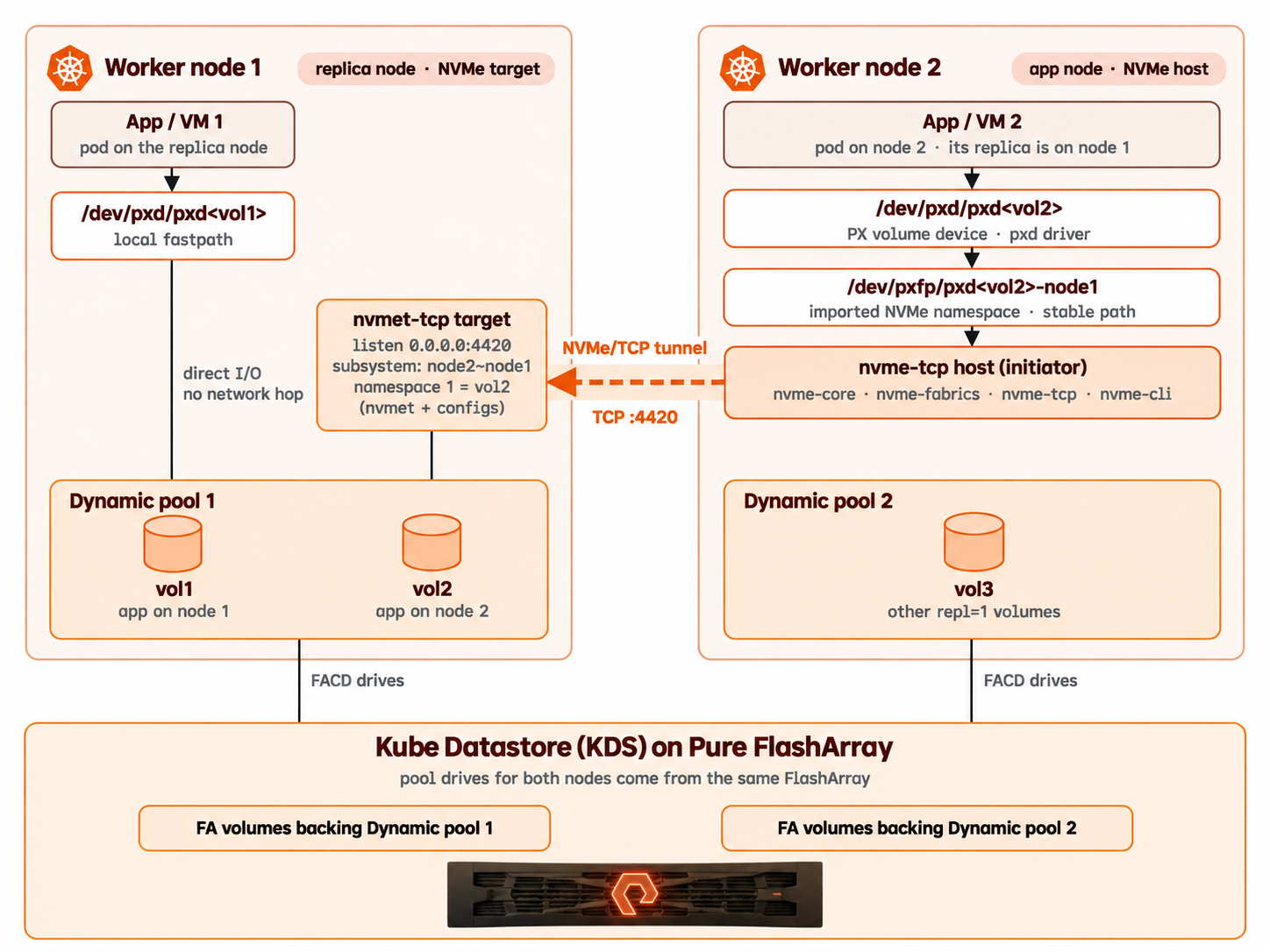
Remote fastpath with dynamic pools
PX-Fast volumes are supported with dynamic pools only if your cluster runs PX fuse kernel driver version 3.7.2 or later.
Local fastpath requires no additional configuration. To use remote fastpath, enable it on the cluster by adding -fastpath_protocol=nvmeof-tcp in the StorageCluster resource.
metadata:
  annotations:
    portworx.io/misc-args: "-fastpath_protocol=nvmeof-tcp"
PX-Fast volumes do not prevent dynamic pool failover. When a pool moves between nodes, Portworx reconfigures fastpath for the volumes in that pool.
During pool migration, Portworx Enterprise:
- Switches fastpath volumes to the standard I/O path and removes their local and remote fastpath exports before the pool leaves the source node. For remote fastpath, Portworx also removes the target exports on the source node before the node goes down.
- Prevents fastpath activation while a pool migration plan exists for the pool.
- Returns the volumes to the fastpath via a periodic background monitor thread that runs every 3 minutes after the pool comes online on the destination node, allowing eligible volumes to use fastpath again.
A volume can report an inactive fastpath state during and shortly after migration. During this period, it uses the standard I/O path. On pools with many fastpath volumes, activation can take longer, and volumes might return to an active state gradually.
If volumes remain inactive, see A fastpath volume does not return to active after a pool move.
Remote fastpath uses a coordinator node for each attached volume. During controlled failover, pool migration behavior depends on when the coordinator becomes unavailable.
| Scenario | Behavior |
|---|---|
| Controlled failover: Coordinator node is already down | Portworx skips the unavailable coordinator node and continues pool migration. |
| Controlled failover: Coordinator node goes down during dynamic pool failover | Pool migration can fail and does not complete until the operation is retried. |
If a controlled pool migration fails because the coordinator becomes unavailable, retry the operation. For CLI-initiated migrations or rebalance, rerun the command after the coordinator node recovers or Portworx marks it as down.
For PX-Fast prerequisites, configuration, and verification procedures, see Create PX-Fast PVCs.
Non-disruptive upgrades
When dynamic pools are enabled, the Portworx Operator relocates eligible dynamic pools before restarting Portworx on a node.
Pool relocations are serialized and occur one node at a time. Rolling upgrades can therefore take longer on clusters with dynamic pools. Plan the maintenance window accordingly.
During a rolling Portworx Enterprise or OpenShift upgrade:
- Before evicting the Portworx pod on a node, the Operator initiates relocation of eligible dynamic pools and waits for relocation to complete. Pool relocation occurs before KubeVirt VM live migration.
- Pool relocation can be blocked when a node is in pool maintenance mode, an HA update is in progress, or pool failover is paused. During a Portworx rolling upgrade, the Portworx Operator waits until these conditions are resolved and all dynamic pools on the node have been relocated before continuing the upgrade. During an OpenShift Container Platform (OCP) upgrade, Portworx Enterprise follows the same process to ensure that pool relocation is complete before the upgrade continues.
- While pool relocation or VM migration is in progress, the
StorageClusterenters theUpdatePausedphase and reports the number of nodes remaining in the upgrade. - Pools containing volumes with a replication factor greater than 1 are not relocated. Their additional replicas provide availability, so these pools do not block the upgrade.
- If a node has no dynamic pools or dynamic pools are disabled, the Operator skips pool relocation for that node.
- If the Portworx Enterprise version in your cluster does not support pool relocation during upgrades, the Operator skips pool relocation on all nodes during the upgrade. Pool relocation becomes available for subsequent upgrades after all nodes are running a version that supports it.
Disable pool relocation during upgrades
By default, the Portworx Operator moves dynamic pools to other nodes before restarting Portworx during an upgrade. You can disable this behavior while allowing KubeVirt VM live migration to continue.
To disable pool relocation, set disablePoolRelocate to true in the StorageCluster resource:
spec:
  updateStrategy:
    rollingUpdate:
      disablePoolRelocate: true
This setting disables pool relocation only during upgrades. Other pool failover operations, such as node failure, rebalance, and administrator-initiated migration, continue to work normally. The setting applies to all remaining nodes in the upgrade.
When pool relocation is disabled, volumes in the pools on each node become unavailable while Portworx restarts on that node. This can interrupt applications that use those volumes.
To enable pool relocation during upgrades again, set disablePoolRelocate to false or remove the field from the StorageCluster resource.
For the complete upgrade procedure, see Configure Dynamic Pools During Installation or Upgrade.
When pool failover does not occur
Pool failover can be blocked when:
- A pool expansion is in progress on the source or destination node.
- A volume attachment operation is in progress for a volume in the pool.
- A high-availability (HA) update is in progress for volumes in the pool.
- Rebalance is moving a pool from the same node.
- The Portworx daemon is down on the node.
- The cluster-wide failover concurrency limit has been reached.
- All eligible destination nodes have reached the maximum number of pools per node.
- The pool contains a PX-Fast volume, but not all nodes in the cluster run PX fuse kernel driver version 3.7.2 or later.