Kube Datastore for Portworx Enterprise 3.7.2
If your cluster runs Portworx Enterprise 3.7.0, where Kube Datastore is available under Directed Availability, see Kube Datastore for Portworx Enterprise 3.7.0.
This topic explains what Kube Datastore (KDS) is, describes static and dynamic pools, the benefits of dynamic pools, and helps you decide which pool type to use for each workload.
What is Kube Datastore?
Kube Datastore (KDS) is a logical grouping of Portworx storage pools backed by the same FlashArray. KDS consists of one or more static or dynamic pools attached to different Kubernetes worker nodes. In a FlashArray Cloud Drive (FACD) deployment, Portworx creates one KDS for each FlashArray used by the cluster.
For example, if a cluster uses two FlashArrays, Portworx creates two Kube Datastores and each KDS contains the storage pools backed by its corresponding FlashArray.
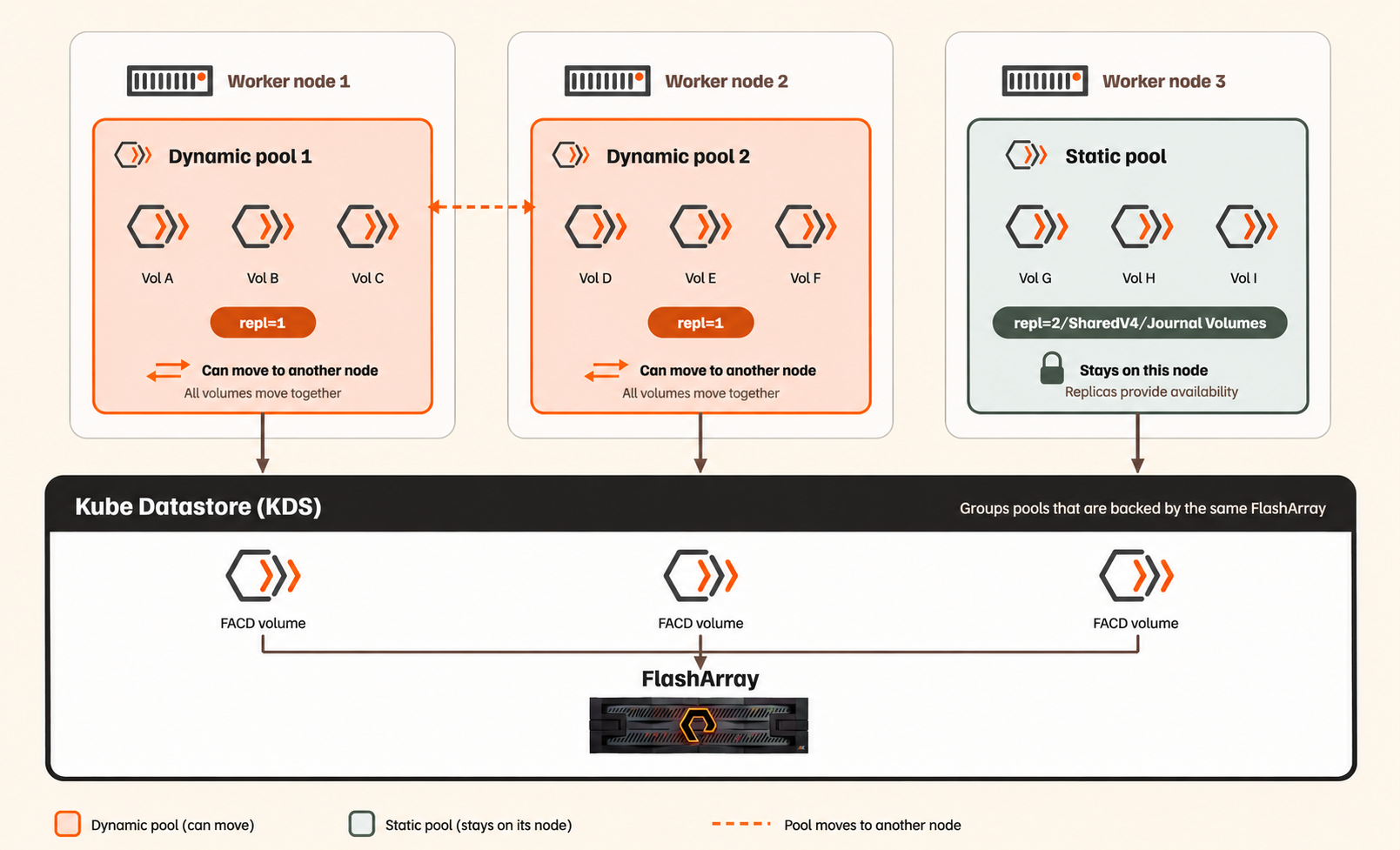
Kube Datastore with static and dynamic pools
With KDS, you can:
- View storage capacity at the FlashArray level.
- Place volumes on storage pools backed by a specific FlashArray.
- Manage storage pools across multiple Kubernetes nodes.
- Use dynamic pools to provide availability for
repl=1volumes during node failures or maintenance.
Portworx applies the following labels to storage pools associated with a KDS:
| Label | Value | Description |
|---|---|---|
kube_datastore | FlashArray name | Identifies the KDS that contains the pool. Portworx uses this value as the KDS display name. |
kube_datastore_id | FlashArray UUID | Uniquely identifies the KDS. Portworx uses this value in volume placement rules. |
Portworx manages these labels automatically. You cannot manually add, modify, or remove them.
Static and dynamic storage pools in KDS
Portworx defines static and dynamic pools as follows:
Static pools: Static pools are storage pools that cannot move between nodes during pool failover. These pools contain volumes with repl=2 or higher. If a node fails, another replica on a healthy node can continue serving replicated volumes.
These pools can containSharedV4 volumes, or volumes with journal profiles.
Dynamic pools: Dynamic pools are storage pools that can move between nodes during failover. These pools contain volumes with replication factor 1 (repl=1). They use FlashArray Cloud Drives (FACD) and rely on FlashArray for storage redundancy. If a node fails, Portworx moves the pool and its volumes to a healthy node. The data remains on FlashArray, so Portworx does not need to copy data or rebuild replicas.
A KDS can contain both, dynamic pools with repl=1 volumes and static pools with repl=2 volumes. If a node fails, only the dynamic pools move.
For more information about failover behavior, destination-node selection, and conditions that prevent failover, see How dynamic pool failover works.
When to use static vs dynamic pools
Choose the pool type based on your workload's storage and availability requirements.
-
Use dynamic pools for KubeVirt VMs, container workloads, and other applications that use
repl=1volumes on FlashArray. Choose dynamic pools if you want Portworx to move pools and their volumes to healthy nodes during failover without copying data or rebuilding replicas. Dynamic pools rely on FlashArray for storage redundancy, reducing storage consumption, network traffic, and processing overhead associated with Portworx replication. -
Use static pools for workloads that require repl=2 or higher for data availability, or when you use SharedV4 volumes or volumes with journal profiles. Pools backed by local or pre-provisioned storage also remain static.
To control volume placement, use volume placement strategies. For supported configurations and capacity requirements, see Scale Limits for Kube Datastore.
Why use KDS dynamic pools?
In a traditional shared-nothing environment, each Kubernetes worker node has its own storage. Portworx replicates volumes across nodes to protect data. For example, a volume with repl=3 has three replicas on different nodes.
However, when multiple storage pools use the same FlashArray, Portworx replication adds overhead because FlashArray already provides storage-level redundancy. This overhead includes:
- Storage capacity: Multiple replicas consume additional capacity on the same FlashArray.
- Network traffic: Portworx sends replicated writes between worker nodes.
- Storage processing: FlashArray processes the additional data created by Portworx replication.
KDS dynamic pools reduce this overhead by using volumes with replication factor 1 (repl=1). These volumes rely on FlashArray for data protection, while Portworx provides availability by moving dynamic pools between nodes instead of maintaining additional replicas.
Dynamic pools provide the following benefits:
- Reduced storage consumption: Volumes use one Portworx replica instead of multiple replicas.
- Reduced network traffic: Portworx does not generate replication or replica rebuild traffic between nodes for
repl=1volumes. - Reduced storage processing: FlashArray does not process the additional copies created by Portworx replication.
- Pool failover without copying data: Portworx moves the pool and its volumes to another node without copying data or rebuilding replicas.
- Flexible pool placement: Portworx can move pools between healthy nodes that meet the placement and capacity requirements.
- VM storage placement: Portworx can keep related KubeVirt VM storage pools together on the same node to improve I/O performance.
Supported platforms
KDS is supported on the following platform and versions:
| Platform | Supported versions |
|---|---|
| Red Hat OpenShift Container Platform (OCP) | 4.17.58 4.19.42, 4.19.49, 4.19.50, 4.19.51 4.20.17, 4.20.20, 4.20.27, 4.20.41 4.21.3, 4.21.7 |
Getting Started with Kube Datastore
Use the following table to find information about planning, configuring, managing, and troubleshooting Kube Datastore and dynamic pools.
| Task or information | See |
|---|---|
| Learn how dynamic pool failover works, how Portworx selects destination nodes, and how pool placement and rebalance work | Dynamic Pool Failover |
| Review scale limits, limitations, and capacity requirements for pool failover. | Scale Limits for Kube Datastore |
| Enable dynamic pools during a new installation or upgrade, or upgrade a cluster that already uses dynamic pools | Set Up a Portworx Cluster with KDS Dynamic Pools |
| Select a KDS for volume placement, view Kube Datastores, and create KDS-aware StorageClasses | Kube Datastore-Aware Volume Placement |
| Keep KubeVirt VMs on the same nodes as their storage and restore hyperconvergence after pool movement | Configure and Manage KubeVirt VM Hyperconvergence |
| Migrate VMs from VMware to OpenShift Virtualization on Kube Datastore | Migrate VMs from VMware to Kube Datastore |
| Move KubeVirt VM disks to another Kube Datastore without recreating the VM | Migrate KubeVirt VM Disks to a Different Kube Datastore |
| Troubleshoot pool failover, migration, rebalance, VM placement, and upgrade issues | Troubleshoot Dynamic Pools |
| Find cluster options, runtime options, alerts, and metrics | Cluster Options, Alerts, and Metrics |