Volume Placement Strategies
When you provision volumes, Portworx places them throughout the cluster and across configured failure domains to provide fault tolerance. While this default manner of operation works well in many scenarios, you may wish to control how Portworx handles volume and replica provisioning more explicitly. You can do this by creating VolumePlacementStrategy CRDs.
Within a VolumePlacementStrategy CRD, you can specify a series of rules that control volume and volume replica provisioning on nodes and pools in the cluster based on the labels they have.
For information on how to create and use VolumePlacementStrategies, see Create and use VolumePlacementStrategies.
Understand the VolumePlacementStrategy spec
You can define your VolumePlacementStrategy by creating a spec containing affinity rule sections. Affinity rules instruct Portworx on where to place volumes and volume replicas within your cluster and come in two flavors: affinity and antiaffinity.
replicaAffinity
The replicaAffinity section allows you to specify rules relating replicas within a volume. You can use these rules to place replicas of a volume on nodes or pools that match the specified labels in the rule. You can constrain the replicas to a certain failure domain by specifying the topology key that defines the failure domain.
replicaAntiAffinity
The replicaAntiAffinity section allows you to specify a dissociation rule for replicas within a volume. You can use this to allocate replicas across failure domains by specifying the topology key of the failure domain.
volumeAffinity
The volumeAffinity section allows you to colocate volumes by specifying rules that place replicas of a volume together with those of another volume whose labels match the specified criteria.
volumeAntiAffinity
The volumeAntiAffinity section allows you to specify dissociation rules between two or more volumes that match the given labels. Use this to exclude failure domains, nodes, or storage pools that match the given labels for one or more volumes.
For more information on specific rules, see the following sections of the CRD reference guide:
Example
apiVersion: portworx.io/v1beta2
kind: VolumePlacementStrategy
metadata:
  name: <your_strategy_name>
spec:
    replicaAffinity:         <1>
      matchExpressions:      <2>
        key: mediatype       <3>
        operator: In         <4>
        values:
          - "SSD"            <5>
The example above instructs Portworx to perform the following:
replicaAffinitydirects Portworx to create replicas under the preferred conditions defined beneath itmatchExpressionsis a list of label selector requirements and the requirements are ANDed.keyspecifies themediatypelabel, directing Portworx to create replicas on pools which have the "mediatype" labeloperatorspecifies theInoperator, directing Portworx to create replicas of the media typevaluesspecifies theSSDlabel, directing Portworx to create replicas on SSD pools
Understand the VolumePlacementStrategy CRD's place within your cluster
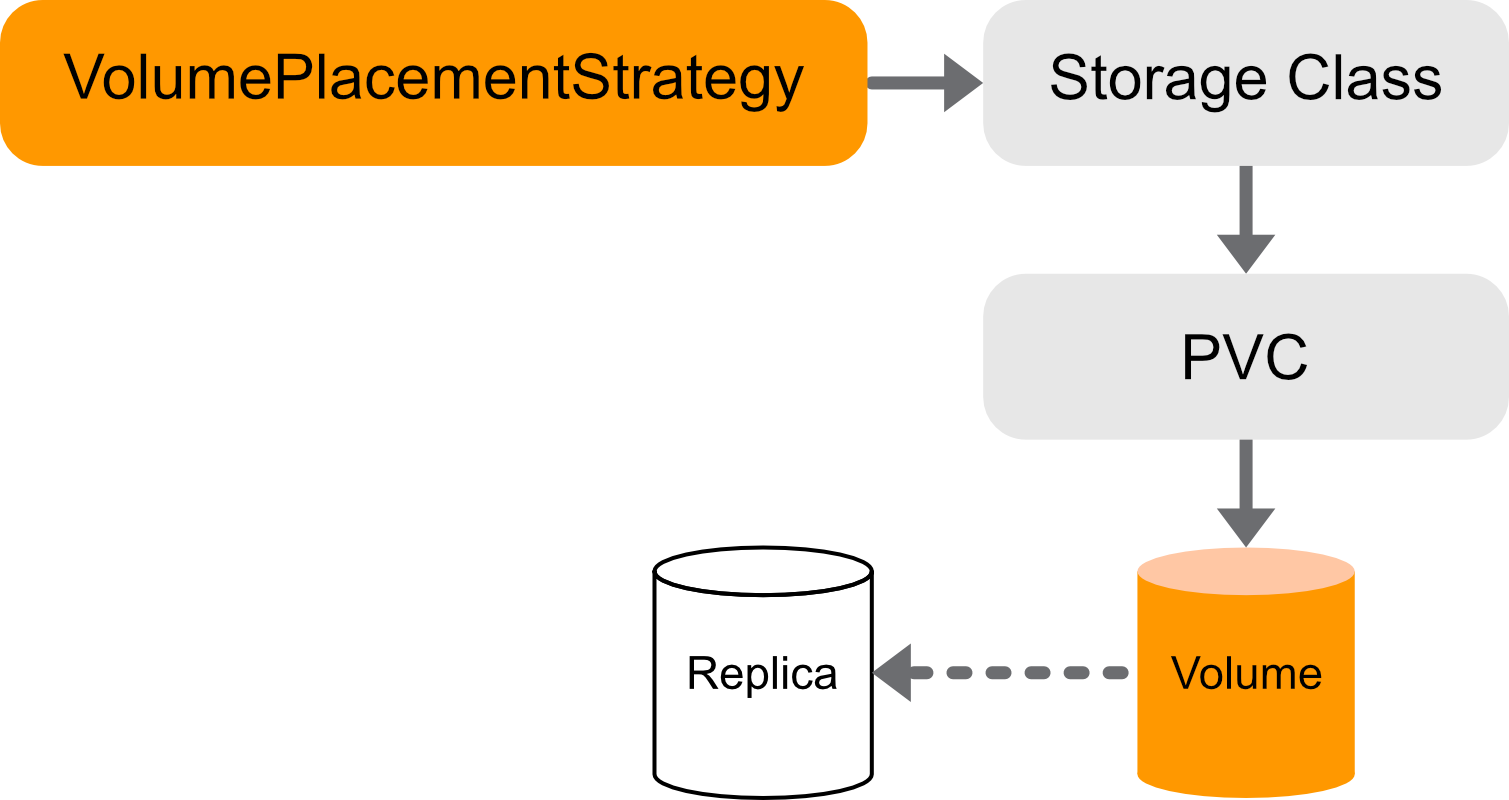
Portworx links a VolumePlacementStrategy to a StorageClass through the StorageClass placement_strategy parameter. All PVCs that refer to that StorageClass adhere to the linked VolumePlacementStrategy rules. Portworx places volumes provisioned from these PVCs according to the rules defined in the placement strategy.
Understand common use cases
How you choose to place and distribute your volumes and replicas depends on the kinds of apps running in your cluster, your cluster topology, and your goals. The following examples illustrate some common uses of VolumePlacementStrategies:
Replica placement use cases
Here are a few examples of replica placement use cases.
-
If you are running an application with a replication factor of 2 and you don't distribute replicas across failure zones, a node failure may disrupt services. You can avoid this by creating a VolumePlacementStrategy, which distributes your application's replicas over multiple failure zones:
spec:replicaAntiAffinity:- topologyKey: failure-domain.beta.kubernetes.io/zone -
If you are running an application on a cloud cluster where, depending on demand, some cloud provider zones are expensive, you can avoid this by creating a VolumePlacementStrategy, which limits your application's replicas to less costly zones:
spec:replicaAffinity:- matchExpressions:- key: failure-domain.beta.kubernetes.io/zoneoperator: NotInvalues:- "us-east-1a"
Volume placement use cases
Here are a few examples.
-
If you have an application that relies on multiple volumes, such as a webserver, and your volumes are distributed over multiple nodes, your application may be subject to latency, and your cluster may become congested with unnecessary network activity. You can avoid this by creating a VolumePlacementStrategy, which collocates your application's volumes on the same set of nodes and pools:
apiVersion: portworx.io/v1beta2kind: VolumePlacementStrategymetadata:name: webserver-volume-affinityspec:volumeAffinity:- matchExpressions:- key: appoperator: Invalues:- webserver -
If you are running an application that performs replication internally, such as Cassandra, and you don't distribute volumes across failure zones, a node failure may disrupt services. You can avoid this by creating a VolumePlacementStrategy, which distributes your application's volumes over multiple failure zones:
apiVersion: portworx.io/v1beta2kind: VolumePlacementStrategymetadata:name: cassandra-volume-anti-affinityspec:volumeAntiAffinity:- enforcement: requiredmatchExpressions:- key: appoperator: Invalues:- cassandratopologyKey: topology.kubernetes.io/zone
KubeVirt VMs and CSI clone
Starting with Portworx Enterprise 3.5.0, KubeVirt RWX Block VMs with only a single cloned root disk provisioned using cloneStrategy: csi-clone and no additional non-cloned data disks do not honor user-defined VPS rules at volume creation time. In this configuration, Portworx applies clone co-location behavior, placing the cloned volume replicas on the same nodes as the source volume.
To allow VPS rules to be honored, use one of the following approaches:
-
Switch to copy-based cloning: Configure the StorageClass or StorageProfile to use copy-based cloning instead of CSI clone.
Annotate the StorageClass:
oc annotate sc <storageClassName> cdi.kubevirt.io/clone-strategy=copy --overwriteOr patch the StorageProfile:
oc patch storageprofile <storageProfileName> --type merge -p '{"spec":{"cloneStrategy":"copy"}}' -
Add a blank data disk: Add at least one blank non-cloned data disk to the VM using the same StorageClass. With a non-cloned volume present, Portworx applies VPS rules during provisioning. Add the following entry to
spec.dataVolumeTemplatesin the VM spec:- metadata:name: <data-disk-name>annotations:cdi.kubevirt.io/storage.usePopulator: "false"spec:source:blank: {}storage:accessModes:- ReadWriteManyresources:requests:storage: <size>GistorageClassName: <storageClassName>volumeMode: Block
For more information, see Manage Shared Block Device (RWX Block) for KubeVirt VMs.