Set up Disaster Recovery
Disaster Recovery (DR) is a process that ensures the availability and recoverability of services and resources within a cluster in the event of a disaster. When you implement a DR strategy provided by Portworx, it mitigates or minimizes data loss caused by unforeseen incidents that can disrupt business operations. The goal is to swiftly restore the operational status of a cluster, enabling access to data as soon as possible after a disaster occurs.
You can easily manage the failover and failback of your applications. Failover is the process of migrating an application or workload from your source cluster to a destination cluster in the event of a failure or disruption in the source cluster. Failback is the process of moving the application and its data back to the source cluster once the source cluster is restored and operational again.
Types of disaster recovery
This section describes the synchronous, asynchronous, and ACM-based multi-cluster methods for achieving Disaster Recovery (DR) between multiple clusters when using Portworx.
Synchronous DR

Synchronous DR involves the immediate replication of any changes made to data or applications on the source cluster to the destination cluster.
In a Synchronous DR setup, a single Portworx cluster spans both the source and destination clusters. This is achieved by providing a common external key-value store endpoint during the installation of Portworx on all clusters. Once a single stretched Portworx cluster is established, volumes are automatically replicated across the clusters. This ensures consistent and up-to-date data on both the source and destination clusters.
With this setup, the Recovery Point Objective (RPO) is zero, and the Recovery Time Objective (RTO) is less than 60 seconds.
You should consider this method when:
-
Your source and destination clusters are within the same Metropolitan Area Network (MAN), including:
- The same cloud region, i.e., on-prem environments (potentially in different zones).
- The same datacenter or datacenters located within a 50-mile proximity.
-
Network latency between the nodes remains under 10 ms. This low latency requirement ensures the seamless synchronization and replication of data between the source and destination clusters.
Asynchronous DR
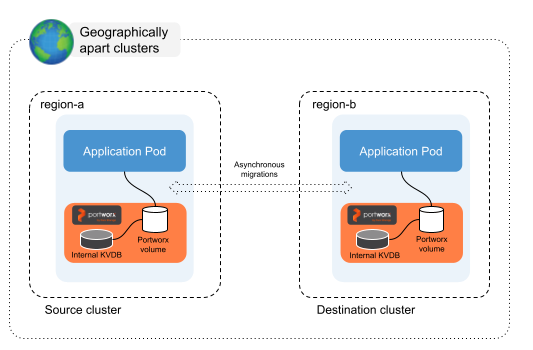
Asynchronous DR involves replicating data from a source cluster to a destination cluster with a delay between the data changes occurring on the source cluster and their replication to the destination cluster.
In an Asynchronous DR setup, a separate Portworx cluster is installed on each Kubernetes cluster. This method can be used in a heterogeneous environment. For volume replications, you need to create migration schedules to migrate applications and volumes between the clusters that are paired.
With this setup, the Recovery Point Objective (RPO) is 15 minutes and the Recovery Time Objective (RTO) is less than 60 seconds.
You should consider this setup when:
- Nodes in all your clusters are in the different regions or datacenter.
- The network latency between the nodes is higher than 10 ms.
ACM Multi Cluster DR
ACM Multi-Cluster DR extends asynchronous DR by integrating it with Red Hat Advanced Cluster Management (ACM) for Kubernetes. Instead of configuring standalone Stork-based cluster pairing through multiple CLI steps, you can configure DR between managed OpenShift clusters directly from the OpenShift console.
In this setup, you designate one OpenShift cluster as the ACM hub cluster and install the Portworx Multi-Cluster Operator on it. The hub cluster manages one or more clusters where Portworx Enterprise is installed and application workloads run. The Multi-Cluster Operator automates cluster pairing, performs preflight readiness checks, and exposes DR workflows as Kubernetes custom resources (DisasterRecoveryPair, ProtectionGroup, and DisasterRecoveryAction). These workflows can also be managed through GitOps.
Because replication is asynchronous, the Recovery Point Objective (RPO) is 15 minutes and the Recovery Time Objective (RTO) is less than 60 seconds.
You should consider this method when:
- You manage multiple OpenShift clusters with Red Hat Advanced Cluster Management and want to configure and monitor DR from a centralized hub cluster.
- You prefer a UI-driven setup instead of the standalone CLI-based Async DR workflow.
- Your source and destination clusters are in different regions or data centers, and network latency between nodes exceeds 10 milliseconds.