Configure Backend REST API
A backend REST API refers to the interface that connects the front-end or user-facing applications with the backend servers, databases, or services. The backend REST API is responsible for handling the core logic of the system, database interactions, and any background services.
With the Portworx Backup backend REST API, you can perform the following tasks:
- Create roles
- Update roles
- List roles
- Delete roles
- Map roles
- Unmap roles
To configure the backend REST API, you need to fetch an access token for the instance.
Fetch authorization bearer token
To fetch the token for an instance, log in with the admin credentials and then perform the following steps:
-
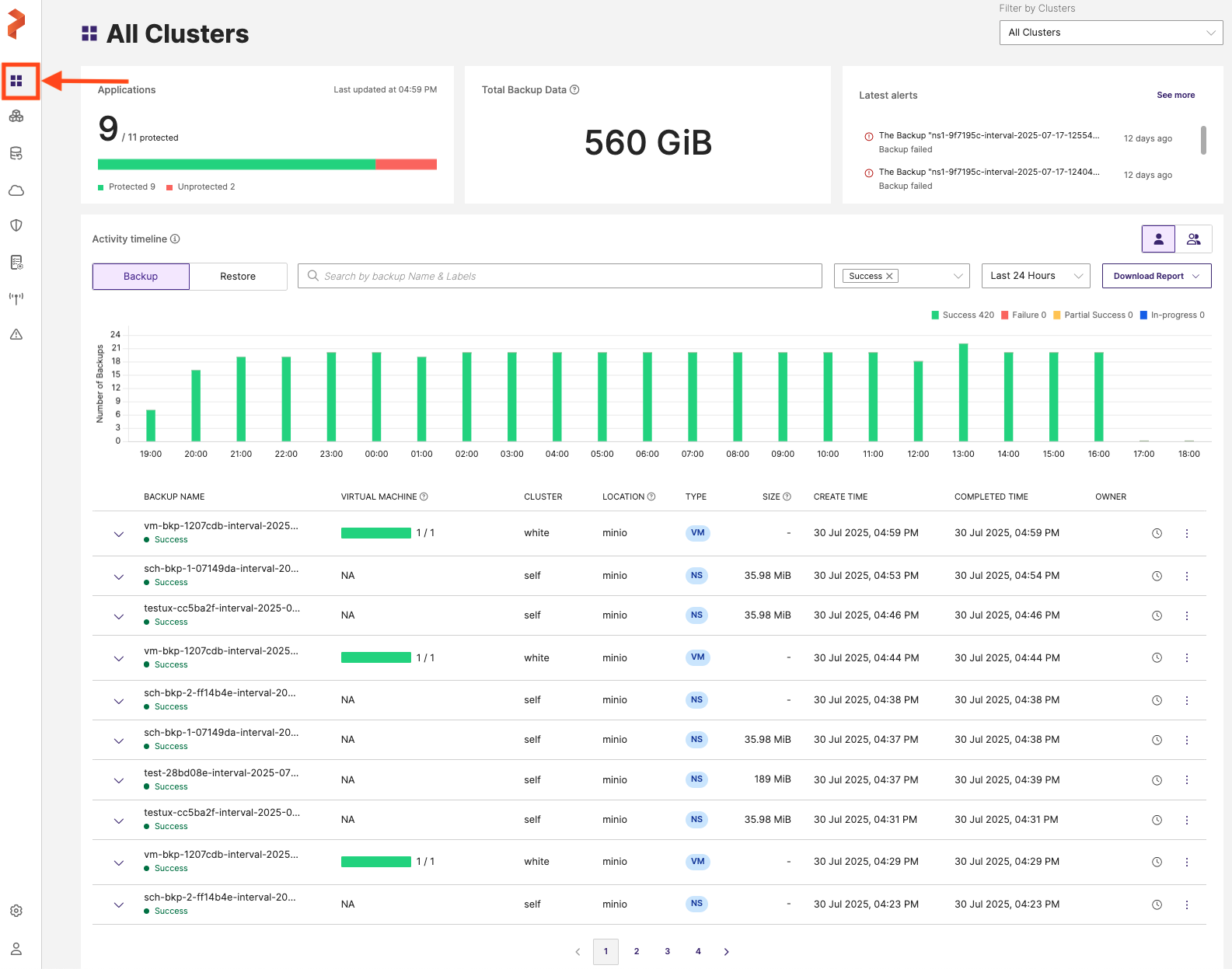
Access the Portworx Backup web console and log in with super administrator (super admin) or infrastructure administrator (infra admin) credentials. For the roles and their permissions, see the Role matrix.
-
On the home page, in the left navigation pane, click User Management.
-
Right-click on the User Management page and select Inspect from the context menu. This opens the browser's developer tools.
-
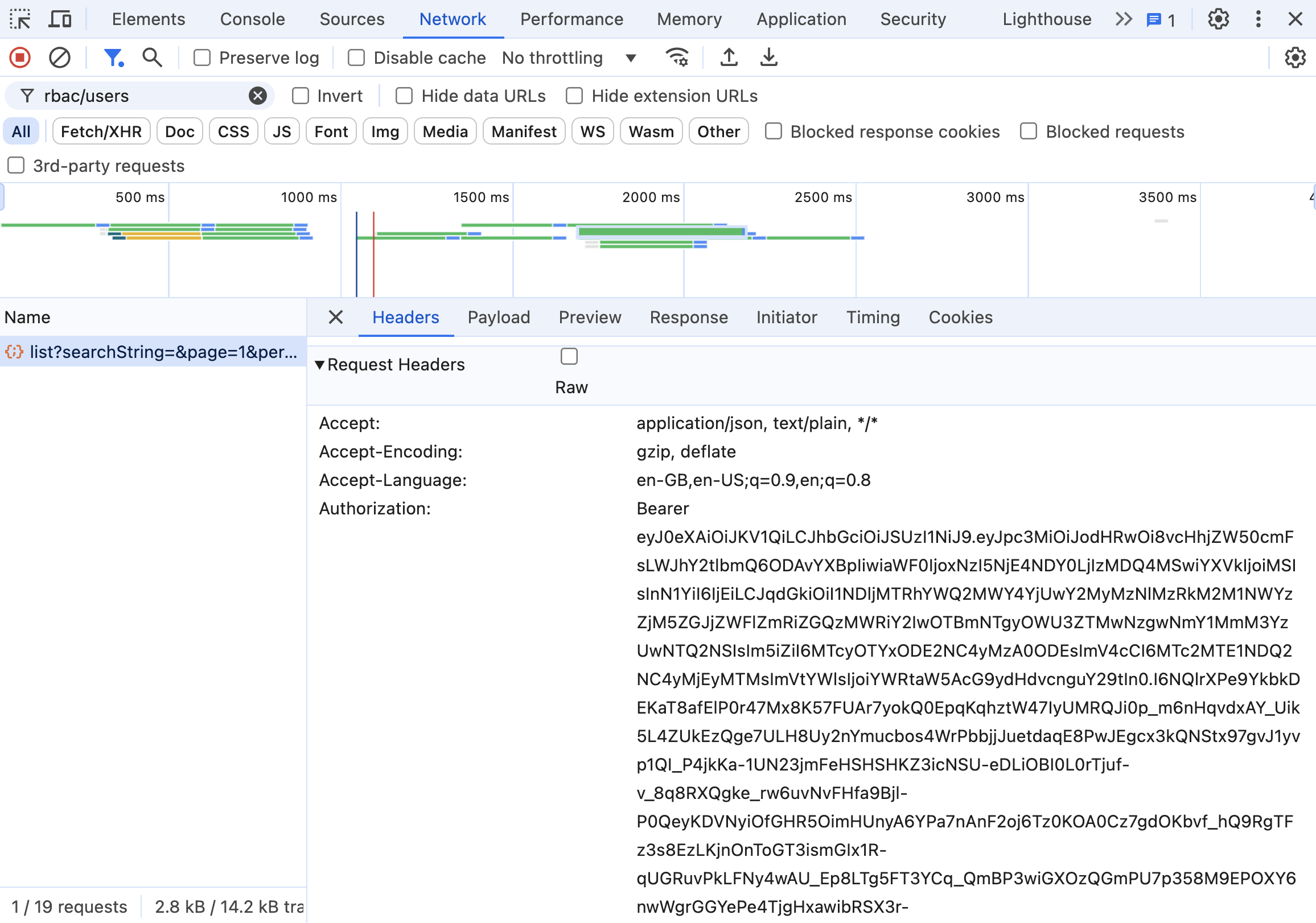
In the developer tools panel, navigate to the Network tab. With the Network tab open and recording, reload the User Management page (or switch to the Users tab) so the console re-issues its API requests, then wait for the following endpoint to load in the Name column. You can also type rbac/users in the filter box to find this endpoint. Confirm the request completed with a status of 200 before you use it.
https://<end-point>/backend/api/pxBackup/rbac/users/list?searchString=&page=1&per_page=10noteThe URL path uses lowercase
/backend/(not/Backend/). Using an uppercaseBwill result in a 404 error.The Name column shows the requests being made, including specific APIs being called or resources being fetched during a web application's operation.
-
Select the above API endpoint from the Name column and move to Request Headers row and copy the bearer token from Authorization section. Make sure you copy only the token and not the Bearer string that appears before the token.
cautionThe bearer token extracted from browser DevTools is a short-lived UI session token. It will expire quickly and is not suitable for automation, scripting, or CI/CD pipelines. For long-lived programmatic access, obtain a token directly from the Keycloak token endpoint using your admin credentials, as described in Fetch an access token.
-
Export the token with the following command:
export TOKEN="Bearer <token-copied-from-authorization-field>" -
Run the following API call to check if the token works. Make sure you replace the endpoint with the actual server address:
curl -k -X GET "https://<end-point>/backend/api/pxBackup/rbac/roles/list" -H "accept: application/json" -H "Authorization: $TOKEN"The
-kflag disables TLS certificate verification. Omit-kwhen the endpoint presents a certificate that your system trusts; use it only for endpoints with self-signed or otherwise untrusted certificates (for example, in test environments).If the token is valid, the response begins with
{"SUCCESS":true,"DATA":{ ... }}and lists the roles. Seeing"SUCCESS":trueconfirms that the token works and the call succeeded. An invalid or expired token instead returns an authentication error (for example, HTTP 401), not a"SUCCESS":truebody.Sample output:
{"SUCCESS":true,"DATA":{"current_page":1,"searched":false,"first_page_url":"","from":0,"last_page":1,"last_page_url":"","next_page_url":"","path":"","per_page":10,"to":5,"total":5,"metaData":null,"data":[{"metadata":{"name":"px-backup-super.admin","uid":"<alpha-numeric-uid>","org_id":"default","create_time":{"seconds":1729158677,"nanos":332422260},"last_update_time":{"seconds":1729158743,"nanos":476343054},"create_time_in_sec":1729158677,"ownership":{"owner":"<owner-uid>","public":{"type":1}},"description":"Has full control to create, view, edit, and delete clusters, namespaces, cloud accounts, backup locations, schedule policies, rules, backups, restores, roles, users, and user groups, either created by themselves or by other users."},"rules":[{"services":["schedulepolicy","cloudcredential","backuplocation","rules","role","receiver","recipient","audit"],"apis":["*"]}],"role_id":"<alpha-numeric-role-id>"},{"metadata":{"name":"px-backup-infra.admin","uid":"<alpha-numeric-uid>","org_id":"default","create_time":{"seconds":1729158677,"nanos":370751364},"last_update_time":{"seconds":1729158743,"nanos":243144225},"create_time_in_sec":1729158677,"ownership":{"owner":"<owner-uid>","public":{"type":1}},"description":"Can create, view, edit, and delete cloud accounts, backup locations, schedule policies, rules, roles, users, and user groups they have created. In addition, they can view shared backup resources."},"rules":[{"services":["schedulepolicy","cloudcredential","backuplocation","rules","role","receiver","recipient"],"apis":["*"]},{"services":["audit"],"apis":["inspect*","enumerate*"]}],"role_id":"<alpha-numeric-role-id>"},{"metadata":{"name":"px-backup-app.admin","uid":"<alpha-numeric-uid>","org_id":"default","create_time":{"seconds":1729158677,"nanos":378614407},"last_update_time":{"seconds":1729158743,"nanos":351234891},"create_time_in_sec":1729158677,"ownership":{"owner":"<owner-uid>","public":{"type":1}},"description":"Can create, edit, view, and delete backup locations, schedule policies, and rules they have created. They can also view all other shared backup resources."},"rules":[{"services":["schedulepolicy","backuplocation","rules"],"apis":["*"]},{"services":["role"],"apis":["inspect*","enumerate*","validate*"]},{"services":["cloudcredential"],"apis":["inspect*","enumerate*"]},{"services":["recipient"],"apis":["*"]},{"services":["receiver"],"apis":["enumerate*"]}],"role_id":"<alpha-numeric-role-id>"},{"metadata":{"name":"px-backup-app.user","uid":"<alpha-numeric-uid>","org_id":"default","create_time":{"seconds":1729158677,"nanos":386510867},"last_update_time":{"seconds":1729158743,"nanos":413840572},"create_time_in_sec":1729158677,"ownership":{"owner":"<owner-uid>","public":{"type":1}},"description":"Can only view the shared resources created by other roles."},"rules":[{"services":["schedulepolicy","cloudcredential","backuplocation","rules","role"],"apis":["inspect*","enumerate*","validate*"]},{"services":["recipient"],"apis":["*"]},{"services":["receiver"],"apis":["enumerate*"]}],"role_id":"<alpha-numeric-role-id>"},{"metadata":{"name":"test-role","uid":"<alpha-numeric-uid>","org_id":"default","create_time":{"seconds":1729227011,"nanos":248356472},"last_update_time":{"seconds":1729227011,"nanos":248356472},"create_time_in_sec":1729227011,"ownership":{"owner":"<owner>","public":{"type":1}},"description":"NA"},"rules":[{"services":["cloudcredential"],"apis":["inspect*","enumerate*"]},{"services":["schedulepolicy"],"apis":["inspect*","enumerate*"]},{"services":["backuplocation"],"apis":["inspect*","enumerate*"]},{"services":["rules"],"apis":["inspect*","enumerate*"]},{"services":["role"],"apis":["inspect*","enumerate*"]}],"role_id":"<alpha-numeric-role-id>"}],"fromCache":false,"networkTimer":null,"processTimer":null,"dsRequestId":0,"next_token":""},"SUCCESSMESSAGE":"Fetched all roles"}