Stateful Application Operations
Customize StorageClass for your application
Different database workloads have unique storage demands. Portworx StorageClasses let you define replication factors, I/O priorities, and volume parameters to meet your business SLAs.
Key benefits
- Optimized performance: Control replication factor (
repl) andio_priority. - Easy provisioning: Dynamically provision volumes for new application instances.
- Customizable policies: Fine-tune parameters for various environment needs, such as development, testing, and production.
Example StorageClass configuration
apiVersion: storage.k8s.io/v1
kind: StorageClass
metadata:
  name: px-<stateful-application>-sc
provisioner: pxd.portworx.com
parameters:
  repl: "2"
  io_priority: "high"
allowVolumeExpansion: true
where:
repl=2: Offers high availability with minimal write overhead.allowVolumeExpansion=true: Enables online resizing without downtime.
Further configuration
aggregation_level: Stripes data for higher throughput.snap_interval: Sets snapshot intervals if using Portworx periodic snapshots.encryption: Encrypts volumes for enhanced security.
Capacity Management with Autopilot
As workloads evolve, so do their storage requirements. Relying on manual processes to expand capacity can introduce downtime and operational complexity. By continuously monitoring resource utilization, Portworx Autopilot intelligently scales storage volumes when thresholds are exceeded. This hands-off approach ensures your application clusters stay responsive, helping you avoid sudden space shortages and maintain steady performance as demands grow.
Example Autopilot policy
apiVersion: autopilot.libopenstorage.org/v1alpha1
kind: AutopilotRule
metadata:
  name: volume-capacity-autoscale
spec:
  conditions:
    - type: "LabelSelector"
      key: "app"
      value: "<stateful-application>"
    - type: "VolumeUsage"
      operator: "Gt"
      value: "80"
  actions:
    - name: "openstorage.io.action.volume/resize"
      params:
        resizePercentage: "20"
The example policy above triggers at 80% usage and expands the volume by 20%.
For more information, refer to the Portworx Autopilot documentation.
Performance Optimization with Hyperconvergence using Stork
Hyperconvergence with Stork bridges the gap between where data is stored and where the application pods run, reducing cross-node traffic and improving overall performance. By scheduling pods on the same nodes that hold their storage replicas, you can cut down on I/O latency, increase throughput, and streamline operations particularly in large or rapidly scaling clusters. For more information, refer to the Stork documentation.
Perform the following steps to enable hyperconvergence with Stork.
- Install Stork (often part of the Portworx Operator).
- Use an annotation like
stork.libopenstorage.org/preferLocalNodeOnly: "true". - Verify pods are scheduled on nodes that hold the volume replicas.
Monitor your applications
Real-time insights and proactive alerts help maintain optimal performance and accelerate issue resolution by providing a single-pane view of metrics across Portworx, Kubernetes, and stateful applications. This unified visibility enables early detection of anomalies, including replication lag, node failures, and volume saturation, before they escalate. Storage metrics deliver actionable intelligence for accurate root-cause analysis.
| Application | Recommended Metrics |
|---|---|
| Portworx | px_node_status, px_volume_used_bytes, px_pool_available_bytes, px_volume_latency |
| Elasticsearch | Node count, active/relocating/initializing/unassigned shards, request rate/latency |
| Kafka | UnderReplicatedPartitions, OfflinePartitionsCount, TotalTimeMs, IsrShrinksPerSec/IsrExpandsPerSec |
| PostgreSQL | pg_stat_activity, pg_database_size, pg_stat_replication, WAL lag |
| Cassandra | Read/write throughput/latency, timeout/unavailable exceptions, compactions |
Adaptive storage scaling
Proactive capacity planning is essential to avoid running out of storage at critical moments. By anticipating data growth, replication overhead, and backup requirements, you ensure that your application cluster can scale smoothly without sacrificing performance or availability. This approach not only prevents service disruptions but also helps manage costs by striking the right balance between allocation and utilization.
Considerations
- Initial data size + Growth rate
- Replication overhead (for example,
RF=2orRF=3) - Backup retention (local snapshots, offsite backups)
Benefits
- Predictable scaling: Size your cluster for current and future needs.
- Optimized costs: Prevent overprovisioning while avoiding shortages.
- Seamless growth: Dynamically expand volumes as needed.
Topology awareness with Volume Placement Strategy
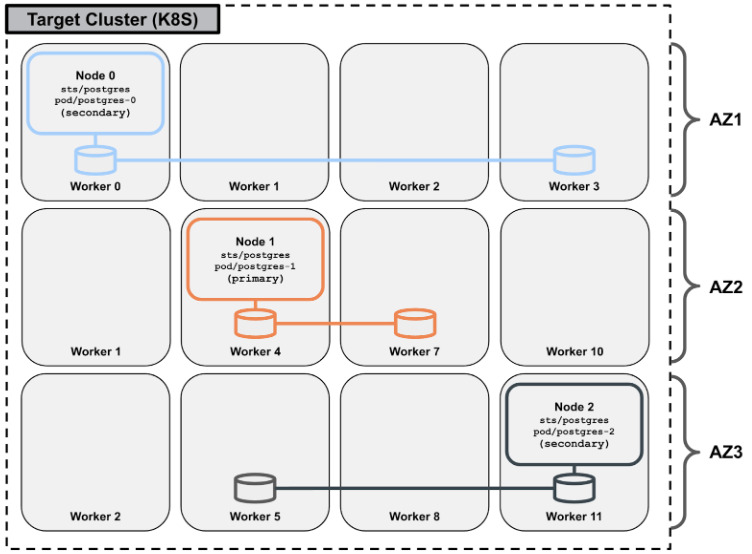
Properly distributing storage replicas across multiple fault domains or availability zones is crucial for maintaining both high availability and consistent performance. By leveraging topology-aware scheduling, Portworx ensures that your application data is placed intelligently, minimizing the impact of node failures and reducing cross-zone network overhead. This approach not only safeguards data integrity but also helps maintain low‑latency access for mission-critical workloads.
Example volume placement strategy
apiVersion: portworx.io/v1beta2
kind: VolumePlacementStrategy
metadata:
  name: test-vps
spec:
  volumeAntiAffinity:
    - enforcement: required
      topologyKey: topology.kubernetes.io/zone
      matchExpressions:
      - key: "name"
        operator: In
        values:
        - "${pvc.labels.name}"
  replicaAffinity:
    - enforcement: required
      topologyKey: topology.kubernetes.io/zone
You can use this example volume placement to achieve the volume placements illustrated in the following figure:
For more information, refer to the volume placement strategy documentation.