Synchronous Disaster Recovery
This topic explains how to install a stretched Portworx cluster and achieve synchronous disaster recovery (DR). It demonstrates how to failover and failback applications between two clusters.
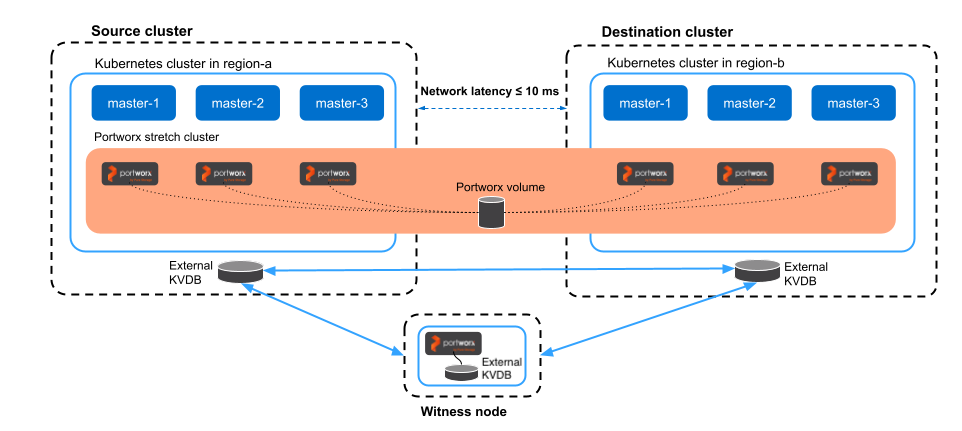
To deploy a synchronous DR (also known as Metro DR) setup, you must install a single stretched Portworx cluster across two clusters. A single Portworx cluster spans an on-premises environment with a maximum round-trip latency of 10 ms.
The following diagram shows a synchronous DR setup involving two clusters in the same metropolitan area network:
Supported platforms
The following table shows the platforms and storage configurations supported for synchronous DR:
| Platform | vSphere cloud drive | FlashArray cloud drive | Local drives | KubeVirt VMs |
|---|---|---|---|---|
| VMware vSphere Kubernetes Service | ✓ | - | - | - |
| Vanilla Kubernetes | ✓ | ✓ | ✓ | - |
| Rancher Kubernetes Engine 2 | ✓ | ✓ | - | - |
| OpenShift Container Platform | ✓ | ✓ | ✓ | ✓ |
| SUSE Virtualization¹ | - | ✓ | - | ✓ |
¹ SUSE Virtualization requires Stork 26.2.0 or later and Portworx Enterprise 3.5.2 or later.
- Cluster-wide operators are not migrated as part of a DR migration if they are not installed in the same namespace as the applications you want to migrate (for example, in OpenShift, the operator installation defaults to the
openshift-operatorsnamespace). As a result, after migration, you will not be able to scale up or down your applications on the destination cluster usingstorkctl. - In a Synchronous DR setup:
- The maximum supported replication factor is
2. - Portworx does not support sharedv4 service volumes in the cluster.
- The maximum supported replication factor is
- For KubeVirt VMs, synchronous DR is supported only with Portworx Enterprise raw block volumes. Sharedv4 service volumes are not supported.
Setting up synchronous DR
Perform the following steps to set up synchronous DR:
📄 Prerequisites
Prerequisites for Synchronous DR migration.
📄 Prepare your cluster
Find out how to install a single stretched Portworx cluster across multiple Kubernetes clusters.
📄 Setup a witness node
Find out how to install a witness node.
📄 Generate and apply a cluster pair spec
Find out how to pair your clusters.
📄 Schedule a migration
Find out how to synchronize your clusters by scheduling periodic migrations between them.
📄 Failover an application
Find out how to failover an application from one Kubernetes cluster to another.
📄 Failback an application
Find out how to failback an application from the backup Kubernetes cluster to the original one.