Synchronous Disaster Recovery
To deploy Synchronous DR (also known as Metro DR) setup, you need to install a single stretched Portworx cluster across two clusters. A single Portworx cluster spans across an on-premise environment with a maximum latency of 10 ms.
The following diagram shows a synchronous DR setup involving two clusters in the same metropolitan area network:
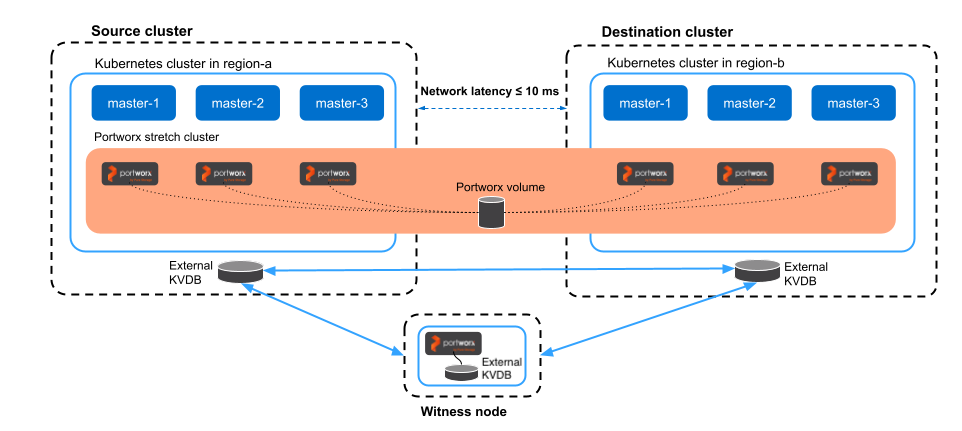
This document explains how to install a stretched Portworx cluster and achieve synchronous DR. It will demonstrate how to failover and failback applications between two clusters.
Perform the following steps to set up synchronous DR:
📄 Prerequisites
Prerequisites for Synchronous DR migration.
📄 Prepare your cluster
Find out how to install a single stretched Portworx cluster across multiple Kubernetes clusters.
📄 Setup a witness node
Find out how to install a witness node.
📄 Generate and apply a cluster pair spec
Find out how to pair your clusters.
📄 Schedule a migration
Find out how to synchronize your clusters by scheduling periodic migrations between them.
📄 Failover an application
Find out how to failover an application from one Kubernetes cluster to another.
📄 Failback an application
Find out how to failback an application from the backup Kubernetes cluster to the original one.