Asynchronous Disaster Recovery
In an asynchronous disaster recovery setup, you can replicate your applications and their data between two Kubernetes or OpenShift clusters. A separate Portworx Enterprise cluster runs on each Kubernetes or OpenShift cluster.
The following diagram shows an asynchronous DR setup involving two clusters that are geographically apart:
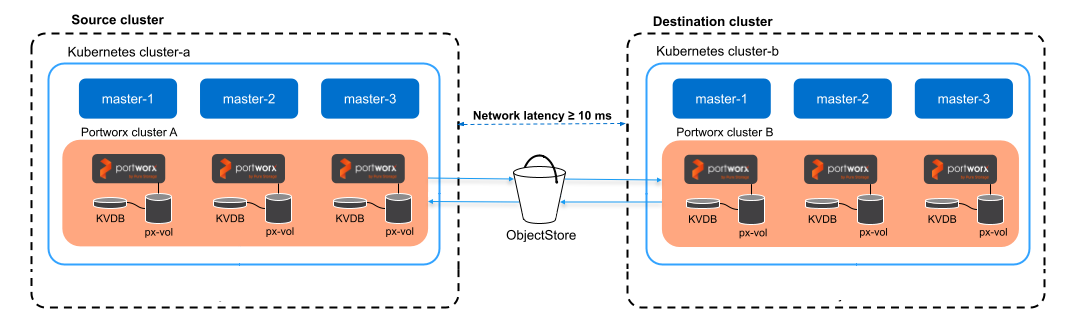
- Application data and supported Kubernetes resources are asynchronously replicated from a source to a destination cluster, which means there is a delay between data changes occurring on the source cluster and their replication to the destination cluster.
- Incremental changes from Kubernetes or OpenShift applications and Portworx data are continuously sent to the destination cluster.
- If the source cluster becomes unavailable, you can activate the applications in the destination cluster.
Supported platforms
Asynchronous DR is supported on all Kubernetes and OpenShift platforms. The following platform-specific capabilities apply:
- OpenShift Container Platform (OCP): Supports KubeVirt VMs with PX RWX block volumes
- Amazon EKS with hybrid nodes: Uses the Amazon S3 cluster pair path. No
LoadBalancerservice or additional network infrastructure is required. The configuration does not depend on whether the on-premises pod CIDR is routable. For more information, see Installation on an Amazon EKS Cluster with Hybrid Nodes. - SUSE Virtualization: Requires Stork 26.2.0 or later and Portworx Enterprise 3.5.2 or later
- Gardener clusters: Supported on Gardener clusters provisioned in Amazon Web Services (AWS), Azure, and Google Cloud Platform (GCP), with additional network and workload identity configuration required. For more information, see Prerequisites for Asynchronous Disaster Recovery.
- Cluster-wide operators are not migrated during a DR migration unless they are installed in the same namespace as the applications you want to migrate.
- For OpenShift, the operator installation defaults to the
openshift-operatorsnamespace. - For Kubernetes, ensure operators are installed in the same namespace as your applications.
As a result, after migration, you will not be able to scale up or down your applications on the destination cluster using
storkctl.
- For OpenShift, the operator installation defaults to the
- Disaster recovery is not supported for FlashArray Direct Access and FlashBlade Direct Access volumes. Do not configure migration schedules for namespaces containing these volumes.
- In an asynchronous disaster recovery setup, if a MigrationSchedule is created with a 100 MB object size, failover or failback to a cluster configured with a 10 MB object size fails. Portworx by Everpure recommends configuring both the source and destination clusters with the same object size to ensure successful MigrationSchedule and failover/failback operations.
Setting up asynchronous DR
Perform the following steps to set up asynchronous DR:
📄 Prerequisites
Prerequisites for Async DR migration.
📄 Prepare your Portworx cluster
Prepare your Portworx cluster for asynchronous DR.
📄 Generate and apply a cluster pair spec
How to pair your clusters.
📄 Schedule a migration
How to set up asynchronous schedules.
📄 Failover an application
How to failover an application from one Kubernetes cluster to another.
📄 Failback an application
Learn how to failback an application from the backup Kubernetes cluster to the original one.