How to deploy OpenShift hosted clusters with Portworx
OpenShift supports a deployment model called Hosted Control Planes (HCP) that decouples the control plane of a cluster from its worker nodes by hosting the control plane components in a separate, centralized OpenShift cluster. This centralized cluster can act as a management plane for multiple hosted clusters, allowing resource consolidation.
To deploy OpenShift hosted clusters with Portworx, both the management cluster and all hosted clusters must run Portworx Enterprise version 3.6.2 or later.
Hosted Cluster Deployment Model
The hosted cluster deployment model provides a scalable, multi-tenant OpenShift environment where the control plane resources for hosted clusters are isolated, while sharing the same physical infrastructure and storage backend. This model comprises a single centralized management cluster, and one or more hosted clusters.
Management Cluster
The OpenShift cluster hosts the control planes (API server, etcd, controller manager, etc.) for other clusters. Control planes run as pods inside this cluster.
Hosted Cluster
A hosted cluster is a fully functional OpenShift cluster whose control plane is hosted (as pods) in the hosting cluster, while its worker nodes run as OpenShift Virtualization VMs (KubeVirt VMs).
Architecture
Worker nodes for hosted clusters are provisioned through NodePools, and can be created on any OpenShift supported platforms as VMs, bare metal nodes, or cloud instances, including KubeVirt VMs.
KubeVirt VMs are provisioned in the management cluster and serve as worker nodes for the hosted cluster. Each hosted cluster runs in its own namespace with a dedicated Hosted Control Plane, ensuring isolation of workloads, control plane resources, and lifecycle operations.
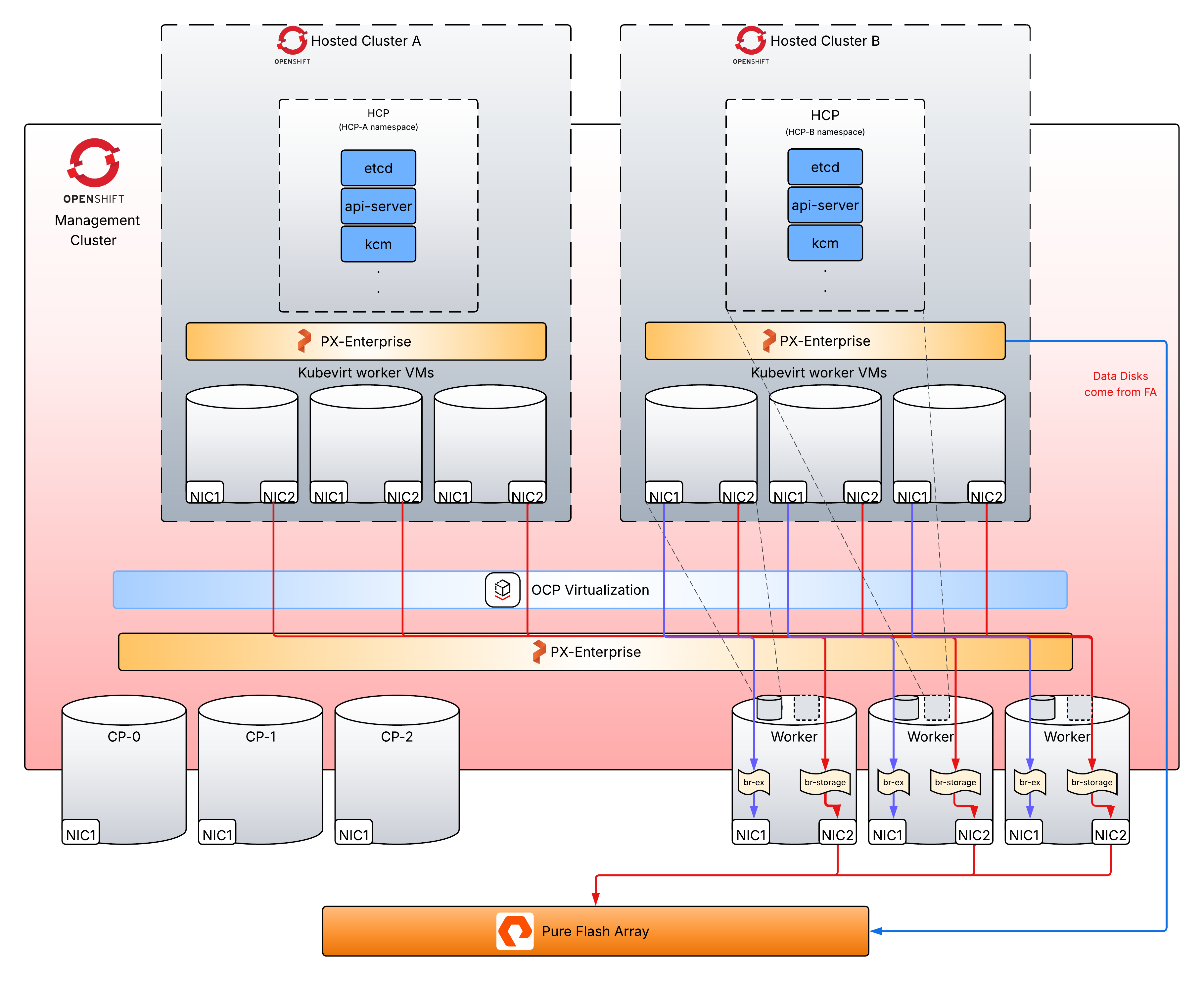
On the management cluster, Portworx Enterprise is always installed with FlashArray Cloud Drive (FACD). The KubeVirt VMs that host the OpenShift hosted cluster use FlashArray Direct Access (FADA)-backed persistent volume claims (PVCs) for their root disks, provisioned by the Portworx Enterprise cluster.
Deployment configurations
You can provide Portworx storage to the hosted clusters in one of the following ways:
-
Portworx Enterprise on the hosted cluster with FACD: Portworx Enterprise runs inside the hosted cluster and connects directly to FlashArray through FACD. Hosted cluster workloads can use both RWO and RWX volumes and the full set of Portworx Enterprise capabilities, including synchronous and asynchronous disaster recovery (DR). This configuration provides full cloud-drive automation and requires the hosted cluster to have iSCSI or NVMe/TCP connectivity to the FlashArray.
-
Portworx Enterprise on the hosted cluster with local drives: Portworx Enterprise runs inside the hosted cluster on FADA disks that are pre-provisioned to the KubeVirt VMs from the management cluster. Hosted cluster workloads can use both RWO and RWX volumes and the full set of Portworx Enterprise capabilities, including synchronous and asynchronous DR across hosted clusters. Because the hosted cluster does not connect directly to FlashArray, storage is served through the management cluster. This configuration also supports Fibre Channel connectivity and is recommended when the hosted cluster cannot access the FlashArray over iSCSI or NVMe/TCP.
-
KubeVirt CSI on the hosted cluster: Portworx Enterprise runs only on the management cluster. The KubeVirt CSI driver maps a Portworx
StorageClassfrom the management cluster to the hosted cluster, allowing hosted cluster workloads to consume volumes backed by the management cluster. This option supports only RWO volumes and does not support RWX volumes or disaster recovery.
Portworx Enterprise supports the following capabilities for these deployment configurations:
- FlashArray as the storage backend for both management and hosted clusters.
- Storage operations for the management and hosted clusters, including live migration of KubeVirt VMs.
Asynchronous and synchronous disaster recovery are supported only when Portworx Enterprise runs on the hosted cluster.
Deployment workflow
The following collection of tasks describes how to prepare your clusters and install Portworx Enterprise on the hosted cluster:
- Preparing your management cluster: Deploy the required operators, configure the storage network, install the FlashArray multipath dependencies, and deploy Portworx Enterprise with FACD on the management cluster.
- Create hosted OpenShift cluster: Enable Hosted Control Planes and create the hosted cluster and its NodePool, including the required
InPlaceupgrade type. - Preparing your hosted cluster: Prepare the hosted cluster's KubeVirt VM worker nodes for your chosen installation method, a multipath ConfigMap for FACD, or pre-provisioned drives for local drive.
- Deploy Portworx Enterprise in hosted OpenShift cluster: Provide Portworx storage to the hosted cluster using FACD, local drives, or KubeVirt CSI.
Preparing your management cluster
Ensure that your OpenShift cluster meets the following requirements before you deploy Portworx Enterprise on the cluster so that hosted clusters (also running Portworx Enterprise) can work seamlessly.
To use a secondary network for storage I/O, you must perform step 2 and step 5. If you can use the default pod network for storage, you don't need to create a bridge on infra nodes or a NetworkAttachmentDefinition, and you can keep the default data/mgmt interface on the StorageClass for Portworx deployment.
Skip step 2 and step 5 if you use the default pod network for storage.
1. From Operator hub, deploy the following operators:
-
NMState operator: This is required to create NodeNetworkConfigurationPolicy, using which you can configure the required networking in the management cluster nodes.
-
Multicluster engine for Kubernetes Operator: Required to create and manage multiple clusters.
-
MetalLB Operator: Required to provide a LoadBalancer to hosted cluster’s services like
kubeapi-server. -
OpenShift Virtualization: Required to create KubeVirt VMs for the hosted cluster.
Skip step 2 in case you can use the default pod network for storage.
2. Create a NMState: Using the NMState operator, create a NMState that displays options for creating NodeNetworkConfigurationPolicies (NNCPs). Create an NNCP to create a Linux bridge on management nodes—use one NNCP per node to assign static IPs unless you are using DHCP. Specify the management node interface name in the port field, which will be enslaved by the bridge.
apiVersion: nmstate.io/v1
kind: NodeNetworkConfigurationPolicy
metadata:
  name: br-storage-b38-bm
spec:
  nodeSelector:
    kubernetes.io/hostname: ini528-b38-bm
  desiredState:
    interfaces:
    - name: br-storage
      type: linux-bridge
      state: up
      ipv4:
        enabled: true
        address:
        - ip: 10.xx.xxx.101
          prefix-length: 20
        - ip: 169.xxx.xxx.1
          prefix-length: 24
        dhcp: false
      bridge:
        options: {}
        port:
        - name: ens1f1.400
3. Create a MachineConfig: Create a MachineConfig to install FlashArray multipath dependencies in management cluster nodes.
apiVersion: machineconfiguration.openshift.io/v1
kind: MachineConfig
metadata:
  labels:
    machineconfiguration.openshift.io/role: worker
  name: worker-iscsi-configuration
spec:
  config:
    ignition:
      version: 3.2.0
    storage:
      files:
        - contents:
            source: 'data:text/plain;charset=utf-8;base64,YmxhY2tsaXN0IHsKICAgICAgZGV2bm9kZSAiXnB4ZFswLTldKiIKICAgICAgZGV2bm9kZSAiXnB4ZCoiCiAgICAgIGRldmljZSB7CiAgICAgICAgdmVuZG9yICJWTXdhcmUiCiAgICAgICAgcHJvZHVjdCAiVmlydHVhbCBkaXNrIgogICAgICB9Cn0KZGVmYXVsdHMgewogdXNlcl9mcmllbmRseV9uYW1lcyBubwogZmluZF9tdWx0aXBhdGhzIHllcwogcG9sbGluZ19pbnRlcnZhbCAgMTAKfQpkZXZpY2VzIHsKICAgIGRldmljZSB7CiAgICAgICAgdmVuZG9yICAgICAgICAgICAgICAgICAgICAgICJOVk1FIgogICAgICAgIHByb2R1Y3QgICAgICAgICAgICAgICAgICAgICAiUHVyZSBTdG9yYWdlIEZsYXNoQXJyYXkiCiAgICAgICAgcGF0aF9zZWxlY3RvciAgICAgICAgICAgICAgICJxdWV1ZS1sZW5ndGggMCIKICAgICAgICBwYXRoX2dyb3VwaW5nX3BvbGljeSAgICAgICAgZ3JvdXBfYnlfcHJpbwogICAgICAgIHByaW8gICAgICAgICAgICAgICAgICAgICAgICBhbmEKICAgICAgICBmYWlsYmFjayAgICAgICAgICAgICAgICAgICAgaW1tZWRpYXRlCiAgICAgICAgZmFzdF9pb19mYWlsX3RtbyAgICAgICAgICAgIDEwCiAgICAgICAgdXNlcl9mcmllbmRseV9uYW1lcyAgICAgICAgIG5vCiAgICAgICAgbm9fcGF0aF9yZXRyeSAgICAgICAgICAgICAgIDAKICAgICAgICBmZWF0dXJlcyAgICAgICAgICAgICAgICAgICAgMAogICAgICAgIGRldl9sb3NzX3RtbyAgICAgICAgICAgICAgICA2MAogICAgfQogICAgZGV2aWNlIHsKICAgICAgICB2ZW5kb3IgICAgICAgICAgICAgICAgICAgIlBVUkUiCiAgICAgICAgcHJvZHVjdCAgICAgICAgICAgICAgICAgICJGbGFzaEFycmF5IgogICAgICAgIHBhdGhfc2VsZWN0b3IgICAgICAgICAgICAic2VydmljZS10aW1lIDAiCiAgICAgICAgaGFyZHdhcmVfaGFuZGxlciAgICAgICAgICIxIGFsdWEiCiAgICAgICAgcGF0aF9ncm91cGluZ19wb2xpY3kgICAgIGdyb3VwX2J5X3ByaW8KICAgICAgICBwcmlvICAgICAgICAgICAgICAgICAgICAgYWx1YQogICAgICAgIGZhaWxiYWNrICAgICAgICAgICAgICAgICBpbW1lZGlhdGUKICAgICAgICBwYXRoX2NoZWNrZXIgICAgICAgICAgICAgdHVyCiAgICAgICAgZmFzdF9pb19mYWlsX3RtbyAgICAgICAgIDEwCiAgICAgICAgdXNlcl9mcmllbmRseV9uYW1lcyAgICAgIG5vCiAgICAgICAgbm9fcGF0aF9yZXRyeSAgICAgICAgICAgIDAKICAgICAgICBmZWF0dXJlcyAgICAgICAgICAgICAgICAgMAogICAgICAgIGRldl9sb3NzX3RtbyAgICAgICAgICAgICA2MDAKICAgIH0KfQ=='
          filesystem: root
          mode: 420
          overwrite: true
          path: /etc/multipath.conf
        - contents:
            source: 'data:text/plain;charset=utf-8;base64,IyBSZWNvbW1lbmRlZCBzZXR0aW5ncyBmb3IgUHVyZSBTdG9yYWdlIEZsYXNoQXJyYXkuCiMgVXNlIG5vbmUgc2NoZWR1bGVyIGZvciBoaWdoLXBlcmZvcm1hbmNlIHNvbGlkLXN0YXRlIHN0b3JhZ2UgZm9yIFNDU0kgZGV2aWNlcwpBQ1RJT049PSJhZGR8Y2hhbmdlIiwgS0VSTkVMPT0ic2QqWyEwLTldIiwgU1VCU1lTVEVNPT0iYmxvY2siLCBFTlZ7SURfVkVORE9SfT09IlBVUkUiLCBBVFRSe3F1ZXVlL3NjaGVkdWxlcn09Im5vbmUiCkFDVElPTj09ImFkZHxjaGFuZ2UiLCBLRVJORUw9PSJkbS1bMC05XSoiLCBTVUJTWVNURU09PSJibG9jayIsIEVOVntETV9OQU1FfT09IjM2MjRhOTM3KiIsIEFUVFJ7cXVldWUvc2NoZWR1bGVyfT0ibm9uZSIKCiMgUmVkdWNlIENQVSBvdmVyaGVhZCBkdWUgdG8gZW50cm9weSBjb2xsZWN0aW9uCkFDVElPTj09ImFkZHxjaGFuZ2UiLCBLRVJORUw9PSJzZCpbITAtOV0iLCBTVUJTWVNURU09PSJibG9jayIsIEVOVntJRF9WRU5ET1J9PT0iUFVSRSIsIEFUVFJ7cXVldWUvYWRkX3JhbmRvbX09IjAiCkFDVElPTj09ImFkZHxjaGFuZ2UiLCBLRVJORUw9PSJkbS1bMC05XSoiLCBTVUJTWVNURU09PSJibG9jayIsIEVOVntETV9OQU1FfT09IjM2MjRhOTM3KiIsIEFUVFJ7cXVldWUvYWRkX3JhbmRvbX09IjAiCgojIFNwcmVhZCBDUFUgbG9hZCBieSByZWRpcmVjdGluZyBjb21wbGV0aW9ucyB0byBvcmlnaW5hdGluZyBDUFUKQUNUSU9OPT0iYWRkfGNoYW5nZSIsIEtFUk5FTD09InNkKlshMC05XSIsIFNVQlNZU1RFTT09ImJsb2NrIiwgRU5We0lEX1ZFTkRPUn09PSJQVVJFIiwgQVRUUntxdWV1ZS9ycV9hZmZpbml0eX09IjIiCkFDVElPTj09ImFkZHxjaGFuZ2UiLCBLRVJORUw9PSJkbS1bMC05XSoiLCBTVUJTWVNURU09PSJibG9jayIsIEVOVntETV9OQU1FfT09IjM2MjRhOTM3KiIsIEFUVFJ7cXVldWUvcnFfYWZmaW5pdHl9PSIyIgoKIyBTZXQgdGhlIEhCQSB0aW1lb3V0IHRvIDYwIHNlY29uZHMKQUNUSU9OPT0iYWRkfGNoYW5nZSIsIEtFUk5FTD09InNkKlshMC05XSIsIFNVQlNZU1RFTT09ImJsb2NrIiwgRU5We0lEX1ZFTkRPUn09PSJQVVJFIiwgQVRUUntkZXZpY2UvdGltZW91dH09IjYwIgo='
          filesystem: root
          mode: 420
          overwrite: true
          path: /etc/udev/rules.d/99-pure-storage.rules
    systemd:
      units:
        - enabled: true
          name: iscsid.service
        - enabled: true
          name: multipathd.service
4. Deploy Portworx Enterprise on management cluster: Deploy Portworx Enterprise by creating a px-pure-secret and the StorageCluster Custom resource.
Skip step 5 to configure network in case you can use the default pod network for storage.
5. Configure network: Set spec.network.dataInterface/mgmtInterface to the bridge interface name created in step 1. Replace br-storage in the given spec with the correct bridge interface name.
spec:
    network:
      dataInterface: br-storage
      mgmtInterface: br-storage
Create hosted OpenShift cluster
A hosted cluster comprises the hosted control plane and a nodepool that runs KubeVirt VMs acting as worker nodes in the cluster.
-
Using Multicluster engine for Kubernetes operator, enable Hypershift by creating a MultiClusterEngine CR. This allows you to create new clusters.
apiVersion: multicluster.openshift.io/v1kind: MultiClusterEnginemetadata:name: multiclusterenginespec:overrides:components:- name: hypershift-previewenabled: true -
Follow the steps to create a LoadBalancer using MetalLB operator.
-
Add wildcards to the ingress controller to allow external traffic to the hosted cluster console.
oc patch ingresscontroller -n openshift-ingress-operator default --type=json -p '[{ "op": "add", "path": "/spec/routeAdmission", "value": {wildcardPolicy: "WildcardsAllowed"}}]' -
Create a
clustersnamespace. -
Add a Credential in
clustersnamespace. This is required for hosted clusters to pull images from private OpenShift registries. Creating this credential is standard OpenShift configuration; refer to the OpenShift documentation for the steps.noteSkip the next step (creating a NetworkAttachmentDefinition) in case you use the default pod network for storage.
-
Create a NetworkAttachmentDefinition (NAD) to enable external networking on the hosted clusters.
apiVersion: k8s.cni.cncf.io/v1kind: NetworkAttachmentDefinitionmetadata:name: storage-networkspec:config: |-{"cniVersion": "0.3.1","type": "bridge","bridge": "br-storage","ipam": {"type": "whereabouts","range": "10.xx.xxx.xxx/20","gateway": "10.xx.xxx.1"}}For DHCP, skip adding static IP for
spec.config.ipam.To get range and gateway, run the following command on the management host node.
> ip route show dev br-storage10.xx.xxx.0/20 proto kernel scope link src 10.xx.xxx.xxx metric 425169.xxx.xxx.0/24 proto kernel scope link src 169.xxx.xxx.1 metric 425 -
Create a hosted cluster. Choose Red Hat OpenShift Virtualization as the infrastructure, and provide the Credential created earlier. While creating a cluster, make the following changes:
-
Set the NodePool upgrade type to
InPlace. Portworx Enterprise on a hosted cluster supports only theInPlaceupgrade type; the default isReplace. This field is not exposed in the UI, so edit the NodePool CR in the manifest before creating the cluster:spec:management:upgradeType: InPlaceinPlace:maxUnavailable: 1 -
To enable live migration for KubeVirt-based worker nodes, configure the NodePool to use ReadWriteMany (RWX) raw block volumes for the VM root disks.
- AccessMode - RWX
- VolumeMode - Block
Here is a
StorageClassmanifest for the same.apiVersion: storage.k8s.io/v1kind: StorageClassmetadata:name: px-rwx-block-kubevirtprovisioner: pxd.portworx.comparameters:repl: "3"volumeBindingMode: ImmediateallowVolumeExpansion: truenoteOpenShift Virtualization (OSV) versions 4.18.4 and earlier have a known issue that handles discards incorrectly when used with Portworx block devices. As a workaround, you can disable discards for the Portworx volume by including the parameter
nodiscard: truein the StorageClass. -
Ensure that each KubeVirt VM in the NodePool is provisioned with sufficient compute resources for Portworx based provisioning. Each VM requires a minimum of 4 vCPUs. Check System Requirements to ensure you provision enough resources.
-
Specify an additional network for the hosted cluster by referencing a NetworkAttachmentDefinition (NAD) in the format
<namespace>/<name>created earlier. Enable the default Pod network option only if you are not using an external network via NAD.
noteDo not enable the
autoRepairconfiguration on the NodePool. When a node becomes unhealthy or unresponsive, the auto-repair feature triggers recreation of the underlying machine, which can conflict with Portworx operations. -
Once the hosted cluster deployment finishes, it shows the console URL and the credentials to access the hosted cluster. The hosted OpenShift cluster can be accessed independently of the management cluster.
Preparing your hosted cluster
After the hosted cluster is created, prepare its KubeVirt VM worker nodes for the Portworx Enterprise installation.
Skip this section if you are using the KubeVirt CSI configuration, which does not require Portworx Enterprise to be installed on the hosted cluster.
- FlashArray Cloud Drive
- Local Drive
For a FACD installation, you must configure multipath and udev for FlashArray on the hosted cluster VMs. Create a ConfigMap in the clusters namespace that bundles a MachineConfig applied to each VM of the hosted cluster.
apiVersion: v1
kind: ConfigMap
metadata:
  name: machine-config-fa
  namespace: clusters
data:
  config: |
    apiVersion: machineconfiguration.openshift.io/v1
    kind: MachineConfig
    metadata:
      labels:
        machineconfiguration.openshift.io/role: worker
      name: multipath-udev-config
    spec:
      config:
        ignition:
          version: 3.2.0
        storage:
          files:
          - contents:
              source: data:text/plain;charset=utf-8;base64,ZGVmYXVsdHMgewogICAgdXNlcl9mcmllbmRseV9uYW1lcyBubwogICAgZW5hYmxlX2ZvcmVpZ24gIl4kIgogICAgcG9sbGluZ19pbnRlcnZhbCAgICAxMAogICAgZmluZF9tdWx0aXBhdGhzIHllcwp9CgpkZXZpY2VzIHsKICAgIGRldmljZSB7CiAgICAgICAgdmVuZG9yICAgICAgICAgICAgICAgICAgICAgICJOVk1FIgogICAgICAgIHByb2R1Y3QgICAgICAgICAgICAgICAgICAgICAiUHVyZSBTdG9yYWdlIEZsYXNoQXJyYXkiCiAgICAgICAgcGF0aF9zZWxlY3RvciAgICAgICAgICAgICAgICJxdWV1ZS1sZW5ndGggMCIKICAgICAgICBwYXRoX2dyb3VwaW5nX3BvbGljeSAgICAgICAgZ3JvdXBfYnlfcHJpbwogICAgICAgIHByaW8gICAgICAgICAgICAgICAgICAgICAgICBhbmEKICAgICAgICBmYWlsYmFjayAgICAgICAgICAgICAgICAgICAgaW1tZWRpYXRlCiAgICAgICAgZmFzdF9pb19mYWlsX3RtbyAgICAgICAgICAgIDEwCiAgICAgICAgdXNlcl9mcmllbmRseV9uYW1lcyAgICAgICAgIG5vCiAgICAgICAgbm9fcGF0aF9yZXRyeSAgICAgICAgICAgICAgIDAKICAgICAgICBmZWF0dXJlcyAgICAgICAgICAgICAgICAgICAgMAogICAgICAgIGRldl9sb3NzX3RtbyAgICAgICAgICAgICAgICA2MAogICAgfQogICAgZGV2aWNlIHsKICAgICAgICB2ZW5kb3IgICAgICAgICAgICAgICAgICAgIlBVUkUiCiAgICAgICAgcHJvZHVjdCAgICAgICAgICAgICAgICAgICJGbGFzaEFycmF5IgogICAgICAgIHBhdGhfc2VsZWN0b3IgICAgICAgICAgICAic2VydmljZS10aW1lIDAiCiAgICAgICAgaGFyZHdhcmVfaGFuZGxlciAgICAgICAgICIxIGFsdWEiCiAgICAgICAgcGF0aF9ncm91cGluZ19wb2xpY3kgICAgIGdyb3VwX2J5X3ByaW8KICAgICAgICBwcmlvICAgICAgICAgICAgICAgICAgICAgYWx1YQogICAgICAgIGZhaWxiYWNrICAgICAgICAgICAgICAgICBpbW1lZGlhdGUKICAgICAgICBwYXRoX2NoZWNrZXIgICAgICAgICAgICAgdHVyCiAgICAgICAgZmFzdF9pb19mYWlsX3RtbyAgICAgICAgIDEwCiAgICAgICAgdXNlcl9mcmllbmRseV9uYW1lcyAgICAgIG5vCiAgICAgICAgbm9fcGF0aF9yZXRyeSAgICAgICAgICAgIDAKICAgICAgICBmZWF0dXJlcyAgICAgICAgICAgICAgICAgMAogICAgICAgIGRldl9sb3NzX3RtbyAgICAgICAgICAgICA2MDAKICAgIH0KfQoKYmxhY2tsaXN0X2V4Y2VwdGlvbnMgewogICAgICAgIHByb3BlcnR5ICIoU0NTSV9JREVOVF98SURfV1dOKSIKfQoKYmxhY2tsaXN0IHsKICAgICAgZGV2bm9kZSAiXnB4ZFswLTldKiIKICAgICAgZGV2bm9kZSAiXnB4ZCoiCiAgICAgIGRldmljZSB7CiAgICAgICAgdmVuZG9yICJWTXdhcmUiCiAgICAgICAgcHJvZHVjdCAiVmlydHVhbCBkaXNrIgogICAgICB9Cn0=
            filesystem: root
            mode: 0644
            overwrite: true
            path: /etc/multipath.conf
          - contents:
              source: data:text/plain;charset=utf-8;base64,IyBSZWNvbW1lbmRlZCBzZXR0aW5ncyBmb3IgUHVyZSBTdG9yYWdlIEZsYXNoQXJyYXkuCiMgVXNlIG5vbmUgc2NoZWR1bGVyIGZvciBoaWdoLXBlcmZvcm1hbmNlIHNvbGlkLXN0YXRlIHN0b3JhZ2UgZm9yIFNDU0kgZGV2aWNlcwpBQ1RJT049PSJhZGR8Y2hhbmdlIiwgS0VSTkVMPT0ic2QqWyEwLTldIiwgU1VCU1lTVEVNPT0iYmxvY2siLCBFTlZ7SURfVkVORE9SfT09IlBVUkUiLCBBVFRSe3F1ZXVlL3NjaGVkdWxlcn09Im5vbmUiCkFDVElPTj09ImFkZHxjaGFuZ2UiLCBLRVJORUw9PSJkbS1bMC05XSoiLCBTVUJTWVNURU09PSJibG9jayIsIEVOVntETV9OQU1FfT09IjM2MjRhOTM3KiIsIEFUVFJ7cXVldWUvc2NoZWR1bGVyfT0ibm9uZSIKCiMgUmVkdWNlIENQVSBvdmVyaGVhZCBkdWUgdG8gZW50cm9weSBjb2xsZWN0aW9uCkFDVElPTj09ImFkZHxjaGFuZ2UiLCBLRVJORUw9PSJzZCpbITAtOV0iLCBTVUJTWVNURU09PSJibG9jayIsIEVOVntJRF9WRU5ET1J9PT0iUFVSRSIsIEFUVFJ7cXVldWUvYWRkX3JhbmRvbX09IjAiCkFDVElPTj09ImFkZHxjaGFuZ2UiLCBLRVJORUw9PSJkbS1bMC05XSoiLCBTVUJTWVNURU09PSJibG9jayIsIEVOVntETV9OQU1FfT09IjM2MjRhOTM3KiIsIEFUVFJ7cXVldWUvYWRkX3JhbmRvbX09IjAiCgojIFNwcmVhZCBDUFUgbG9hZCBieSByZWRpcmVjdGluZyBjb21wbGV0aW9ucyB0byBvcmlnaW5hdGluZyBDUFUKQUNUSU9OPT0iYWRkfGNoYW5nZSIsIEtFUk5FTD09InNkKlshMC05XSIsIFNVQlNZU1RFTT09ImJsb2NrIiwgRU5We0lEX1ZFTkRPUn09PSJQVVJFIiwgQVRUUntxdWV1ZS9ycV9hZmZpbml0eX09IjIiCkFDVElPTj09ImFkZHxjaGFuZ2UiLCBLRVJORUw9PSJkbS1bMC05XSoiLCBTVUJTWVNURU09PSJibG9jayIsIEVOVntETV9OQU1FfT09IjM2MjRhOTM3KiIsIEFUVFJ7cXVldWUvcnFfYWZmaW5pdHl9PSIyIgoKIyBTZXQgdGhlIEhCQSB0aW1lb3V0IHRvIDYwIHNlY29uZHMKQUNUSU9OPT0iYWRkfGNoYW5nZSIsIEtFUk5FTD09InNkKlshMC05XSIsIFNVQlNZU1RFTT09ImJsb2NrIiwgRU5We0lEX1ZFTkRPUn09PSJQVVJFIiwgQVRUUntkZXZpY2UvdGltZW91dH09IjYwIg==
            filesystem: root
            mode: 0644
            overwrite: true
            path: /etc/udev/rules.d/99-pure-storage.rules
        systemd:
          units:
          - enabled: true
            name: iscsid.service
          - enabled: true
            name: multipathd.service
Add the MachineConfig ConfigMap to the NodePool spec.
spec:
  ..
  config:
  - name: machine-config-fa
For a local drive installation, the KubeVirt VM worker nodes must already have drives attached to them before you install Portworx Enterprise. Pre-provision these drives in two stages: first provision the volumes from a StorageClass, then attach them to the VMs.
-
Provision the drives from a StorageClass. Provision FlashArray Direct Access volumes directly using a StorageClass:
apiVersion: storage.k8s.io/v1kind: StorageClassmetadata:name: fada-rwx-block-kubevirtprovisioner: pxd.portworx.comparameters:backend: "pure_block"volumeBindingMode: ImmediateallowVolumeExpansion: trueThis StorageClass helps provision FlashArray Direct Access volumes. You can deploy FlashArray Direct Access volumes in a specific realm, see Create Volume in FlashArray realm with StorageClass.
-
Attach the drives to the KubeVirt VMs. Create a DataVolume for each drive, then hotplug it into the hosted cluster's KubeVirt VMs. For the procedure, see the KubeVirt hotplug volumes documentation. Deploy
ReadWriteMany(RWX) block volumes using DataVolume:apiVersion: cdi.kubevirt.io/v1beta1kind: DataVolumemetadata:name: rwx-block-dvspec:source:blank: {}storage:storageClassName: fada-rwx-block-kubevirtaccessModes:- ReadWriteManyvolumeMode: Blockresources:requests:storage: 100GiThis DataVolume uses the StorageClass created in Step 1 and creates a raw block volume.
Deploy Portworx Enterprise in hosted OpenShift cluster
You can provide Portworx storage to hosted clusters based on the selected deployment configuration.
For the FACD and local drive configurations, install Portworx Enterprise on each hosted cluster. For the KubeVirt CSI configuration, configure a StorageClass mapping.
- FlashArray Cloud Drive
- Local Drive
- KubeVirt CSI
To install Portworx Enterprise with FlashArray Cloud Drive (FACD), follow the instructions in Install Portworx on FlashArray, except for the following changes that apply to the hosted cluster:
-
Create the
px-pure-secretand theStorageClusterCR. -
In the
StorageClusterconfiguration, setPURE_ISCSI_ALLOWED_IFACESto the network interface name of the NodePool VM to enable iSCSI traffic. To identify the correct interface, find theinterfaceNamethat corresponds to the network connected to the bridge on the host. For example, if the network name isiface1_clusters-hosted1-storage-network, setPURE_ISCSI_ALLOWED_IFACEStoenp2s0.oc get vmi <vm-name> -n clusters-<hosted-cluster-name> -o json | jq '.status.interfaces[] | {name,interfaceName,ipAddresses}' -
Get the Prometheus URL for OpenShift monitoring and set the monitoring URL for Autopilot.
oc get route thanos-querier -n openshift-monitoring
To install Portworx Enterprise with local drives, follow the instructions in Install Portworx on a non-air-gapped bare-metal OpenShift cluster, except for the following changes that apply to the hosted cluster:
-
Provide the device path of the pre-provisioned volume as the storage devices in the
StorageClusterspec or while generating spec in Portworx Central. -
In the
StorageClusterconfiguration, set thePX_NESTED=trueenvironment variable. This is required only for local drive installations on hosted clusters to avoid labeling conflict across management and hosted clusters.importantIn hosted clusters that use PX-StoreV2, Portworx Enterprise reports storage pool disks as Magnetic (
STORAGE_MEDIUM_MAGNETIC) even when the underlying storage uses SSDs. Because KubeVirt presents all disks to the hosted cluster as virtual disks, Portworx cannot reliably detect the underlying storage medium and skips storage medium detection. The reported Magnetic medium type is informational only, does not reflect the actual backing storage, and does not affect performance.
In this configuration, Portworx Enterprise is not installed on the hosted cluster. Instead, the KubeVirt CSI driver maps a Portworx StorageClass from the management cluster to the hosted cluster, allowing hosted cluster workloads to consume volumes backed by Portworx Enterprise running on the management cluster.
Enable the storage-class mapping by editing the HostedCluster spec:
spec:
  platform:
    type: KubeVirt
    kubevirt:
      baseDomainPassthrough: true
      storageDriver:
        type: Manual
        manual:
          storageClassMapping:
            - infraStorageClassName: raw-vol-sc
              guestStorageClassName: kv-raw-vol-sc
            - infraStorageClassName: px-fa-direct-access
              guestStorageClassName: kv-px-fa-direct-access
          volumeSnapshotClassMapping:
            - infraVolumeSnapshotClassName: px-csi-snapclass
              guestVolumeSnapshotClassName: kv-px-csi-snapclass
A PVC created in the hosted cluster provisions a volume on the management cluster through the KubeVirt CSI driver and attaches it to the workload on the hosted cluster. To verify, confirm that the VM's data disk appears as a PVC on the management cluster.