Portworx Operator Release Notes
If you are running Portworx with restricted RBAC, Portworx Operator 26.3.0 and later versions require updated permissions. You must upgrade Portworx Operator by following the steps in the Upgrade Portworx Operator with restricted RBAC tab in Upgrade Operator installed using Portworx Central.
This ensures that the changes to the ClusterRole permissions are applied before the upgrade. Otherwise, the StorageCluster enters a degraded state because of a mismatch in the ClusterRole permissions.
26.4.0
September 29, 2026
New features
-
PX-StoreV1 to PX-StoreV2 migration for three-node clusters: The Portworx Operator now supports in-place migration from PX-StoreV1 (btrfs) to PX-StoreV2 (dm-thin) on clusters with three storage nodes. On a three-node cluster using internal KVDB, you must add the
portworx.io/migrate-storev1-to-v2-force-ack: "true"annotation to the StorageCluster in addition to theportworx.io/migrate-v1-to-v2annotation, to acknowledge that KVDB temporarily runs with only two members while a node is being converted. During migration, the operator reduces the replication factor to 2 for volumes that have a replication factor of 3 and a replica on the node being migrated, and restores the replication factor to 3 after the node returns to service. This feature requires Portworx Enterprise 3.7.0 or later. For more information, see Migrate Portworx Datastore from PX-StoreV1 to PX-StoreV2. -
Labels and annotations on operator-managed Kubernetes Services: You can now set custom labels and annotations on the Kubernetes Services created and managed by the Portworx Operator using the
ComponentK8sConfigcustom resource (CR). Use theservice/<service-name>workload name format to target a specific Service (for example,service/stork-service). For more information, see Configure resource limits, placements, tolerations, nodeAffinity, labels, and annotations for Portworx components. -
Configurable Stork scheduler performance settings: You can now configure Stork scheduler performance parameters directly in the StorageCluster spec. Set the following fields under
spec.stork.schedulerto tune how the stork-scheduler interacts with the Kubernetes API server and scores nodes:kubeSchedulerClientQPS— Steady-state limit on Kubernetes API calls per second (default:50, valid range: 1–10000).kubeSchedulerClientBurst— Maximum number of Kubernetes API calls the stork-scheduler can fire in a burst (default:100, valid range: 1–10000).kubeSchedulerExtenderWeight— Weight applied to the Stork extender's node scores (default:1).
The default extender weight has changed from
5to1in this release so that Stork's data-locality preference supplements rather than overrides the Kubernetes scheduler's scoring. Values are persisted across reconciles and upgrades. The stork-scheduler pods restart automatically when you change these values. For more information, see Configure Stork and Stork configuration.
Improvements
| Improvement Number | Improvement Description |
|---|---|
| PWX-55975 | The NodeDrain CR now exposes Kubernetes conditions that capture each stage of the drain process. You can monitor per-node migration progress by running kubectl describe nodedrain <name> and reviewing the Conditions section without requiring log access. |
| PWX-55635 | The px-libs-update DaemonSet, created when spec.pxfslibsUpdate is enabled, now inherits node placement rules from StorageCluster.spec.placement (nodeAffinity and tolerations). You can also override placement for this DaemonSet by using the ComponentK8sConfig CR with the PxLibsUpdate component and the px-libs-update workload name. Component names in ComponentK8sConfig are case-sensitive. For more information, see Update Portworx filesystem dependencies. |
| PWX-55558 | When Portworx rejects an environment variable set in spec.env of the StorageCluster because it is not on the allowlist, the Portworx Operator now emits a Kubernetes warning event on the StorageCluster object. Previously, the rejection was silent. This feature requires Portworx Enterprise 3.7.0 or later. |
| PWX-51064 | The Portworx Operator now validates service account tokens on each reconcile cycle and proactively rotates them if they are rejected with an Unauthorized or InvalidToken error. Previously, the operator rotated service account tokens only at a fixed time interval, which could leave invalidated tokens, for example, after a Kubernetes certificate renewal, in use until the next scheduled rotation. |
Fixes
| Issue Number | Issue Description | Severity |
|---|---|---|
| PWX-56697 | Issue: On OpenShift clusters, the Portworx Operator deployed its own CSI snapshot-controller inside px-csi-ext even when openshift-cluster-storage-operator had already installed one. The pre-install detection matched only the substring /snapshot-controller: in container image names, but OpenShift ships a rebranded image that does not contain this substring.User Impact: Two snapshot-controllers competed to process VolumeSnapshot resources simultaneously, causing unpredictable snapshot behavior on OpenShift clusters.Resolution: The operator now detects pre-installed snapshot-controllers using stable identifiers — the app=csi-snapshot-controller and app.kubernetes.io/name=snapshot-controller labels and the snapshot-controller container name — in addition to image-name matching. When a pre-installed controller is found, the operator does not deploy its own and removes any stale container from px-csi-ext on the next reconcile.Affected versions: 26.3.1 and earlier | Major |
| PWX-56107 | Issue: The deprecated spec.cloudStorage fields maxStorageNodes, maxStorageNodesPerZone, and maxStorageNodesPerZonePerNodeGroup were still processed by the operator's reconciliation logic on Portworx 3.5.0 and later, where they have no functional effect. When any of these fields were set or changed, the operator could incorrectly classify nodes as ineligible for storage and enter a retry loop, causing cluster degradation. This was confirmed in P2 escalations at two enterprise customers.User Impact: Clusters running Portworx 3.5.0 or later with these deprecated fields present in their StorageCluster spec could experience node eligibility errors, 29-second retry loops, and storage disruption if those fields were modified. Resolution: The Portworx Operator now transparently ignores these deprecated fields during reconciliation on Portworx 3.5.0 and later. Field values are preserved in the Kubernetes spec, so GitOps tools such as Flux and Argo CD do not detect drift. The operator emits a Warning DeprecatedField event on the StorageCluster for each deprecated field still in use, so you can remove them at your own pace.Affected versions: 26.3.1 and earlier | Major |
| PWX-52052 | Issue: The portworx-api DaemonSet pod used the /status endpoint for its readiness probe, which returned success even when the underlying Portworx node was in maintenance mode. As a result, the pod remained Ready and continued to receive traffic from the portworx-api Service.User Impact: API calls from Stork and other Portworx API clients could be routed to nodes in maintenance mode, causing failed requests. Resolution: The portworx-api readiness probe now uses the /health endpoint, which correctly returns unhealthy when the Portworx node is in maintenance mode. The pod transitions to Not Ready, removing it from the Service endpoint pool.Affected versions: 26.3.1 and earlier | Major |
| PWX-46832 | Issue: The Portworx Operator allowed a StorageCluster spec to be applied even when the cluster name in the spec was different from the name used when the cluster was first installed. User Impact: Applying a StorageCluster spec with a different cluster name than the initialized cluster could cause the operator to attempt to reconfigure the cluster under an incorrect identity. Resolution: The Portworx Operator now validates that the cluster name in any StorageCluster spec matches the name recorded at initial installation. If the names differ, the operator rejects the operation with an error. Affected versions: 26.3.1 and earlier | Major |
26.3.2
September 8, 2026
This release addresses a security vulnerability.
Improvements
- StorageCluster admission control: The Portworx Operator now enforces cluster-admin rights for all create, update, and delete operations on StorageCluster resources by using a Kubernetes
ValidatingAdmissionPolicy(VAP). The operator denies unauthorized requests and logs them for auditing. This admission control enforcement requires Kubernetes 1.30 or later. On Kubernetes versions earlier than 1.30, the operator skips VAP creation and logs a warning; all other functionality is unaffected. If you manage the StorageCluster by using GitOps tools such as Argo CD or Flux, or through Helm, the service account or user performing the operation must havecluster-adminor equivalent rights. For more information, see StorageCluster Admission Control.
26.3.1
August 12, 2026
Fixes
| Issue Number | Issue Description | Severity |
|---|---|---|
| PWX-57224 | Issue: On clusters where HTTP_PROXY and HTTPS_PROXY are configured on the Portworx Operator pod, the Operator cannot establish SDK/gRPC connections to portworx-service.<namespace>:9020, and the StorageCluster enters a Degraded state with repeated errors: Failed to connect gRPC server portworx-service.<namespace>:9020: context deadline exceeded. The operator dials the SDK service using the unqualified name portworx-service.<namespace>:9020, which does not match .cluster.local or .svc suffix entries in NO_PROXY, so the connection is routed through the proxy, which cannot resolve or reach the internal service.User Impact: DisruptionBudget reconciliation, rolling updates, and all StorageCluster control-plane operations that require SDK connectivity are blocked. The StorageCluster remains in the Degraded state until the proxy configuration is updated.Resolution: The Portworx Operator now ensures all internal service connections bypass the proxy. SDK connectivity to Portworx services is no longer affected by proxy configuration, regardless of how NO_PROXY is configured or what cluster DNS domain is used.Affected versions: 26.3.0 | Major |
| PWX-56935 | Issue: On OpenShift clusters where you install Portworx through OLM or OperatorHub, the Portworx Operator intermittently sets Stork to restricted RBAC permissions instead of the full permissions required for data protection. The operator determines its own permissions by scanning ClusterRoles with the olm.owner label. A prefix collision between the operator's versioned ClusterRole (portworx-operator.v<version>) and OperatorGroup-generated roles (such as olm.og.portworx-operatorgroup.admin) causes the operator to non-deterministically select the wrong role on some reconcile cycles. When a restricted OperatorGroup role is selected, Stork's permissions are restricted, removing list access to OpenShift Routes, ServiceAccounts, RoleBindings, and ControllerRevisions.User Impact: On affected OLM installations, Stork's RBAC permissions flip between restricted and full permissions on each reconcile cycle (as frequently as every 16 seconds), causing DataProtectionRBACMisconfigured warnings on the StorageCluster. During reconcile cycles with restricted permissions, Stork silently skips collection of OpenShift Routes and other resources during disaster recovery migrations, and subsequently deletes already-migrated copies of those resources on the DR cluster. This affects all OLM-based Portworx installations where the portworx-operatorgroup OperatorGroup exists and an exact-name portworx-operator ClusterRole is not present.Resolution: The Portworx Operator now reliably determines its own effective permissions and consistently configures Stork with the correct RBAC permissions for data protection operations. If the check cannot be completed, the operator retains Stork's existing permissions and retries on the next reconcile, preventing unintended permission downgrades. Affected versions: 26.1.0 to 26.3.0 | Major |
| PWX-57505 | Issue: On installations where the Portworx Operator runs with restricted permissions, the operator grants the Cache Agent (used for the OpenShift Dynamic Plugin and ACM disaster recovery) a wildcard ClusterRole based on the spec.stork.restrictDataProtectionRBAC flag alone, without checking whether the operator itself actually has those permissions.User Impact: On restricted-RBAC installations, such as OLM/OperatorHub deployments, the Cache Agent's ClusterRole reconcile can request permissions the operator doesn't have, which can cause the reconcile to fail or grant the Cache Agent broader access than intended, undermining restricted RBAC enforcement for the OpenShift Dynamic Plugin and ACM disaster recovery workflows. Resolution: The Portworx Operator now verifies that it actually holds wildcard permissions before granting them to the Cache Agent. If it doesn't, the Cache Agent runs with restricted permissions and the operator raises a DataProtectionRBACMisconfigured warning on the StorageCluster. If the check cannot be completed, the operator retains the Cache Agent's existing permissions and retries on the next reconcile.Affected versions: 26.1.0 to 26.3.0 | Major |
26.3.0
July 28, 2026
This release also addresses security vulnerabilities.
Portworx Operator 26.3.0 has a known issue related to proxy configuration. Refer to the known issues section for more information. We recommend that you upgrade directly to Portworx Operator 26.3.1.
Improvements
| Improvement Number | Improvement Description |
|---|---|
| PWX-47577 | The UninstallAndDelete delete strategy is now supported on Oracle Cloud Infrastructure, IBM Cloud, and FlashArray cloud drives. This option removes all Portworx components from the system, wipes storage devices, deletes Portworx metadata from KVDB, and removes the associated cloud drives. For more information, see Delete/Uninstall strategy. |
| PWX-49818 | When spec.customImageRegistry is set to registry.portworx.io (bare hostname), the Portworx Operator now automatically normalizes it to registry.portworx.io/portworx. Because that registry serves images only under the portworx namespace, using the bare hostname caused image pull failures. Existing clusters that already specify registry.portworx.io/portworx or a custom path are unaffected. For more information, see StorageCluster Schema. |
| PWX-32805 | The Portworx Operator now emits Kubernetes events on the PortworxDiag CR to report the lifecycle of automatically triggered periodic diagnostics collections. The events are: PeriodicDiagStarted when a collection begins, PeriodicDiagCompleted when it succeeds, and PeriodicDiagFailed when it ends in a failure or partial failure. These events appear in kubectl describe portworxdiag output without requiring log access. For more information, see Collect diagnostics using PortworxDiag custom resource. |
| PWX-47198 | The px-kvdb-auth secret used for external KVDB certificate authentication now supports the standard kubernetes.io/tls Kubernetes secret format (keys ca.crt, tls.crt, and tls.key), in addition to the existing Opaque secret format (keys kvdb-ca.crt, kvdb.crt, and kvdb.key). This lets you use certificates issued by cert-manager or similar tools without renaming keys. For more information, see Secure your etcd communication. |
Fixes
| Issue Number | Issue Description | Severity |
|---|---|---|
| PWX-53752 | Issue: On dual-stack Kubernetes clusters where PX_PREFER_IPV6_NETWORK_IP was set to true in the StorageCluster spec, the portworx-service, portworx-api, and portworx-kvdb-service Kubernetes Services were created with IPv4 as the primary address family. Because Portworx was configured to listen only on IPv6, the mismatch broke all communication over these Services.User Impact: All service-based component communication failed on dual-stack clusters with IPv6 preference, including the Portworx Operator, Stork, and the OpenShift UI cache agent. Portworx storage I/O continued because it uses direct IP communication, but operator management, metrics collection, and plugin functionality were impaired. Resolution: The Portworx Operator now sets IPFamilies and IPFamilyPolicy on its managed Services to match the PX_PREFER_IPV6_NETWORK_IP value. When the variable is true, Services are SingleStack IPv6. When false, they are SingleStack IPv4. When unset, Kubernetes defaults apply.Affected versions: 26.2.1 and earlier | Major |
| PWX-55921 | Issue: After upgrading Portworx from version 3.4.x to 3.5.x, the fields maxStorageNodes, maxStorageNodesPerZone, and maxStorageNodesPerZonePerNodeGroup in spec.cloudStorage became deprecated and are no longer used by Portworx. When users removed these deprecated fields from their StorageCluster spec to clean up their configuration, the Portworx Operator incorrectly detected a spec change and triggered an unnecessary rolling pod restart across all Portworx storage nodes.User Impact: Users who removed deprecated CloudStorage fields from their StorageCluster spec after upgrading to Portworx 3.5.x experienced an unexpected rolling restart of all Portworx pods. This caused unnecessary disruption and temporary storage unavailability during the restart cycle, even though no functional configuration change was made. Resolution: The Portworx Operator now correctly ignores the deprecated maxStorageNodes, maxStorageNodesPerZone, and maxStorageNodesPerZonePerNodeGroup fields when evaluating whether a pod restart is required on Portworx 3.5.0 and later. Users who still have these fields set in their StorageCluster spec can safely remove them without triggering a pod rolling restart.Affected Version: 26.2.1 and earlier | Minor |
| PWX-55581 | Issue: When a third-party Kubernetes component (such as Kasten K10) had stale APIService registrations — for example, because its backing service pod was crashlooping or had been removed — the Portworx Operator failed every reconciliation loop with errors such as unable to retrieve the complete list of server APIs: <group>/v1alpha1: stale GroupVersion discovery: <group>/v1alpha1. This occurred because the operator used a cluster-wide API discovery call to check whether a CRD was present, and that call failed completely if any single registered APIService was stale, even one unrelated to Portworx.User Impact: Any cluster running a third-party product that registers APIService objects (such as Kasten K10, Velero, or cert-manager) was affected if those services became unavailable. The operator continuously failed to detect OpenShift, configure ServiceMonitors, set up KubeVirt StorageClass objects, and reconcile Autopilot, effectively stalling cluster lifecycle management until the third-party service was restored. Resolution: The Portworx Operator now uses a targeted, per-group API discovery call for each resource check instead of a single cluster-wide discovery call. This isolates CRD detection from unrelated, unresponsive third-party APIServices, so reconciliation continues even when stale APIService objects are present. Affected Version: 26.2.1 and earlier | Major |
| PWX-55566 | Issue: When upgrading an OpenShift cluster from version 4.20 to 4.21, the Portworx Operator did not add the required Dynamic Resource Allocation (DRA) RBAC permissions (resourceclaims, resourceslices, and deviceclasses) to the Stork scheduler ClusterRole. This occurred because the operator cached the Kubernetes version at startup and did not refresh it after a cluster upgrade, causing version-gated RBAC logic to behave as if the cluster was still running the older Kubernetes version.User Impact: The Stork scheduler lacked the RBAC permissions required by the latest Kubernetes version, causing KubeVirt VM migrations to become stuck. This blocked worker node upgrades from completing. Resolution: The Portworx Operator now refreshes its cached Kubernetes version from the API server every 5 minutes instead of only at startup, so the Stork scheduler ClusterRole picks up the required DRA RBAC permissions after a cluster upgrade without requiring a manual operator restart. Affected version: 26.2.0 | Major |
Known issues (Errata)
| Issue number | Description |
|---|---|
| PWX-56617, PWX-56728 | When a StorageCluster using FlashArray Cloud Drives (FACD) over iSCSI or Fibre Channel (FC) is removed by using deleteStrategy.type: UninstallAndDelete, Portworx correctly destroys the backing volumes and removes the corresponding host connections on the FlashArray. However, the node-wiper does not clean up the host-side transport layer: the device-mapper multipath maps and their underlying SCSI sd block devices for the deleted LUNs are left on each node as permanently failed faulty maps.User impact: Stale multipath maps and orphaned /dev/sd* and /sys/block SCSI devices persist on the storage nodes after uninstall. This has no functional impact on the cluster, but the affected nodes accumulate dead device entries until they are manually cleaned up or rebooted.Workaround: On each affected node, clear the faulty multipath map and then remove its underlying SCSI devices: multipath -f <wwid>echo 1 > /sys/block/sdX/device/delete (repeat for each path or use rescan-scsi-bus.sh --remove)Alternatively, reboot the node. Affected versions: 26.3.0. and earlier |
| PWX-53752 | After you upgrade Portworx Operator to 26.3.0 on a dual-stack Kubernetes cluster with PX_PREFER_IPV6_NETWORK_IP set to true, the portworx-service used by the Portworx proxy stays SingleStack IPv4 instead of migrating to IPv6, because the Portworx Operator does not delete and recreate this particular Service as a safeguard. Other Portworx Services (portworx-api, portworx-kvdb-service, and the backend portworx-service) migrate to IPv6 as expected, and the operator log repeatedly shows: IPFamilies/IPFamilyPolicy on Service <namespace>/portworx-service differ from desired; re-creatingUser impact: The IP family mismatch breaks communication between the Portworx proxy and the backend Portworx services. Workaround: Manually delete the service so the Portworx Operator recreates it with the correct IPv6 configuration: 1. Back up the manifest: kubectl get service portworx-service -n <namespace> -o yaml > portworx-proxy-service.yaml2. Delete the service: kubectl delete service portworx-service -n <namespace>3. The operator recreates portworx-service as SingleStack IPv6. If it doesn't, restore from the backup.Affected versions: 26.3.0 |
| PWX-57224 | On clusters where HTTP_PROXY and HTTPS_PROXY are configured on the Portworx Operator pod, Operator 26.3.0 cannot establish SDK/gRPC connections to portworx-service.<namespace>:9020, and the StorageCluster enters a Degraded state with repeated errors: Failed to connect gRPC server portworx-service.<namespace>:9020: context deadline exceeded. The operator dials the SDK service using the unqualified name portworx-service.<namespace>:9020, which does not match .cluster.local or .svc suffix entries in NO_PROXY, so the operator's gRPC client routes the connection through the proxy, which cannot resolve or reach the internal Service.User impact: DisruptionBudget reconciliation, rolling updates, and all StorageCluster control-plane operations that require SDK connectivity are blocked. The StorageCluster remains in the Degraded state until the proxy configuration is updated.Workaround: On OpenShift Container Platform (OLM-managed installs): Add .<namespace> to the NO_PROXY or no_proxy environment variable in the Portworx Operator Subscription. For example, if Portworx is installed in the portworx namespace:NO_PROXY=<existing-values>,.portworxOn other Kubernetes distributions: Edit the Portworx Operator Deployment directly and add the same entry to the proxy variable: 1. kubectl edit deployment portworx-operator -n <px-operator-namespace>2. Under the portworx-operator container's env: section, update the variable:- name: NO_PROXY value: "<existing-values>,.<namespace>"Note: Adding the service CIDR to NO_PROXY does not resolve this issue because Go evaluates CIDR entries only against literal IP addresses, not hostnames.Affected versions: 26.3.0 |
26.2.1
June 12, 2026
Fixes
| Issue Number | Issue Description | Severity |
|---|---|---|
| PWX-55352 | Issue: On clusters where Kubernetes nodes carried a large number of labels, the Portworx Operator gRPC client failed to receive the storage node enumeration response because the payload exceeded the default 4 MiB gRPC receive limit. The operator logged ResourceExhausted errors and could not complete DisruptionBudget setup or rolling updates.User Impact: FailedComponent events appeared repeatedly on the StorageCluster object, PodDisruptionBudgets were not created or maintained, and Portworx rolling upgrades could not proceed because the operator could not enumerate storage nodes. OpenShift MachineConfigPool rollouts were also blocked during this window.Resolution: The Portworx Operator gRPC client receive limit has been increased from 4 MiB to 16 MiB, allowing the operator to handle storage node responses from clusters with nodes carrying large label sets. Affected version: 26.2.0 and earlier | Major |
Known issues (Errata)
| Issue number | Description |
|---|---|
| PWX-55627 | On OpenShift clusters using OLM-based (Operator Lifecycle Manager) upgrades, a probabilistic race condition can permanently strip custom fields from the StorageCluster spec. During an OLM upgrade to 26.2.x, the bundle CRD applies a narrowed schema for a brief window (6–10 seconds) before the new operator pod restores the full CRD schema. If the outgoing operator pod writes to the StorageCluster during this window, kube-apiserver prunes any fields that are absent from the narrowed bundle CRD schema, with no automatic recovery. User impact: The stripped fields are permanently removed from the StorageCluster spec. For example, if spec.security.secretProviderPerFeature is affected, Portworx may fail to start with the following error: failed to load Pure cloudops configuration: failed to fetch Pure credentials: StorageCluster secretsProvider is 'k8s', not 'vault'. Cannot fetch credentialsWorkaround: Scale down the Portworx Operator deployment before triggering the OLM-based upgrade. Scale it back up after the upgrade completes. This prevents the outgoing operator pod from writing to the StorageCluster during the window when the narrowed bundle CRD schema is active. Affected version: 26.2.0 and 26.2.1 |
| PWX-55812 | On clusters with separate management and data network interfaces where the data network (storage VLAN) is isolated and not routable from the Kubernetes pod network, KVDB TLS migration stalls indefinitely. During migration, the Portworx Operator verifies KVDB health by opening a direct TCP connection to each node's data IP. When the data network is not routable from the Kubernetes pod network, these connections fail even if etcd is healthy and has full quorum. User impact: The Portworx Operator logs one or more KVDB members are down, not proceeding with kvdb tls migration, numUnavailableKvdb <n>, numKvdbNodes <n> repeatedly and the StorageCluster transitions to a Degraded state.Affected version: 26.2.1 and earlier |
26.2.0
May 29, 2026
This release also addresses security vulnerabilities.
After upgrading to Portworx Operator version 26.2.0, the Stork and Telemetry pods restart.
New features
- ComponentK8sConfig support for Fusion Controller: The Portworx Operator now supports the ComponentK8sConfig custom resource for configuring Fusion Controller deployments. The operator automatically watches ComponentK8sConfig resources and applies the specified workload configurations to Fusion Controller components. For more information, see Configure Portworx Pods and Containers.
Fixes
| Issue Number | Issue Description | Severity |
|---|---|---|
| PWX-53539 | When using Portworx Enterprise versions earlier than 3.6.0 with Portworx Operator 26.1.0 and the dynamic plugin enabled in the StorageCluster object, the operator repeatedly attempted to deploy the px-integration-operator because the image was not present in the installer endpoint. This behavior caused repeated warning messages and unnecessary API calls to the installer endpoint. The warning message was: Failed to setup Integration Operator. Deployment.apps "px-integration-operator" is invalid: spec.template.spec.containers[0].image: Required valueUser Impact: Repeated warning messages appeared in operator logs and StorageCluster object events, generating excessive log noise and additional API calls to the installer endpoint. Portworx storage operations were not affected. Resolution: The operator now skips deployment of the Integration Operator when the Portworx version is earlier than 3.6.0. Fusion integration requires Portworx Enterprise version 3.6.0 or later. Affected version: 26.1.0 | Minor |
26.1.0
April 6, 2026
New features
-
Everpure Fusion Integration: The Portworx Operator now supports Everpure Fusion integration. Use Fusion to centrally manage storage policies across your Kubernetes clusters. Enable it by using the
spec.purePlatformfield in the StorageCluster custom resource (CR). The operator automatically deploys the Integration Operator component when Fusion is enabled. The Integration Operator manages the Fusion controller life cycle.For more information about StorageCluster fields to enable Fusion integration, see the StorageCluster CRD reference.
Fusion integration requires Portworx Enterprise 3.6.0 or later. If you enable Fusion on earlier versions, the Operator displays a warning.
-
Restrict Data Protection RBAC: The Portworx Operator now supports a restricted RBAC mode for storage-only deployments that don't require data protection capabilities, such as backups or disaster recovery. You can limit Stork permissions or run the operator with the minimum required permissions to meet least privilege security requirements. For more information, see Restrict RBAC for Stork and Operator.
Note: This feature is not supported for PX-CSI.
Fixes
| Issue Number | Issue Description | Severity |
|---|---|---|
| PWX-51912 | RBAC warnings related to VolumeAttributesClass were emitted from the PX-CSI resizer container on Kubernetes 1.34 or later. The warnings occurred because the PX-CSI controller ClusterRole lacked permissions to list VolumeAttributesClass resources.User Impact: Warning messages appeared in PX-CSI resizer container logs, which could cause confusion during troubleshooting. Resolution: The operator now grants the required RBAC permissions for VolumeAttributesClass to the PX-CSI controller ClusterRole, eliminating the warning messages.Affected Version: 25.6.1 and earlier | Minor |
| PWX-47895 | The operator did not automatically add systemMetadataDeviceSpec to the StorageCluster when PX-StoreV2 was specified in the annotation and preflight checks were skipped. This caused Portworx installations to fail with errors indicating that the system metadata device was not specified, which is required for PX-StoreV2 configurations.User Impact: Portworx installations with PX-StoreV2 failed when preflight checks were skipped, requiring manual intervention to add the systemMetadataDeviceSpec field.Resolution: The operator now automatically adds a default systemMetadataDeviceSpec when PX-StoreV2 is specified in the annotation, the systemMetadataDeviceSpec field is empty, and preflight checks are skipped.Affected Version: 25.6.1 and earlier | Major |
25.6.1
March 2, 2026
If you are upgrading from Portworx Operator version 25.6.0, review the Known issues (errata) section and apply any applicable workarounds for your environment.
Fixes
| Issue Number | Issue Description | Severity |
|---|---|---|
| PWX-51697 | When you added custom annotations to operator-created StorageClass objects (except KubeVirt StorageClass objects px-rwx-block-kubevirt, px-rwx-file-kubevirt, and px-cdi-scratch), the operator removed them during reconciliation.User Impact: Integrations that relied on these annotations (for example, backup tools or GitOps systems) might not have detected the intended StorageClass objects. Resolution: The operator now preserves custom annotations on operator-created StorageClass objects. Affected Version: 25.6.0 | Major |
| PWX-49456 | If you created a VolumeSnapshotClass object named px-csi-snapclass, the operator deleted and recreated it. Custom annotations, labels, parameters, or deletion policy settings on operator-created VolumeSnapshotClass objects were not preserved.User Impact: Custom VolumeSnapshotClass configurations were lost, which might have affected snapshot workflows or integrations. Resolution: The operator now preserves existing VolumeSnapshotClass resources. If a VolumeSnapshotClass with the target name already exists in your cluster, the operator no longer modifies or overwrites it. Affected Version: 25.6.0 | Major |
| PWX-49374 | When the portworx.io/disable-storage-class: "true" annotation was applied to the StorageCluster, the operator could delete an existing StorageClass object if its name matched a default StorageClass introduced by the operator, even if that StorageClass was originally created by you. Additionally, Portworx Operator version 25.6.0 created StorageClass objects without the managed-by: operator label, which caused StorageClass objects to remain orphaned after uninstallation.User Impact: You could unexpectedly lose user-created StorageClass objects after upgrading the operator or enabling the disable-storage-class annotation, which could disrupt workloads relying on those StorageClass objects. Additionally, manual cleanup was required during uninstallation.Resolution: The operator now safely manages StorageClass objects by using explicit managed-by: operator ownership labels. The operator now deletes StorageClass objects only if they were created and labeled as operator-managed. User-created StorageClass objects are no longer modified or deleted, even if their names match default StorageClass objects.Affected Version: 25.6.0 | Major |
Known issues (Errata)
| Issue number | Description |
|---|---|
| PWX-51756 | If you add the portworx.io/disable-storage-class: "true" annotation to the StorageCluster after you install Portworx and then remove it, the Operator doesn’t recreate the KubeVirt StorageClass objects (px-rwx-block-kubevirt, px-rwx-file-kubevirt, and px-cdi-scratch) automatically. This issue doesn’t occur if the annotation is present during initial installation and then removed. User impact: In OpenShift clusters with virtualization enabled, the KubeVirt StorageClass objects aren’t created after you remove the disable-storage-class annotation that you added after installation. Workaround: Restart the Portworx Operator pod to trigger the recreation of the missing StorageClass objects. Affected version: 25.5.2 or later |
25.6.0
February 24, 2026
Install or upgrade to Portworx Operator version 25.6.1 instead of 25.6.0 to avoid the known issues with StorageClass and VolumeSnapshotClass objects management. For details, see the Known issues (errata) section.
Note: Existing PVs and volumes are not affected.
New features
-
Two-Node Arbiter (TNA) support for OpenShift: The Portworx Operator now supports Red Hat OpenShift two-node with arbiter (TNA) clusters for edge deployments. A TNA cluster has two control-plane nodes and one arbiter node. The arbiter stores Portworx KVDB data to maintain quorum and prevent split-brain, but it doesn’t store application data or run workloads. For more information, see Installation on OpenShift Two-Node with Arbiter Bare Metal Cluster.
Note: This feature requires Portworx Enterprise 3.5.2 or later and OpenShift Container Platform 4.20.11 or later.
-
OpenShift dynamic plugin configuration enhancements: You can now set custom images for Portworx OpenShift dynamic plugin components by using
spec.ocpDynamicPluginin the StorageCluster spec:pluginImage: Portworx plugin imageproxyImage: Portworx plugin proxy image
For more information, see StorageCluster CRD reference.
Portworx Plugin components (
px-pluginandpx-plugin-proxy) are now deployed only when the OpenShift Console plugin is enabled. In earlier versions, these components were always deployed, even when the plugin was disabled. You can configure resource limits, tolerations, and other settings for these components using theComponentK8sConfigCR.
-
Priority class configuration for all Portworx components: You can now set priority classes for Portworx components by using the
ComponentK8sConfigcustom resource (CR):spec.globalConfig.priorityClass: Apply one priority class to all Portworx components.spec.components.workloadConfigs.priorityClass: Override the global priority class for specific components.
A higher priority class helps keep Portworx pods scheduled and reduces the chance of eviction under resource pressure. For more information, see Configure Priority Class and ComponentK8sConfig CRD reference.
-
Autopilot Prometheus metrics and alerts: The Portworx Operator now exposes Prometheus metrics for Autopilot and adds the
AutopilotActionFailedalert when an action for a rule object fails. For more information, see Portworx Metrics and Portworx Alerts. -
ComponentK8sConfig in OpenShift Software Catalog:
ComponentK8sConfigis now available in the OpenShift Software Catalog as a Provided API. You can create and manageComponentK8sConfigresources in the OpenShift console to configure settings such as priority classes, resource limits, and deployment behavior. For more information, see ComponentK8sConfig CRD reference and Configure resource limits, placements, tolerations, nodeAffinity, labels, and annotations for Portworx components. -
Automated pxfslibs update DaemonSet: The Portworx Operator can now deploy and manage the pxfslibs update DaemonSet through the StorageCluster spec. This feature is supported only in air-gapped environments and simplifies updating filesystem dependencies. The Operator creates the DaemonSet, monitors execution, updates status, and cleans up. Configure it using
spec.pxfslibsUpdate. For more information, see Update Portworx filesystem dependencies and StorageCluster CRD reference.
Improvements
| Improvement Number | Improvement Description |
|---|---|
| PWX-49291 | Increased the default memory resources for px-telemetry-metrics-collector — requests from 64Mi to 128Mi and limits from 128Mi to 1000Mi. These defaults apply when no custom values are set using the ComponentK8sConfig CR. |
| PWX-48988 | Added RBAC get and list permissions for CSIDriver, StatefulSets, DaemonSets, and ReplicaSets to support diagnostics collection of storage-related Kubernetes objects. |
| PWX-43575 | Added RBAC get and list permissions for ControllerRevisions so diagnostics can capture these resources. |
| PWX-49290 | Increased the readiness probe timeout for telemetry registration and phone-home probes from 1s to 2s. This prevents intermittent failures when /ping-trusted responds successfully but exceeds the 1s client-side timeout. |
| PWX-50538 | You can now set the cluster domain at the cluster level or node level. Use the portworx.io/misc-args annotation for cluster-level configuration, or spec.nodes[].clusterDomain for node-level configuration (recommended for TNA). Node-level configurations override cluster-level settings. |
| PWX-49373 | Added RBAC get, list, and watch permissions for VolumeAttachment resources to the CSI node plugin service account. This change lets the PX-CSI Lister service monitor VolumeAttachment resources using informers on active clusters. |
Fixes
| Issue Number | Issue Description | Severity |
|---|---|---|
| PWX-50225 | Issue: When internal KVDB TLS is enabled, the Operator could misclassify an in-progress installation as not a fresh installation if the cluster temporarily entered a Degraded state during installation. As a result, it enforced KVDB TLS migration validation too early and repeatedly emitted this warning: Internal kvdb tls is enabled, but kvdb tls migration is not approved.User Impact: The installation could be blocked, leaving clusterCondition in the InProgress state and the StorageCluster in the Degraded state, which caused reconciliation failures.Resolution: The Operator now treats an Install condition of InProgress as a fresh installation, even if the cluster is temporarily in a Degraded state during installation.Affected Version: 25.5.2 and earlier | Minor |
| PWX-50025 | Issue: During a Portworx upgrade, the Operator could fail if it encountered volumes not managed by Portworx. In environments running KubeVirt virtual machines (VMs) with a mix of Portworx-managed and non-Portworx volumes, the Operator incorrectly treated missing Portworx volume metadata as a fatal error, causing the Portworx upgrade to pause or fail. User Impact: Portworx upgrades could pause or fail even though the non-Portworx volumes were unrelated. Resolution: The Operator now skips non-Portworx volumes safely and logs a debug message instead of failing the upgrade. Affected Version: 25.5.2 and earlier | Major |
| PWX-49846 | Issue: After upgrading to PX CSI 25.8.0 with containerd, volumes could not be unmounted. User Impact: Applications using PX-CSI volumes could not be stopped or migrated after the PX-CSI upgrade. Resolution: Fixed the unmount issue with containerd. Affected Version: 25.5.2 and earlier | Major |
| PWX-49745 | Issue: StorageCluster uninstall could get stuck if Prometheus Operator CRDs (ServiceMonitor, PrometheusRule) were not installed. User Impact: Uninstall could not complete in clusters without Prometheus Operator CRDs. Resolution: Uninstall now succeeds even when Prometheus Operator CRDs are not present. Affected Version: 25.5.2 and earlier | Major |
| PWX-49579 | Issue: In PX-CSI, PVCs could remain in the Pending state when many PVCs were created at once. User Impact: Applications could not start because PVCs were stuck in the Pending state. Resolution: Reduced the number of PX-CSI provisioner worker threads to avoid bottlenecks. Affected versions: 25.5.2 and earlier | Major |
| PWX-47448 | Issue: imagePullPolicy in the StorageCluster spec did not apply to the px-plugin deployment.User Impact: Users could not control the px-plugin image pull policy. Resolution: The StorageCluster imagePullPolicy now applies to the px-plugin deployment as well.Affected Version: 25.5.2 and earlier | Minor |
| PWX-47367 | Issue: Autopilot custom resources (AutopilotRule, AutopilotRuleObject, and ActionApproval) were not removed during uninstall. User Impact: Stale Autopilot CRs remained after Portworx uninstallation. Resolution: Fixed Autopilot CR cleanup during uninstall. Affected Version: 25.5.2 and earlier | Minor |
| PWX-42749 | Issue: Invalid volume IDs were ignored during diagnostics collection, making it difficult to understand why diagnostics stayed Pending. User Impact: Users could not determine why diagnostics collection failed. Resolution: Diagnostics now reports missing volume IDs clearly and stops with an error so you can update the PortworxDiag spec and resume automatically.Affected Version: 25.5.2 and earlier | Minor |
| PWX-42750 | Issue: When Telemetry services were non-functional, the system did not provide notifications or error logs. User Impact: Users were not notified when diagnostics failed to upload due to Telemetry issues. Resolution: The system now logs and reports Telemetry failures appropriately. Affected Version: 25.5.2 and earlier | Minor |
| PWX-50406 | Issue: If the PortworxDiags CR was unhealthy, diagnostics collection stayed in Pending state without error details.User Impact: Users could not determine why diagnostics was stuck in Pending. Resolution: PortworxDiags Pending now includes appropriate reasoning. Affected Version: 25.5.2 and earlier | Minor |
| PWX-50372 | Issue: ComponentK8sConfig did not apply annotations to the portworx-service and portworx-kvdb-service services. When users specified annotations for these Services by using ComponentK8sConfig, the CR entered the VALIDATION_FAILED state.User Impact: Users could not configure annotations for the portworx-service and portworx-kvdb-service services by using ComponentK8sConfig. Migration from StorageCluster to ComponentK8sConfig that uses the portworx.io/migrate-configs: "true" annotation did not migrate annotations for these services.Resolution: ComponentK8sConfig now supports annotations for the portworx-service service and the portworx-kvdb-service service. The migration now correctly migrates annotations for these Services. For more information, see the Configure resource limits, placements, tolerations, nodeAffinity, labels, and annotations for Portworx components.Affected Version: 25.5.2 and earlier | Major |
Known issues (Errata)
| Issue Number | Issue Description | Severity |
|---|---|---|
| PWX-49374 | New installations with version 25.6.0 create StorageClass objects without the managed-by: operator label. This causes the portworx.io/disable-storage-class annotation to not work as expected. If you create a custom StorageClass with the same name as an operator-created StorageClass and set portworx.io/disable-storage-class: "true" in the StorageCluster, the custom StorageClass is deleted. Additionally, StorageClass objects remain orphaned after uninstallation.User Impact: The portworx.io/disable-storage-class annotation does not function correctly, and manual cleanup is required during uninstallation.Workaround: After installation, manually add the managed-by: operator label to operator-created StorageClass objects, or manually delete them during uninstallation.Affected Version: 25.6.0 | Major |
| PWX-51697 | When you add custom annotations to operator-created StorageClass objects (except KubeVirt StorageClass objects px-rwx-block-kubevirt, px-rwx-file-kubevirt, and px-cdi-scratch), the operator removes them during reconciliation.User Impact: Integrations that rely on these annotations (for example, backup tools or GitOps systems) might not detect the intended StorageClass objects. Workaround: Create custom StorageClass objects with different names and add the required annotations to them instead of modifying operator-created StorageClass objects. Affected Version: 25.6.0 | Major |
| PWX-49456 | If you create a VolumeSnapshotClass named px-csi-snapclass, the operator deletes and replaces it. Custom annotations, labels, parameters, or deletion policy settings on operator-created VolumeSnapshotClass objects are not preserved.User Impact: Custom VolumeSnapshotClass configurations are lost, which might affect snapshot workflows or integrations. Workaround: Use a different name for custom VolumeSnapshotClass objects (for example, custom-px-snapclass). Avoid modifying operator-created VolumeSnapshotClass objects.Affected Version: 25.6.0 | Major |
25.5.2
February 02, 2026
This release also addresses security vulnerabilities.
Improvements
| Improvement Number | Improvement Description |
|---|---|
| PWX-50404 | You can now configure the Pure1 metrics collector separately from other telemetry components using new StorageCluster fields:
Note: When telemetry is enabled, the Operator automatically adds metricsCollector.enabled: true to your StorageCluster spec. If you use GitOps, update your Git manifest to include this field so that your Git repository matches the actual cluster state.For more information, see Customize metrics collector. |
Fixes
| Issue Number | Issue Description | Severity |
|---|---|---|
| PWX-50404 | Issue: The metrics collector logged excessive warning messages for Prometheus metrics with more than 32 labels, causing increased log volume in centralized logging systems. User Impact: Increased log volume from the metrics collector consumed additional storage in centralized logging systems. Resolution: The issue is fixed in metrics collector image StorageCluster For more information, see Customize metrics collector. Affected Version: 25.5.1 and earlier | Minor |
25.5.1
January 06, 2026
New features
- Taint-based scheduling support: This Portworx Operator release enables Stork support for taint-based scheduling for workloads. When taint-based scheduling is enabled, the Operator applies taints to Portworx storage and storageless nodes. Stork automatically adds matching tolerations to Portworx system pods and to applications that use Portworx volumes. This blocks workloads that lack matching tolerations from being scheduled on Portworx storage nodes. For more information, see Taint-based scheduling with Stork.
note
This feature requires Stork version 25.6.0 or later.
Improvements
| Improvement Number | Improvement Description |
|---|---|
| PWX-48477 | The Portworx Operator now uses the Portworx Volume API to identify volume types instead of relying on the StorageClass API. Previously, when a StorageClass was deleted after a PersistentVolumeClaim (PVC) was created, the Operator couldn't determine the volume type, which led to failures during operations, including KubeVirt VM live migration. The Portworx Operator now queries the volume object directly through the Portworx API, enabling consistent volume type detection even if the StorageClass is unavailable. This update improves the reliability of VM live migration during Portworx upgrades for both Pure and SharedV4 volumes. |
Fixes
| Issue Number | Issue Description | Severity |
|---|---|---|
| PWX-48822 | In air-gapped environments with KVDB TLS enabled, Portworx fails to pull the cert-manager image from a private registry that requires authentication. This occurs because the Portworx Operator does not attach the regcred secret to the cert-manager pods.User Impact: The cert-manager pods enter a ImagePullBackOff state due to missing registry credentials, and installation fails.Resolution: Portworx Operator ensures that all cert-manager components are deployed with the correct imagePullSecrets, such as regcred, when you use authenticated custom registries.Affected Version: 25.5.0 and earlier | Minor |
| PWX-49374 | When you apply the portworx.io/disable-storage-class: "true" annotation, the Operator can delete an existing StorageClass if its name matches a default StorageClass introduced by the Operator. This can occur even if the StorageClass was not created by the Operator.User impact: StorageClasses not created by the Operator can be deleted after an upgrade or when the annotation is enabled. Workloads that depend on those StorageClasses might be disrupted. Resolution: The Operator now manages StorageClasses using explicit managed-by ownership labels. It deletes only those StorageClasses it created and labeled as Operator-managed. StorageClasses not created by the Operator are not modified or deleted, even if their names match default StorageClasses.Affected version: 25.5.0 | Minor |
| PWX-49456 | The Operator could overwrite existing VolumeSnapshotClass resources, removing your custom parameters or annotations during a restart or upgrade.User Impact: If you customized the snapshot configuration, your changes might be lost during an Operator restart or upgrade, potentially resulting in snapshot failures. Resolution: The Operator now preserves existing VolumeSnapshotClass resources. If a VolumeSnapshotClass with the same name already exists in the cluster, the Operator no longer modifies or overwrites it.Affected version: 25.5.0 | Minor |
25.5.0
November 19, 2025
New Features
-
Support for external Prometheus monitoring: Portworx now supports external Prometheus for monitoring. You can configure this by disabling PX Prometheus and enabling metrics export in the
StorageCluster....spec:monitoring:prometheus:enabled: falseexportMetrics: true...For more information, see Monitor Clusters on Kubernetes.
If you are using Autopilot, after you configure an external Prometheus instance, you must specify the Prometheus endpoint in the Autopilot configuration. For more information, see Autopilot.
-
Introduction of
initialStorageNodesfor new installations: The parametersmaxStorageNodesPerZone,maxStorageNodes, andmaxStorageNodesPerZonePerNodeGroupare deprecated for new installations of Portworx Enterprise 3.5.0 or later. Usespec.cloudStorage.initialStorageNodes. For more information, see Provisioning Storage Nodes.
Improvements
| Improvement Number | Improvement Description |
|---|---|
| PWX-47324 | You can now use the spec.deleteStrategy.ignoreVolumes field in the StorageCluster spec to allow uninstall even when Portworx volumes are present. This is required in scenarios where PersistentVolumeClaims (PVCs) referencing Portworx storage classes exist, such as those created by KubeVirt virtual machines. When set to true, this field allows uninstall operations using the UninstallAndWipe or UninstallAndDelete strategy to proceed. If not set, the uninstall is blocked until all Portworx volumes are removed. Note: The default value is false. |
| PWX-25352 | The StorageCluster spec now supports a delete strategy type: UninstallAndDelete on vSphere, AWS, GKE, and Azure platforms. This option removes all Portworx components from the system, wipes storage devices, deletes Portworx metadata from KVDB, and removes the associated cloud drives. For more information, see Delete/Uninstall strategy. |
| PWX-47099 | The Portworx Operator now supports configuring the cert-manager, cert-manager-cainjector, and cert-manager-webhook deployments through the ComponentK8sConfig custom resource. You can now set labels, annotations, resource requests and limits, and placement specifications (such as tolerations) for these workloads using the ComponentK8sConfig API. This enhancement enables consistent and centralized configuration of Portworx-managed cert-manager components deployed for TLS enabled KVDB. |
| PWX-42597 | If call-home is enabled on the cluster, telemetry is now automatically enabled. If telemetry does not become healthy within 30 minutes, the Operator disables it. Telemetry can still be toggled manually using spec.monitoring.telemetry.enabled field in the StorageCluster. |
| PWX-47543 | The Operator now suppresses repeated gRPC connection errors when the Portworx service is down on a node, reducing log noise and improving readability during node failure scenarios. |
| PWX-35869 | On OpenShift clusters, the Operator now creates the following StorageClasses by default when the HyperConverged custom resource is detected:
Creation of these StorageClasses can be controlled using the spec.csi.kubeVirtStorageClasses section in the StorageCluster. |
Fixes
| Issue Number | Issue Description | Severity |
|---|---|---|
| PWX-47053 | Callhome telemetry failed in dual-stack clusters because the telemetry service did not listen on IPv6 interfaces. When the environment variable PX_PREFER_IPV6_NETWORK_IP=true was set, the px-telemetry-phonehome service attempted to use IPv6, but the underlying Envoy configuration was bound only to IPv4.User Impact: Telemetry data was not reported in dual-stack clusters with IPv6 preference. Resolution: The Operator now correctly configures telemetry services to bind to both IPv4 and IPv6, ensuring that telemetry functions in dual-stack environments. Affected Version: 25.4.0 and earlier | Minor |
| PWX-46703 | The Portworx Operator was incorrectly updating multiple components on every reconcile cycle, even when there were no changes to their specifications. Affected components included px-telemetry-registration, px-telemetry-metrics-collector, px-prometheus, portworx-proxy, and others. This behavior caused unnecessary updates to deployments and other resources.User Impact: Unnecessary API calls were made to kube-apiserver.Resolution: The Operator now correctly detects and skips updates when there are no spec differences. Default values are explicitly set, and label comparison logic has been fixed to prevent unintended updates.Affected Version: 25.4.0 and earlier | Minor |
| PWX-47985 | If a StorageCluster resource included a toleration with operator: Exists, the upgrade to PX-CSI version 25.8.0 failed. These tolerations matched all taints, which interfered with CSI migration logic during upgrade.User Impact: PX upgrades failed in clusters using broad toleration rules. Resolution: The Operator now correctly handles tolerations with operator: Exists and no longer fails during upgrades.Affected Version: 25.4.0 | Minor |
| PWX-46704 | The Operator deleted all KVDB pods simultaneously when updating the resource or placementSpec in the ComponentK8sConfig or the STC. This caused the Operator to recreate all KVDB pods during the next reconciliation, which could result in quorum loss.User Impact: The cluster might temporarily lose KVDB quorum during updates, potentially affecting cluster availability and operations. Resolution: The Operator now respects the PodDisruptionBudget for KVDB pods and deletes them safely, ensuring quorum is maintained during updates. Affected Version: 25.4.0 | Minor |
| PWX-46394 | During upgrades with Smart upgrade enabled, the Operator did not prioritize nodes marked with the custom Unschedulable annotation for ongoing KubeVirt VM migrations. As a result, the upgrade logic frequently selected new nodes in each cycle, causing redundant VM evictions and increased upgrade time.User Impact: Resulted in prolonged upgrade durations and repeated KubeVirt VM migrations. Resolution: The Operator now treats nodes with the Unschedulable annotation as unavailable and prioritizes them for upgrade until completion. This ensures upgrade continuity and avoids redundant VM evictions. Affected Version: 25.4.0 and earlier | Minor |
| PWX-48279 | On clusters with SELinux set to enforcing mode, the px-pure-csi-node pod crashed due to denied access when attempting to connect to the CSI socket. The node-driver-registrar and liveness-probe containers were blocked by SELinux policies from accessing /csi/csi.sock, resulting in repeated connection failures and pod crash loops.User Impact: The px-pure-csi-node pod failed to start, preventing CSI node registration and storage provisioning when SELinux was in enforcing mode.Resolution: The Operator now configures the node-driver-registrar and liveness-probe containers with the required security context to allow socket access under SELinux enforcing mode.Affected Version: 25.4.0 | Minor |
| PWX-45817 | On some clusters, external webhooks such as those used by Mirantis Kubernetes Engine (MKE) injected configuration into KVDB and Portworx pods, including tolerations, affinity, or placement rules. If these injected settings were not explicitly defined in the ComponentK8sConfig custom resource (CR) or the StorageCluster spec, the Portworx Operator removed them, causing pod restarts.User Impact: Affected pods restarted continuously due to missing tolerations or placement rules. Resolution: The Operator now preserves webhook-injected configuration by default. This fix applies to both StorageCluster and ComponentK8sConfig workflows.Affected Version: 25.3.0, 25.3.1, and 25.4.0 | Minor |
Known issues (Errata)
| Issue Number | Issue Description |
|---|---|
| PWX-47502 | Kubernetes upgrades on AKS might fail when the data drives use Premium_LRS disks and Smart Upgrade isn't enabled, especially if maxUnavailable is set to 1.User Impact: If Smart Upgrade isn't enabled and a node is down, the upgrade process will halt due to the maxUnavailable=1 setting. Even if you increase maxUnavailable to 2, you might still experience a 30-minute timeout due to slow I/O performance from the underlying disk type.Workaround: Enable Smart Upgrade by following these instructions, and adjust maxUnavailable to unblock the upgrade. However, if disk performance issues persist, the timeout might still occur. Affected Version: 25.5.0 |
| PWX-48822 | In air-gapped environments with KVDB TLS enabled, the cert-manager image pull fails when using an authenticated custom registry. This occurs because the Portworx Operator does not attach the regcred secret to the cert-manager pods.User Impact: The cert-manager pods enter an ImagePullBackOff state due to missing registry credentials, and installation fails.Affected Version: 25.2.1 or later |
25.4.0
October 15, 2025
New features
- Support for PX-CSI 25.8.0: Portworx Operator adds support for the redesigned PX-CSI (version 25.8.0). For PX-CSI, this release introduces new components, such as the CSI Controller Plugin and CSI Node Plugin, removes dependencies on KVDB, PX API, CSI, PX Cluster, and PX Plugin pods, and enables in-place migration from earlier PX-CSI versions. The priority class specified in the StorageCluster is also applied to all PX-CSI pods.
Improvements
| Improvement Number | Improvement Description |
|---|---|
| PWX-37494 | Added support to override the seLinuxMount setting in the CSI driver, via the spec.csi.seLinuxMount field in the StorageCluster specification. This field defaults to true but can be set to false in environments where SELinux relabeling is not required. |
| PWX-38408 | The Portworx Operator now supports updating the image for the portworx-proxy DaemonSet based on the image specified in the px-versions ConfigMap. Previously, this image was hard-coded to registry.k8s.io/pause:<release-version>. You can now configure a different image. The proxy DaemonSet reflects updates when AutoUpdateComponents is set to Once or Always. |
| PWX-46659 | The Operator version is now reported in the StorageCluster.status.OperatorVersion field. This change improves visibility into the deployed Operator version. |
Fixes
| Issue Number | Issue Description | Severity |
|---|---|---|
| PWX-46825 | The Portworx Operator incorrectly added the default annotation to a VolumeSnapshotClass even when a default VolumeSnapshotClass already existed. User Impact: This might result in multiple VolumeSnapshotClass objects marked as default.Resolution: The Operator now checks whether a default VolumeSnapshotClass already exists before applying the default annotation. | Minor |
25.3.1
September 06, 2025
Fixes
| Issue Number | Issue Description | Severity |
|---|---|---|
| PWX-46691 | On OpenShift Container Platform (OCP) 4.15 and earlier, if Portworx-specific ServiceAccount objects have no annotations, the Operator updates the objects during every reconciliation loop. User impact: Service account updates trigger the regeneration of associated kubernetes.io/dockercfg and kubernetes.io/service-account-token secrets, causing excessive creation of secret objects and unnecessary API traffic.Resolution: The Operator no longer performs redundant updates on ServiceAccount objects without annotations, preventing unnecessary regeneration of secret objects and reducing API load. Affected versions: 25.3.0 | Major |
25.3.0
September 03, 2025
- When you upgrade to Operator version 25.3.0, the
px-pluginandpx-plugin-proxypods restart. - If you are running OpenShift versions 4.15 and earlier, do not upgrade to Operator version 25.3.0. This version causes excessive
Secretobject creation due to repeatedServiceAccountupdates, which significantly increases API server load. For more information about the workaround, see here.
New features
- ComponentK8sConfig: The
ComponentK8sConfigcustom resource allows configuration of resources, labels, annotations, tolerations, and placement rules for all Portworx components. Configurations previously defined in theStorageClustershould now be migrated to theComponentK8sConfigcustom resource. For more information, see Configure resource limits, placements, tolerations, nodeAffinity, labels, and annotations for Portworx components.
Improvements
| Improvement Number | Improvement Description |
|---|---|
| PWX-42536 | Starting with Kubernetes version 1.31, in-tree storage drivers have been deprecated, and the Portworx CSI driver must be used. The Portworx Operator now automatically sets the CSI configuration to enabled if the CSI spec is left empty or explicitly disabled. If CSI is already enabled, no changes are made. |
| PWX-42429 | The Portworx Operator now supports IPv6 clusters in the OpenShift dynamic console plugin. |
| PWX-44837 | The Portworx Operator now creates a default VolumeSnapshotClass named px-csi-snapclass. You can configure this behavior using the spec.csi.volumeSnapshotClass field in the StorageCluster custom resource. |
| PWX-44472 | The Portworx Operator now reports a new state, UpdatePaused, when an upgrade is paused. This state indicates that an update is not in progress. StorageCluster events and logs provide additional context about the paused upgrade. |
Fixes
| Issue Number | Issue Description | Severity |
|---|---|---|
| PWX-45461 | The Portworx Operator was applying outdated CSI CustomResourceDefinitions (CRDs) that were missing the sourceVolumeMode field in VolumeSnapshotContent, resulting in compatibility issues on standard Kubernetes clusters.User Impact: On vanilla Kubernetes version 1.25 or later, attempts to create VolumeSnapshots failed due to the missing spec.sourceVolumeMode field. Snapshot controller logs reported warnings such as unknown field "spec.sourceVolumeMode". Managed Kubernetes distributions like OpenShift were unaffected, as they typically include the correct CRDs by default.Resolution: The Operator now applies CSI CRDs version 8.2.0, which includes the sourceVolumeMode field, ensuring compatibility with Kubernetes 1.25 and later. Affected Versions: 25.2.2 or earlier | Minor |
| PWX-45246 | An outdated Prometheus CustomResourceDefinition (CRD) was previously downloaded by the Operator. This CRD lacked required fields, which caused schema validation errors during Prometheus Operator reconciliation. User Impact: Reconciliation failures occurred due to missing fields in the CRD. Resolution: The Operator now references the latest Prometheus CRD at the deployment URL, ensuring compatibility and preventing schema validation errors. Affected Versions: 25.2.0 or earlier | Minor |
| PWX-45156 | Live migration was previously skipped only for volumes with backend=pure_block. The Operator continued to trigger live migration for other volume types, such as FADA (pure_fa_file) and FBDA, even when it was not appropriate.User Impact: Unnecessary migrations during upgrades could lead to virtual machine (VM) evictions and movement to other PX nodes. Resolution: The Operator now skips live migration for volumes using FADA and FBDA backends, reducing disruption and maintaining application availability during upgrades. Affected Versions: 25.2.2 or earlier | Minor |
| PWX-45048 | In clusters with KubeVirt virtual machines (VMs), the Portworx Operator might not remove the custom "unschedulable" annotation from nodes when it is no longer needed. Additionally, paused VMs prevented upgrades from proceeding, as they cannot be evicted.Resolution: The Operator now ignores paused KubeVirt VMs during upgrades and removes the custom "unschedulable" annotation when it is no longer required. This behavior improves upgrade reliability in KubeVirt environments. Affected Versions: 25.2.2 or earlier | Minor |
| PWX-44974 | In large clusters (for example, 250+ StorageNodes), the Operator’s API calls to the Kubernetes API server increased linearly, resulting in high load on the API server. Resolution: The Operator is improved with better caching, which significantly reduces API calls to the Kubernetes API server. Affected versions: 25.2.1 and 25.2.2 | Minor |
| PWX-39097 | When csi.enabled was set to false in the StorageCluster (STC) spec, the installSnapshotController field remained enabled, creating inconsistencies in the CSI configuration.User Impact: This mismatch could lead to confusion or result in the snapshot controller being deployed unnecessarily. Resolution: The Operator now automatically resets installSnapshotController when CSI is disabled, maintaining consistent configuration behavior. Affected Versions: 25.2.0 or earlier | Minor |
Known issues (Errata)
-
PWX-46691: If Portworx-specific ServiceAccount objects do not include any annotations, the Operator updates these objects during each reconciliation loop. On OpenShift Container Platform (OCP), each ServiceAccount update triggers the regeneration of associated Secret objects, causing excessive Secret creation and unnecessary API traffic. This affects OCP versions 4.15 and earlier.
Workaround: Add at least one annotation to each Portworx-specific ServiceAccount object, such as the following:
autopilotpx-csiportworx-proxypx-telemetrystorkstork-scheduler
For example:
kind: ServiceAccountmetadata:annotations:portworx.io/reconcile: "ignore"noteIf you've already upgraded to Operator version 25.3.0 and are affected by this issue, you can either downgrade to a previous Operator version or follow the workaround described above.
To downgrade the Operator version, follow these steps to uninstall Operator version 25.3.0 and install 25.2.2:
-
In the OpenShift web console, go to Operators > Installed Operators.
-
Verify that the installed version of Portworx Operator is 25.3.0.
-
Select Actions > Uninstall Operator.
-
In the confirmation dialog, clear the Delete all operand instances for this operator check box. This ensures that Portworx continues to run after uninstallation of Operator.
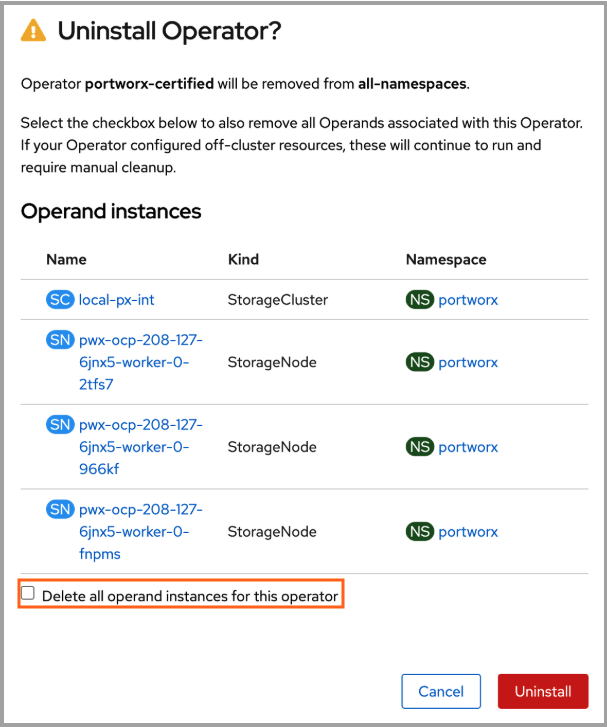
-
Select Uninstall again to confirm.
-
After the uninstallation completes, return to OperatorHub.
-
Search for Portworx Operator, and then install version 25.2.2.
Ensure that you set the Update approval to manual while installing.
-
PWX-45817: On some clusters, external webhooks such as those used by Mirantis Kubernetes Engine (MKE) may inject additional configuration into KVDB and Portworx pods. This includes tolerations, affinity rules, or placement constraints.
If you use the
ComponentK8sConfigcustom resource (CR) to manage tolerations, and the injected tolerations are not explicitly defined in the CR, the Portworx Operator removes them. As a result, the affected pods restart continuously.This issue is not limited to MKE and can affect any platform where an external webhook injects configuration into workloads. It can occur when using either the
StorageClusteror theComponentK8sConfig.Workaround: Follow the steps below:
-
Ensure that
jqoryqis installed on your machine. -
Get the kubeconfig of your cluster.
-
Get taints on the cluster nodes:
-
For
jq, run:kubectl --kubeconfig=<path/to/kubeconfig> get nodes -ojson | jq -r . | jq -r '.items[].spec.taints' -
For
yq, run:kubectl --kubeconfig=<path/to/kubeconfig> get nodes -oyaml | yq -r . | yq -r '.items[].spec.taints'Example output:
nullnullnull[{"effect": "NoSchedule", "key": "com.docker.ucp.manager"}]nullnull
-
Apply the tolerations to the
ComponentK8sConfigCR based on the command output in the previous step. For example:- componentNames:- KVDB- Storage- Portworx APIworkloadConfigs:- placement:tolerations:- key: com.docker.ucp.manageroperator: ExistsworkloadNames:- storage- portworx-kvdb- portworx-api
-
-
PWX-45960: When using the workload identity feature, restart of
KVDBpods can cause theeks-pod-identitywebhook to inject credentials into theKVDBpods because the same service account is used for thePortworx API,Portworx, andKVDBpods.Note: When credentials are removed from
StorageCluster, the operator does not remove them from theKVDBpods if they have been added, so you must manually restart theKVDBpods to remove these credentials.
25.2.2
July 8, 2025
Improvements
| Improvement Number | Improvement Description |
|---|---|
| PWX-40116 | Portworx Operator now emits events on the StorageCluster object during Portworx and Kubernetes smart upgrades if a node is not selected for upgrade. Each event includes details explaining why the node was not selected for the upgrade. |
Fixes
| Issue Number | Issue Description | Severity |
|---|---|---|
| PWX-45078 | The Operator configured Prometheus to connect to KVDB metrics over HTTP, even when TLS was enabled. This caused the connections to fail. User Impact: In clusters with KVDB TLS enabled, Prometheus could not scrape internal KVDB metrics. As a result, monitoring dashboards were incomplete and TLS handshake errors appeared in logs. Resolution: The Operator now configures Prometheus to use HTTPS with TLS settings when KVDB TLS is enabled. This ensures that internal KVDB metrics are collected successfully. Affected Versions: Versions 25.2.1 | Minor |
25.2.1
June 23, 2025
Upgrade to Portworx Operator version 25.2.1. Follow these guidelines for a seamless upgrade:
- If you're running Portworx Operator version 24.2.4 or earlier, upgrade to
Operator 25.2.1directly by following the standard upgrade procedure. - If you're running Portworx Operator version 25.1.0 or 25.2.0, follow these steps:
- If you've labeled only the nodes that should run Portworx by using the
px/enabled=truelabel, apply the workaround described here. - Upgrade Portworx Operator.
- If you've labeled only the nodes that should run Portworx by using the
- On OpenShift clusters, if you're running Portworx Operator version 25.1.0, you cannot upgrade to 25.2.1 directly. Uninstall Operator 25.1.0 (while retaining the StorageCluster and all operands) before installing the new version. For more information, see Upgrade notes for OpenShift.
Fixes
| Issue Number | Issue Description | Severity |
|---|---|---|
| PWX-44096 | During a Portworx upgrade, if one or more nodes are cordoned, Portworx might upgrade multiple nodes simultaneously, exceeding the maxUnavailable configuration. This behavior occurs because of the default value of the cordon restart delay, which is set to 5 minutes. User Impact: More nodes might be upgraded simultaneously than specified by maxUnavailable, exceeding the maxUnavailable limit. Resolution: Now, when any nodes are cordoned, the operator overrides the value of the cordon restart delay to 0 seconds during Portworx upgrade. This ensures that only the number of nodes specified by maxUnavailable are upgraded at the same time. Affected Versions: Versions 25.2.0 and earlier | Minor |
Known issues (Errata)
| Issue Number | Issue Description |
|---|---|
| PWX-41729 | The Portworx Operator did not schedule Portworx pods on nodes labeled px/enabled=false. However, during node decommission, the label is set to px/enabled=remove before being changed to px/enabled=false after Portworx is fully removed. If removal takes time, the Operator could incorrectly reschedule Portworx pods. User Impact: Portworx pods may be rescheduled on nodes that are in the process of being decommissioned, disrupting removal workflows. Affected Versions: 25.2.1 and 24.2.4 and earlier |
25.2.0
May 25, 2025
Clusters running Portworx Operator version 24.2.4 can directly upgrade to 25.2.0 following the regular upgrade procedure and skip the upgrade to 25.1.0.
OpenShift clusters running Portworx Operator version 25.1.0 cannot upgrade to 25.2.0 directly. Uninstall Operator 25.1.0 (while retaining the StorageCluster and all operands) before installing the new version. For more information, see Upgrade notes for OpenShift.
New features
-
Smart Upgrade now supports Kubernetes upgrades on additional platforms, expanding the streamlined and resilient upgrade process. Smart Upgrade maintains volume quorum and prevents application disruption during the parallel upgrade of Portworx and Kubernetes nodes.
- Portworx upgrade: Smart Upgrade continues to be supported on all platforms.
- Kubernetes upgrade: Smart Upgrade is now supported on the following platforms:
- All OpenShift distributions
- Google Anthos
- Vanilla Kubernetes
- Azure Kubernetes Service (AKS) (new)
- Amazon Elastic Kubernetes Service (EKS) (new)
- Google Kubernetes Engine (GKE) (new)
For more information, see Smart Upgrade.
-
Custom labels are supported on all Portworx managed components. You can apply labels to each component or component type via
StorageCluster.spec.metadata.labelsto improve observability. For more information, see StorageCluster.
Improvements
| Improvement Number | Improvement Description |
|---|---|
| PWX-38655 | Portworx Operator now supports the spec.monitoring.telemetry.hostNetwork field in the StorageCluster YAML. This setting controls whether Telemetry Pods run using either the Kubernetes network (default) or the host network. |
| PWX-42823 | When runtime options are specified as part of the misc-args annotation using rt_opts, and also provided as key-value pairs under RuntimeOptions in the cluster or node specification, the key-value pairs in RuntimeOptions are ignored, and a warning is raised in the StorageCluster. For more information, see StorageCluster CRD reference. |
| PWX-42799 | Portworx Operator now supports configuring resource limits for Telemetry pods through the StorageCluster specification. You can now use spec.monitoring.telemetry.resources to set CPU and memory limits for the registration and phonehome pods. |
| PWX-41647 | The Portworx Operator no longer creates in-tree StorageClasses on Kubernetes 1.31 and later. Users should use Portworx CSI StorageClass for volume provisioning. |
| PWX-42375 | Portworx Operator now supports configuring miscArgs at the node level using the spec.nodes[i].miscArgs field, in addition to cluster-level configuration using portworx.io/misc-args annotation. If both are set, the two sets of arguments are combined. When a key exists in both, the node-level value takes precedence. If no arguments are specified at the node level, the cluster-level annotations apply to all PX pods. |
Fixes
| Issue Number | Issue Description | Severity |
|---|---|---|
| PWX-44295 | When upgrading the operator to version 25.1.0, the StorageCluster spec placement configuration was reset to default values. This caused Portworx pods to stop running on infrastructure nodes in OpenShift clusters that had custom placement rules. User Impact: This issue affects OpenShift clusters where Portworx was explicitly configured to run on infrastructure nodes. As a result, workloads relying on Portworx storage on those nodes have become unavailable. Resolution: The operator now preserves existing custom node placement configurations that include infrastructure nodes during upgrades. New installations will continue to use the default placement rules, which exclude infrastructure nodes. Affected Versions: 25.1.0 | Major |
| PWX-42315 | If you disable telemetry in the Portworx Operator configuration, the Operator deletes the associated telemetry ConfigMap. However, it doesn’t remove the corresponding telemetry volume mounts from Portworx pods. User Impact: Portworx pods reference stale telemetry volume mounts. When a node reboots or a pod restarts, Portworx containers fail to start because the ConfigMap volumes are missing. Resolution: The Portworx Operator now detects changes in the telemetry specification and triggers a Portworx upgrade to apply them. This ensures that Portworx and Portworx API pods on affected nodes restart with the correct volume mounts, preventing stale references and startup failures. Affected Versions: 24.2.4 or earlier | Minor |
| PWX-41729 | The Portworx Operator did not schedule Portworx pods on nodes labeled px/enabled=false. However, during node decommission, the label is set to px/enabled=remove before being changed to px/enabled=false after Portworx is fully removed. If removal takes time, the Operator could incorrectly reschedule Portworx pods. User Impact: Portworx pods may be rescheduled on nodes that are in the process of being decommissioned, disrupting removal workflows. Resolution: The Operator now checks for both px/enabled=remove and px/enabled=false before scheduling Portworx pods. This prevents unintended scheduling during node decommissioning. Note: When upgrading to operator version 25.1.0 from an earlier version, all operator-managed pods will restart—except Portworx oci-monitor pods. This is due to a new node affinity rule. Affected Versions: 24.2.4 or earlier | Minor |
| PWX-41181 | Migration from the Portworx DaemonSet to the Portworx Operator failed when performed using Helm. Helm created the StorageCluster directly, which prevented the Operator from adding the required migration status condition. As a result, the Operator could not detect that migration was approved, even when the correct annotation was set. User Impact: The migration could not proceed, and Portworx pods were not created by the Operator. This left the cluster in an incomplete state. Resolution: The Operator now adds the migration status condition when migration starts, even if the StorageCluster was created outside the Operator. This allows migration to complete as expected. Affected Versions: 24.2.4 or earlier | Minor |
| PWX-40283 | During Portworx upgrades, the StorageCluster status remained Running even after the upgrade started. This made it appear that the upgrade was complete when it was still in progress. User Impact: Users could not track the upgrade accurately. The Running status caused confusion and limited visibility into progress. Resolution: Portworx Operator now sets the status to Updating when the upgrade begins and reverts it to Running after completion. This provides clearer tracking of the upgrade process. Affected Versions: 24.2.4 or earlier | Minor |
| PWX-37878 | STORK could not reschedule pods during node maintenance because it was unable to access the Portworx API. This triggered a "No node found with storage driver" error. User Impact: Pods could become stuck or unavailable during node maintenance, affecting application availability. Resolution: A liveness probe was added for the Portworx API. This allows STORK to detect when a node is down or in maintenance mode and reschedule pods appropriately. Note: Portworx API pods will restart during the upgrade to operator version 25.1.0 due to the new liveness probe. Affected Versions: 24.2.4 or earlier | Minor |
| PWX-36253 | When external etcd was configured with only the --cacert flag, the Portworx Operator did not add the required volume mount for the etcd secret. This caused Portworx pods to fail during DaemonSet to Operator migration. User Impact: Clusters using external etcd with only a CA certificate failed to start Portworx pods during migration, blocking successful initialization. Resolution: Portworx Operator now adds the etcd secret volume mount when only the --cacert flag is set. Portworx pods now start successfully during migration in this configuration. Affected Versions: 24.2.4 or earlier | Minor |
Known issues (Errata)
| Issue Number | Issue Description | Severity |
|---|---|---|
| PWX-44331 | To prevent Portworx from being installed and started on specific nodes, Portworx recommends labeling the nodes with If you labeled only the nodes where Portworx should run by using the User Impact: After upgrading to Operator version 25.2.0:
Workaround: Before upgrading to Operator version 25.2.0, update the | Minor |
Upgrade notes for OpenShift
Portworx Operator version 25.1.0 has been replaced with 25.2.0. Upgrade to version 25.2.0.
These steps apply only to OpenShift clusters. For other Kubernetes environments, see Upgrade Portworx Operator.
Follow these steps to uninstall Operator version 25.1.0 and install version 25.2.0 on OpenShift clusters:
-
In the OpenShift web console, go to Operators > Installed Operators.
-
Verify that the installed version of Portworx Operator is 25.1.0.
-
Select Actions > Uninstall Operator.
-
In the confirmation dialog, clear the Delete all operand instances for this operator check box. This ensures that Portworx continues to run after you uninstall the Operator.
-
Select Uninstall again to confirm.
-
After the uninstallation completes, return to OperatorHub.
-
Search for Portworx Operator, and then install version 25.2.0.
25.1.0
May 21, 2025
This release has been replaced with version 25.2.0.
If Portworx was running on nodes labeled node-role.kubernetes.io/infra before upgrading to Portworx Operator version 25.1.0, Portworx may no longer run on those nodes after the upgrade. This issue occurs because upgrading the Portworx Operator to version 25.1.0 resets the pod placement configuration in the StorageCluster resource to its default values. As a result, Portworx pods stop running on infrastructure nodes in OpenShift clusters that use custom placement rules.
Workaround: Manually edit the StorageCluster resource to remove the node affinity rule that excludes infrastructure nodes. Delete the following section under the spec.placement.nodeAffinity field from the StorageCluster spec:
- key: node-role.kubernetes.io/infra
  operator: DoesNotExist
24.2.4
April 17, 2025
Improvements
| Improvement Number | Improvement Description |
|---|---|
| PWX-41562 | The portworx.io/preflight-check annotation now supports only skip and true as valid values. If set to true, the Operator does not modify the annotation value after the pre-flight check completes. The Operator now relies solely on pre-flight conditions to determine whether checks have been executed. If the annotation is not explicitly set in the StorageCluster specification, the Operator defaults to skip. However, for Amazon Elastic Kubernetes Service (EKS) clusters running Portworx Enterprise 3.0 or later, the default is true.Notes:
|
24.2.3
March 6, 2025
Portworx now supports Kubernetes version 1.31, starting from version 1.31.6. Before upgrading Kubernetes to 1.31.6 or later, update the Portworx Operator to version 24.2.3.
Improvements
| Improvement Number | Improvement Description |
|---|---|
| PWX-41353 | Starting from Kubernetes 1.31, support for the in-tree provisioner kubernetes.io/portworx-volume has been removed. All storage requests are now redirected to the CSI driver pxd.portworx.com. Kubernetes automatically manages this transition by converting in-tree objects stored in etcd into CSI-compatible objects. This migration requires additional annotations on existing in-tree PersistentVolumes (PVs), which are handled by the Portworx Operator. When security is enabled and guest access is disabled, the Portworx Operator annotates PVs with the authentication secret name and namespace. The secret name and namespace are retrieved from the StorageClass annotations openstorage.io/auth-secret-name and openstorage.io/auth-secret-namespace, respectively. If unavailable, the corresponding PersistentVolumeClaim (PVC) is checked. If no secret is found, the default px-user-token is used. To comply with recent kubelet changes that restrict secret access to only the pods running on a node, the Portworx Operator now mounts user and admin secrets directly into portworx-api DaemonSet pods. This ensures that kubelet can access the necessary secrets. For additional secrets beyond the default px-user-token and px-admin-token, users should create a separate DaemonSet to mount and manage them. Upgrade Considerations:
Note: If you have a disaster recovery setup, you must upgrade the Operator on both the source and destination clusters before upgrading Kubernetes to version 1.31. |
Fixes
| Issue Number | Issue Description | Severity |
|---|---|---|
| PWX-39594 | On some platforms, the Kubernetes cluster attempts to update the portworx-api DaemonSet and px-csi-ext Deployment with tolerations that are not specified in the StorageCluster. As a result, the Portworx operator, which is unaware of these tolerations, tries to remove them. This results in a loop where the portworx-api and px-csi pods keep restarting.For example, if you enable the AlwaysPullImage admission plugin, it ensures that imagePullPolicy is set to Always for all Pods. If your StorageClass Template (STC) specifies imagePullPolicy: IfNotPresent, PX-Operator will continuously recreate the Pods to match the STC value, causing repeated restarts.Similarly, if an external source modifies PX configurations—such as container or volume settings—restarts will occur. User Impact: Continuous restarts of portworx-api and px-csi-ext pods due to the mismatched tolerations between the StorageCluster spec and the running Kubernetes resources.Resolution: PX-Operator now compares the following configurations from the StorageCluster (STC) with the:
If PX-Operator detects any differences, it updates these resources to match the StorageCluster definition. To avoid unintended restarts, users should ensure that any externally applied changes (such as Admission Plugins modifying tolerations) match the STC configuration. Affected Versions: 24.1.2 to 24.2.2 | Critical |
Known issues (Errata)
-
PWX-42235: When PX-Security is disabled in the StorageCluster, the operator initiates an upgrade to apply the change. During the upgrade, Portworx fails to mount secured persistent volumes (PVs), leading to VM live migration failures and blocking the upgrade.
Workaround: Follow the steps below:
- Stop all pods consuming Portworx volumes before disabling security.
- Manually stop KubeVirt VMs before disabling security to prevent live migration failures.
- Restart the stopped VMs once all nodes have been successfully upgraded.
Affected Versions: 24.2.3
Severity: Minor
24.2.2
February 3, 2025
Fixes
| Issue Number | Issue Description | Severity |
|---|---|---|
| PWX-41581 | On the SUSE Linux Micro platform, the configuration directory was located on a managed partition. This setup inadvertently led to conflicts during configuration updates. User Impact: The conflict could result in startup failures, potentially impacting system functionality and leading to service disruptions. Resolution: The default configuration directory has been relocated to a more stable path, ensuring improved reliability and smoother configuration updates. Affected Versions: 24.2.1 or earlier | Major |
24.2.1
January 6, 2025
Improvements
| Improvement Number | Improvement Description |
|---|---|
| PWX-40632 | When the Operator is upgraded to 24.2.1 in OpenShift Container Platform (OCP), kvdb pods restart to allow the security context constraint (SCC) restriction to be added to those pods. The Operator ensures that only one kvdb pod restarts at a time. In rare cases due to race conditions, two kvdb pods might restart with a very short interval between them, but they come up within a few seconds. |
| PWX-40424 | The Operator performs a health check during installation to verify if the Kubernetes version is supported for the installed PX version on specific platforms. If the version is unsupported, the Operator raises a warning but proceeds with the installation. The supported platforms for the health check are GKE, AKS, EKS, IKS, OKE, RKE2, OCP, ROKS, ROSA, ARO, and MKE. For other platforms, the health check is skipped. |
| PWX-38148 | Updated the following packages to resolve security vulnerabilities:
|
Fixes
| Issue Number | Issue Description | Severity |
|---|---|---|
| PWX-40405 | In certain scenarios, the order of runtime options (rt_opts) in the Portworx container caused an unexpected restart of OCI monitor pods, impacting other functions.User Impact: Unexpected restarts of OCI monitor pods could disrupt other services and functions dependent on these pods. Resolution: The order of runtime options ( rt_options) for the px service no longer causes OCI monitor pods to restart.Affected Versions: 24.2.0 or earlier | Minor |
| PWX-39891 | Some pods, like Autopilot and Stork Scheduler, that use the portworx-restricted SCC might not work because the portworx-restricted SCC does not allow CSI volumes. User Impact: Pods using the portworx-restricted SCC might fail to start or function correctly. Resolution: OCP supports CSI inline volumes only from version 4.13. Therefore, the portworx-restricted SCC for OCP versions 4.13 and later allows the usage of CSI volumes. Portworx recommends upgrading OCP cluster and Operator to the latest version. Affected Versions: 24.2.0 or earlier running on OCP 4.12 or earlier | Minor |
| PWX-37637 | On OCP, the Operator did not set the required SCC for all components, making them rely on OCP-assigned SCCs. This might cause issues if the assigned SCCs do not allow the pods to work properly. User Impact: If OCP-assigned SCCs are incorrect, components might not work as expected. Resolution: All component pods in the Portworx cluster in OCP now have a required SCC annotation added to them. This ensures that OCP assigns only the correct SCC, allowing the pods to function as expected. The components and their required SCCs are as follows:
Affected Versions: 24.2.0 or earlier | Major |
24.2.0
December 2, 2024
If you have installed Portworx with FlashArray configured with cloud drives on the vSphere platform, Portworx pods will restart when you upgrade the Operator from earlier versions to 24.2.0; this is an expected behavior.
New features
Portworx is proud to introduce the following new features:
-
Smart upgrade feature introduces a streamlined, resilient upgrade process for Portworx and Kubernetes nodes, allowing them to be upgraded in parallel while maintaining volume quorum and without application disruption.
- Portworx upgrade: Smart upgrade is supported on all platforms.
- Kubernetes upgrade: Smart upgrade is supported only on the following platforms:
- All OpenShift Platforms
- Google Anthos
- Vanilla Kubernetes
-
Health checks determine if the target system meets the requirements for Portworx before installation. They provide pass, fail, or warning notifications and assist you in resolving issues right before Portworx installation.
Improvements
| Issue Number | Issue Description |
|---|---|
| PWX-34825 | When the version configmap is not available or the URL is not reachable, the installation fails with an appropriate error instead of falling back to default images. |
| PWX-37782 | Upgraded the CSI images to address security vulnerabilities.
|
| PWX-38103 | If multiple storageless nodes have the same scheduler node name and one of them is online, the offline nodes are ignored. This ensures that upgrade is not blocked because of an offline node, which anyway gets auto-decommissioned in some time. |
| PWX-39104 | We have optimized the Portworx Operator to reduce memory consumption on large clusters. |
Fixes
| Issue Number | Issue Description | Severity |
|---|---|---|
| PWX-36251 | When uninstalling the Portworx with UninstallAndWipe delete strategy, the following cloud drive ConfigMaps are not deleted.User Impact: Users were not able to uninstall Portworx completely. Resolution: The Portworx Operator now deletes these cloud drive ConfigMaps as well. Affected Versions: 24.1.3 and earlier | Minor |
| PWX-38509 | Provisioning of KubeVirt VM fails if the bootOrder is not specified for the VM disks and the first disk is not a PVC or a DataVolume.User Impact: Portworx upgrade gets stuck as storage nodes become unavailable. Affected Versions: 24.1.0, 24.1.1, 24.1.2, and 24.1.3 | Minor |
Known issues (Errata)
-
PWX-39594: On MKE platforms, the Kubernetes cluster attempts to update the portworx-api and px-csi pods with tolerations that are not specified in the StorageCluster. As a result, the Portworx operator, which is unaware of these tolerations, tries to remove them. This results in a loop where the portworx-api and px-csi pods keep restarting.
Workaround: Follow the steps below:
-
Ensure that
jqoryqis installed on your machine. -
Get the kubeconfig of your cluster.
-
Get taints on the cluster nodes.
-
For
jq, run thekubectl --kubeconfig=<path/to/kubeconfig> get nodes -ojson | jq -r . | jq -r '.items[].spec.taints'command. -
For
yq, run thekubectl --kubeconfig=<path/to/kubeconfig> get nodes -oyaml | yq -r . | yq -r '.items[].spec.taints'command.
The command output might look like the sample below:
nullnullnull[{"effect": "NoSchedule", "key": "com.docker.ucp.manager"}]nullnull -
-
Apply the tolerations to the StorageCluster based on the command output in the previous step.
For example:
spec:placement:tolerations:- key: com.docker.ucp.manageroperator: Exists
Affected Versions: 24.1.2 and 24.1.3
Severity: Critical
-
24.1.3
October 29, 2024
Fixes
| Issue Number | Issue Description | Severity |
|---|---|---|
| PWX-36976 | Kubernetes typically provides credentials for pods to access the Kubernetes API, which are automatically mounted in the /run/secrets/kubernetes.io/serviceaccount/token file. However, in recent versions of Kubernetes, the service account token's lifetime is tied to the lifetime of the Portworx pod. As a result, the service account token that the Portworx service uses becomes invalid when a Portworx pod terminates and all Kubernetes API calls fail with unauthorized errors, which can be seen in the Portworx logs. This issue can cause Kubernetes upgrades to get stuck while waiting for application pods to terminate.User Impact: Kubernetes platform upgrades may fail due to failure to evict the application pods. Resolution: Operator 24.1.3 creates a new token for Portworx version 3.2.0, which is periodically refreshed for use by Portworx. Note: Portworx versions prior to 3.2.0 will ignore the new token and continue to work as before. Affected Versions: 24.1.0, 24.1.1, and 24.1.2 | Minor |
24.1.2
October 11, 2024
Fixes
| Issue Number | Issue Description | Severity |
|---|---|---|
| PWX-38082 | Portworx CSI pods are crashing on clusters running on RHEL 9.x nodes when SELinux is enabled. User Impact: The csi-node-driver-registrar is not starting, causing application pods to fail to use Portworx PVCs.Resolution: Permissions were corrected in the csi-registrar container, allowing Portworx PVC volumes to work correctly on RHEL 9.x nodes with SELinux enabled. Affected Versions: 24.1.0 and 24.1.1 | Major |
| PWX-36650 | OpenShift applies Security Context Constraints (SCC) to the Portworx Operator pod based on its need and requirement. However, when a new SCC with lower privileges than the "anyuid" SCC was added to the cluster, the new SCC was applied instead, causing the Portworx Operator to fail to start. User Impact: The Portworx Operator did not come up due to the CreateContainerConfigError. Resolution: The Operator now adds an openshift.io/required-scc annotation to the Operator and Stork pods to specify which SCC to apply. The Operator and Stork pods are assigned the "anyuid" SCC, while the Stork-scheduler pod is assigned the portworx-restricted SCC.Note: This fix is applicable on OCP version 4.14 or later. If you are running OCP 4.13 or earlier versions, Portworx by Everpure recommends elevating the SCC's permission based on the pod. Affected Versions: 24.1.1 and earlier | Major |
24.1.1
July 25, 2024
- The Portworx Operator now supports the fresh installation of Portworx on OCP 4.16 clusters. For official OCP upgrade path from OCP 4.15 to OCP 4.16, you can refer to the Red Hat OpenShift documentation.
Improvements
| Issue Number | Issue Description |
|---|---|
| PWX-37545 | When you set the autoUpdateStrategy to Always or Once and update the px-versions ConfigMap, the system will now automatically update the Prometheus Operator, Alertmanager, and Grafana images based on the px-versions ConfigMap. |
| PWX-37634 | We've optimized the startup time for telemetry pods. Previously, the px-telemetry-register configmap didn't set the internalHostnameLookupRetryCount, causing the telemetry registration pod to retry the DNS lookup of the internal hostname up to 30 times. Now, we've set internalHostnameLookupRetryCount to 3, reducing startup time when the internal hostname is unreachable. |
| PWX-32229 | We've enhanced the storage configuration validation. Now, you cannot configure both local and cloud storage at the cluster level or node level. If such a configuration is detected, the StorageCluster enters a degraded state and does not proceed with the deployment until you correct the spec. |
| PWX-36928 | We've added explicit validation of Telemetry SSL certificates. Now, the Telemetry SSL certificates are validated against the Cluster UUID during the Telemetry pod startup. |
| PWX-30050 | We've added an optional field priorityClassName to the StorageCluster for specifying priority classes. You can now assign a priority class to Portworx pods through the StorageCluster configuration. |
Fixes
| Issue Number | Issue Description |
|---|---|
| PWX-37852 | The Telemetry client SSL certificate expiration led to errors during the re-registration of the cluster with the Telemetry backend. Additionally, attempts to manually delete the client SSL certificate and clean up the status on Skyline also failed User Impact: Errors occurred when trying to determine the appliance ID (Portworx UUID), leading to disruptions in the telemetry service. Resolution: The Portworx Operator is now passing the Portworx UUID directly to Telemetry. This simplifies the discovery of the Portworx UUID and reduces the possibility of errors. Affected Versions: All |
24.1.0
June 11, 2024
- The PodDisruptionBudget (PDB) improvements are available with Portworx Enterprise version 3.1 or later.
- In GKE environments, if you override the default PDB value, ensure that the
maxUnavailableis less than thestorage-pdb-min-availablevalue to balance upgrade speed against potential disruption. Portworx by Everpure recommends using the following configurations for surge upgrades:maxSurge=1maxUnavailable=0
- In OpenShift platforms, if you override the default PDB value, ensure that the
storage-pdb-min-availablevalue is greater than or equal to OCP's MCPmaxUnavailable.
Improvements
| Issue Number | Issue Description |
|---|---|
| PWX-36663 | The px-prometheus account user is added to the Portworx Security Context Constraint only in either of the following cases:
|
| PWX-35633 | When you override the PDB value using the portworx.io/storage-pdb-min-available annotation, if the minAvailable value is greater than or equal to the number of storage nodes, Portworx uses the default value for PDB. |
| PWX-36258 | When you override the PDB value using the portworx.io/storage-pdb-min-available annotation, if the minAvailable value is less than the quorum number of storage nodes, Portworx uses the default value for PDB. |
| PWX-35418 | The total storage node count is set to the number of Portworx storage nodes. Therefore, any Portworx node that is not part of the Kubernetes cluster is also considered in the calculation of numStorageNodes. This ensures that such nodes are not down during the upgrade, as it can cause two Portworx nodes to go down at the same time, losing volume quorum. |
| PWX-34410 | The calculation of the numStorageNodes value for DR clusters now includes all storage nodes in the current cluster domain, even those that are not part of the current Kubernetes cluster. |
| PWX-34271 | For KubeVirt environments, when you upgrade the Portworx on a node, the Portworx Operator evicts the KubeVirt VMs by live-migrating them before upgrading the Portworx on that node. For more information, see Manage storage for KubeVirt VMs. |
| PWX-25339 | The Portworx cluster upgrade ensures that the internal KVDB node does not lose quorum. When a KVDB node is down, the remaining KVDB nodes don't get upgraded until the node that went down is back online, ensuring that only one KVDB node is offline at a time. |
Fixes
| Issue Number | Issue Description |
|---|---|
| PWX-36551 | Plugin images were not updated even after the Portworx version in ConfigMap was updated. Resolution: Image versions for the dynamic plugin and dynamic plugin proxy can now be updated with changes in the ConfigMap versions and endpoint when autoUpdateComponents is set to Once or Always in the StorageCluster. |
| PWX-36364 | While upgrading the Kubernetes cluster in the EKS environment, the kube-scheduler-amd64 and kube-controller-manager-amd64 images were not automatically upgraded to match the Kubernetes cluster version. Resolution: After upgrading the Kubernetes cluster, the kube-scheduler-amd64 and kube-controller-manager-amd64 images are also upgraded to match the Kubernetes cluster version, and the pods are updated. |
| PWX-36298 | In an OpenShift environment, the master nodes were not considered while calculating the value of maxStorageNodesPerZone, which resulted in a number of nodes equal to the number of master nodes coming up as storageless nodes.Resolution: When an annotation to run Portworx on master nodes is set in StorageCluster, the operator considers this flag while setting the value of maxStorageNodesPerZone. Thus, all master and worker nodes become storage nodes unless you explicitly specify otherwise. |
| PWX-36159 | The PVC controller failed to come up on the K3s cluster because default ports 10252 and 10257 for PVC were already in use. Resolution: The default configuration is changed and uses the following port numbers on K3s deployment:
|
| PWX-31625 | In OpenShift environments, Portworx created excess portworx-pvc-controller pods, which caused warnings in VMware and vSphere environments.Resolution: Portworx no longer creates portworx-pvc-controller pods in OpenShift environments. |
| PWX-28442 | The Portworx Operator incorrectly calculated the minAvailable value in the PDB. This could lead to the downtime of an extra portworx node when it is not supposed to go down. In a 3–4 node cluster, this could also lead to a loss of cluster quorum.Resolution: Now, the Portworx Operator looks at the NonQuorumMember flag from the node object, which always gives the correct value, even during the node initialization. |
23.10.5
April 5, 2024
Portworx Operator now supports installation of Portworx on OCP 4.15 clusters.
Improvement
| Issue Number | Issue Description |
|---|---|
| PWX-36460 | Portworx Operator adds a new annotation openshift.io/required-scc on Portworx pods to ensure that OpenShift assigns the correct Security Context Constraints (SCC) and the Portworx pods have the required permissions. |
23.10.4
March 19, 2024
Improvements
| Improvement Number | Improvement Description |
|---|---|
| PWX-36274 | For clusters on ARO, AWS, Azure, GCP, ROSA, ROKS or vSphere with OCP version 4.12 and above, Portworx Operator version 23.10.4 facilitates both the export of metrics to OCP Prometheus and the reading of metrics from it. |
| PWX-36198 | Portworx Operator 23.10.4 and Autopilot 1.3.14 enable you to deploy a RedHat Openshift Kubernetes Service (ROKS) cluster on IBM cloud using OCP 4.12 or later versions to view metrics in OpenShift Prometheus. |
Fixes
Portworx has fixed the following issues in this release:
| Issue Number | Issue Description |
|---|---|
| PWX-35477 | Portworx deployments on OpenShift 4.14 and later no longer support the Prometheus deployment packaged with the Portworx Operator. This prevented upgrades for users wishing to upgrade from OCP 4.13.x to 4.14.x. Resolution: You can now disable the Prometheus deployment packaged with the operator and use the OpenShift Prometheus stack for monitoring Portworx metrics, allowing you to upgrade to OpenShift 4.14 and later. This approach requires you to expose Portworx metrics to the OpenShift environment to ensure seamless monitoring integration. |
| PWX-35655 | A race condition sometimes deregistered the Portworx CSI driver immediately after initial registration. As a result, Portworx CSI volumes became stuck in the Pending state.Resolution: This race condition and accidental deregistration no longer occur. This change is applicable to Portworx versions 2.13 and above that have enabled CSI. |
| PWX-35008 | When the user disabled Stork component via StorageCluster, kube-scheduler image was not getting removed from the cache. As a consequence, once set, user could not update or override the kube-scheduler image path and/or version tag. Resolution: If the user disables Stork component now, kube-scheduler component is cleanly removed and the user can update or override the kube-scheduler image and/or version tag. |
| PWX-35007 | User could not update or override the kube-scheduler and kube-controller-manager image paths or version tags using the px-versions ConfigMap.Resolution: User can now update or override the kube-scheduler and kube-controller-manager image paths or version tags using the px-versions ConfigMap. |
| PWX-34360 | The csi-node-driver-registrar container ran inside the portworx pods. During a Kubernetes upgrade, when a node is cordoned, the portworx pod is drained. This de-registered the Portworx CSI driver as the container it was in was removed. Any application pod on that node that had not drained until this point became stuck in the Terminating state.Resolution: The stability and availability of the csi driver during upgrades and maintenance processes is now improved, and the csi-node-driver-registrar container is no longer affected by node draining. This change is applicable to Portworx versions 2.13 and above that have enabled CSI. |
| PWX-35282 | Previously, when a Kubernetes node was cordoned, the Portworx pod was automatically deleted but would restart after a brief five-second interval. This behavior was intended to allow applications using Portworx volumes sufficient time to drain properly. Resolution: In this release, when a node is cordoned prior to a drain, the Portworx pod will now be deleted and will not restart for the next five minutes, instead of the previous five seconds. This change is implemented following the movement of the csi-node-driver-registrar to the portworx-api daemonset, rendering the portworx pod unnecessary for this duration. This revised approach ensures more stability and less frequent disruptions in Portworx volumes management during node maintenance. |
23.10.3
February 08, 2024
- The Operator version 23.10.3 is available only on OpenShift OperatorHub. Non-OpenShift customers are advised not to upgrade to this version and should await the release of version 23.10.4, which will be available shortly.
- In order to use Portworx with OpenShift version 4.14, you must use Operator version 23.10.3 and Autopilot version 1.3.13. Visit the Upgrade OpenShift to version 4.14 with Portworx document for information on upgrading OpenShift to version 4.14 with Portworx.
Improvements
| Improvement Number | Improvement Description |
|---|---|
| PWX-36015 | On fresh installs on OpenShift 4.14+, the Portworx Operator will disable the monitoring.prometheus.enabled flag with a warning event. This is done to prevent users from accidentally enabling the unsupported Portworx managed prometheus deployment. |
Fixes
Portworx has fixed the following issues in this release:
| Issue Number | Issue Description |
|---|---|
| PWX-35477 | Portworx deployments on OpenShift 4.14 and later no longer support the Prometheus deployment packaged with the Portworx Operator. This prevented upgrades for users wishing to upgrade from OCP 4.13.x to 4.14.x. Resolution: You can now disable the Prometheus deployment packaged with the operator and use the OpenShift Prometheus stack for monitoring Portworx metrics, allowing you to upgrade to OpenShift 4.14 and later. This approach requires you to expose Portworx metrics to the OpenShift environment to ensure seamless monitoring integration. |
| PWX-35655 | A race condition sometimes deregistered the Portworx CSI driver immediately after initial registration. As a result, Portworx CSI volumes became stuck in the Pending state.Resolution: This race condition and accidental deregistration no longer occur. This change is applicable to Portworx versions 2.13 and above that have enabled CSI. |
| PWX-34360 | The csi-node-driver-registrar container ran inside the portworx pods. During a Kubernetes upgrade, when a node is cordoned, the portworx pod is drained. This deregistered the Portworx CSI driver as the container it was in was removed. Any application pod on that node that had not drained until this point became stuck in the Terminating state.Resolution: The stability and availability of the csi driver during upgrades and maintenance processes is now improved, and the csi-node-driver-registrar container is no longer affected by node draining. This change is applicable to Portworx versions 2.13 and above that have enabled CSI. |
| PWX-35282 | Previously, when a Kubernetes node was cordoned, the Portworx pod was automatically deleted but would restart after a brief five-second interval. This behavior was intended to allow applications using Portworx volumes sufficient time to drain properly. Resolution: In this release, when a node is cordoned prior to a drain, the Portworx pod will now be deleted and will not restart for the next five minutes, instead of the previous five seconds. This change is implemented following the movement of the csi-node-driver-registrar to the portworx-api daemonset, rendering the portworx pod unnecessary for this duration. This revised approach ensures more stability and less frequent disruptions in Portworx volumes management during node maintenance. |
23.10.2
January 23, 2024
Portworx Enterprise installation or upgrade is currently not supported on OCP 4.14 and above versions.
Fixes
Portworx has fixed the following issues in this release:
| Issue Number | Issue Description |
|---|---|
| PWX-35255 | The Portworx Operator did not create Autopilot Rule Objects (AROs) for Autopilot rules on clusters with KubeVirt VMs. Resolution: The operator now successfully enables the creation of AROs on clusters with KubeVirt VMs. |
| PWX-35206 | Attempting to create a PX-Storev2 cluster with an io2 volume, whether specifying the IOPS or not, failed. Resolution: The operator now successfully creates PX-Storev2 clusters without any failures. |
| PWX-35203 | The operator ran pre-flight checks on undesired environments. Resolution: The Operator now only runs pre-flight checks on EKS clusters running Portworx 3.0.0 or above. |
| PWX-35016 | Prometheus alerts PXKvdbNodeViewUnhealthy and PXKvdbClusterViewUnhealthy used an incorrect metric label {$labels.node_id} to identify Portworx nodes.Resolution: These alerts now correctly use the appropriate node label to display the Portworx node name in the alert. |
| PWX-35004 | Fresh installations overwrote explicitly set Stork and Autopilot images in the StorageCluster with an empty string, requiring users to update the StorageCluster again to correct this. Resolution: The operator now honors user-specified images and updates the StorageCluster status accurately. |
| PWX-32111 | Pre-flight checks failed during fresh installations with PX-Security enabled on EKS clusters. Resolution: Pre-flight checks now successfully complete in this environment. |
23.10.1
November 22, 2023
Fixes
| Issue Number | Issue Description |
|---|---|
| PWX-35067 | In certain scenarios, the Portworx Operator incorrectly auto-detected the cloud provider when using the cloud drive feature. This issue occurred when users left the spec.cloudStorage.provider field blank while operating on any of the following environments:
User impact: This issue may have prevented Portworx from starting successfully when it was freshly installed or updated. Resolution: Portworx no longer auto detects cloud providers when the spec.cloudStorage.provider field in the StorageCluster spec is left blank. |
23.10.0
November 7, 2023
In certain scenarios, the Portworx Operator incorrectly auto-detects the cloud provider when using the cloud drive feature. This issue occurs when you leave the spec.cloudStorage.provider field blank while running Portworx on any of the following environments:
- Bare metal
- RKE2
- vSphere
If you encounter this issue, Portworx fails to start successfully when it is freshly installed or upgraded.
As a workaround, please update the spec.cloudStorage.provider field in your StorageCluster spec to the correct value for your deployment. Correct values are:
purevsphereawsazuregceibmoraclecsi
Improvements
| Improvement Number | Improvement Description |
|---|---|
| PWX-32147 | The Portworx Operator now supports the OpenShift dynamic console plugin for air-gapped clusters. |
| PWX-31732 | You can now list all pods deployed by the operator using the filter: operator.libopenstorage.org/managed-by=portworx. |
| PWX-29299 | You can now install Portworx on Oracle Kubernetes Engine (OKE) clusters using operator Helm charts. |
| PWX-25748 | Install Grafana and the associated Portworx dashboards by enabling spec.monitoring.grafana.enabled. |
Fixes
| Issue Number | Issue Description |
|---|---|
| PWX-34239 | In GKE environments, the Portworx Operator encountered PVC provisioning issues due to a missing GKE installation chart file in Helm. Resolution: The portworx.io/is-gke: "true" annotation has been added to the elasticsearch-sc StorageClass spec to resolve this issue. |
| PWX-33831 | A cordoned node could leave the Portworx kvdb-api pod in a Failed state, potentially interfering with the node's upgrade or maintenance processes.Resolution: The operator now explicitly checks for kvdb-api pods in a Failed state and cleans them up. |
| PWX-31025 | Migrating from a Portworx DaemonSet deployment to an operator deployment sometimes resulted in the system being stuck in an Initializing state, despite the successful completion of the migration.Resolution: The migration process from DaemonSet to Operator deployment has been improved to properly transition states. |
| PWX-30455 | While the StorageCluster spec allows adding custom container mounts, it was previously not possible to use the same mounts as the default Portworx installation directories.Resolution: Custom mounts in the StorageCluster spec can now override the default Portworx directories. For instance, directories like /opt/pwx or /var/cores can be changed to different directories on a partition with more disk space. |
Known issues (Errata)
| Issue Number | Issue Description |
|---|---|
| PWX-32111 | PX-Security is not currently supported on PX-Store V2, and the Operator pre-check will not proceed for this combination. |
23.7.0
September 12, 2023
Notes
-
Enhanced Security: This release addresses security vulnerabilities to enhance overall security.
-
Tech Preview: The OCP Dynamic Plugin for air-gapped installs is currently in tech preview.
-
The Portworx Operator fully supports generic HTTP/HTTPS proxies. However, there is limited support for HTTPS proxies using SSL inspection, such as Next-Generation Firewalls that re-encrypt SSL traffic. To accommodate HTTPS proxy with SSL:
- Portworx recommends configuring the Portworx StorageCluster, Portworx Operator, and License Server similarly to air-gapped environments.
- For the Portworx StorageCluster, you can configure the proxy's self-signed Certification Authority (CA) certificate.
noteTelemetry connection to Pure1 with the Next-Generation Firewall is not supported.
Improvements
| Improvement Number | Improvement Description |
|---|---|
| PWX-32188 | The Portworx Operator now includes portworx.io/tls-cipher-suites and portworx.io/tls-min-version configuration parameters for the portworx-pvc-controller. These parameters allow for specifying TLS cipher-suites preferences and setting the minimum TLS version, respectively.Note: Due to a Golang limitation, selecting VersionTLS13 disables the customization of TLS cipher-suites. |
| PWX-32147 | The operator now enables OCP dynamic plugin installation for air-gapped clusters, including support for custom image registries. Additionally, clusters with PX-Security enabled also support OCP dynamic plugins. |
| PWX-32011 | The operator can now utilize the PX_HTTPS_PROXY environment variable to configure the Envoy proxy to use an internal URL to connect to the destination host. |
| PWX-30520 | The operator offers enhanced security for JWT package. |
| PWX-27765 | The StorageCluster now displays more defined and detailed phases of installation and upgrade, such as initializing, running, degraded, uninstalling, and others, in the condition list. |
Fixes
| Issue Number | Issue Description |
|---|---|
| PWX-32145 | Previously, OCP dynamic plugin images were not included in the px-versions ConfigMap.Resolution: OCP dynamic plugin images are now correctly listed in the ConfigMap. |
| PWX-31944 | In air-gapped environments, the csi-ext-pod pod experienced startup failures due to the default inclusion of the csi-health-monitor-controller container.Resolution: The csi-health-monitor-controller container has been disabled to ensure uninterrupted startup of the csi-ext-pod. |
| PWX-31915 | Occasionally, a cordoned node could leave the Portworx kvdb-api pod in a Completed state, potentially disrupting the node's upgrade or maintenance processes.Resolution: The Portworx Operator now proactively checks for kvdb-api pods in a Completed state and removes any terminated pods to prevent interference. |
| PWX-31842 | On the PKS platform, restarting Portworx pods and services led to excessive mounts, slowed IO operations, and, in some cases, caused the host to become unresponsive. Resolution: Users should upgrade the Portworx Operator to version 23.7.x and reboot affected PKS nodes to resolve these issues. |
23.5.1
July 11, 2023
Fixes
| Issue Number | Issue Description |
|---|---|
| PWX-32051 | The port used for telemetry could be configured as an NFS port in certain distributions, leading to conflicts. Resolution: The Portworx Operator now uses port 9029 for telemetry in Portworx 3.0.0 and later versions to avoid this issue. |
| PWX-32073 | The CSI provisioner was issuing multiple requests for PVC provisioning, causing system delays. Resolution: The CSI provisioner timeout has been updated to mitigate these delays. |
| PWX-32197 | In proxied Envoy versions greater than 1.22, a necessary configuration section was missing, preventing telemetry pods from starting. Resolution: The configuration section for Envoy running with an HTTP proxy has been added, ensuring telemetry pods start as expected. |
23.5.0
June 13, 2023
Notes
The PodSecurityPolicy resource is deprecated from Kubernetes 1.21 and unsupported from 1.25.x. Hence, you need to use either Pod Security Admission or third-party admission-plugin or both to impose restrictions on pods.
New features
Portworx is proud to introduce the following new features:
- OpenShift users on OCP 4.12 or newer and Portworx Enterprise 3.0.2 or newer versions can now enable the Console plugin option during Portworx Operator installation or upgrade to use the Portworx Cluster dashboard within the OpenShift UI to manage their Portworx cluster. This avoids switching and navigating between different management interfaces to perform Day 2 operations.
- The Portworx Operator now supports loading installation images into multiple custom registries for seamless Portworx installation for all Kubernetes installation environments (air gapped and non-air gapped). You need to update the path of the custom registry for each of these components in the version manifest prior to installation. For more information, see Install Portworx on Kubernetes with a custom container registry.
Improvements
| Improvement Number | Improvement Description |
|---|---|
| PWX-26156 | If your Portworx runs on Kubernetes version 1.26 and higher, the Portworx Operator auto-enables CSI in StorageCluster for both fresh installation and upgrade to ease volume migration. |
| PWX-27920 | The operator enables batching in metrics collector to reduce memory usage on large scale clusters. |
Fixes
| Issue Number | Issue Description |
|---|---|
| PWX-28650 | The Portworx Operator used to allow Autopilot to access all resources on the cluster without any restrictions. Resolution: The operator now enables Autopilot to provide selective access for the required resources (actions), thus minimizing the RBAC permissions. |
| PWX-30386 | StorageCluster warnings were issued when the operator tried to delete a non-existent component. Resolution: Warning alerts are no longer issued in such scenarios now. |
| PWX-30737 | Stork scheduler pods were not created and px-csi-ext pods were stuck in a pending state. Resolution: Update Stork scheduler ClusterRole to use Portworx SCC to create a Stork scheduler pod. |
| PWX-30943 | Prometheus pod crashed due to out of memory issue with default memory and CPU. Resolution: Users can now control and enforce memory usage on their actual cluster deployment and set the required limit by editing the StorageCluster spec. |
| PWX-31551 | The latest OpenShift installations have introduced more restrictive SELinux policies, as a result, non-privileged pods cannot access the csi.sock CSI interface file.Resolution: All Portworx CSI pods now run as privileged pods. |
Known issues (Errata)
| Issue Number | Issue Description |
|---|---|
| PD-2156 | On OpenShift clusters running with Dynatrace, Portworx might not start after upgrading OCP version from 4.11 to 4.12 Workaround: Delete the Portworx pod on the node. |
23.4.1
September 1, 2023
Fixes
| Issue Number | Issue Description |
|---|---|
| PWX-32073 | During PVC provisioning, CSI CreateVolume function used to constantly retry volume creation causing CSI provisioner to become unresponsive leading to delays.Resolution: CSI provisioner timeout value is updated from 10 seconds to 5 minutes to provide adequate time for volume creation. |
23.4.0
May 03, 2023
Improvements
| Improvement Number | Improvement Description |
|---|---|
| PWX-27168 | A new annotation is added to the Portworx Operator to let users customize Prometheus alert rules without the operator rolling back the change. Add the following annotations in the Prometheus spec to customize the alerts:metadata:annotations:operator.libopenstorage.org/reconcile: "0" |
| PWX-24897 | You can configure Prometheus with these new flags in your StorageCluster spec for monitoring Portworx:
|
Fixes
| Issue Number | Issue Description |
|---|---|
| PWX-29409 | In a cluster, if there was a zone with no nodes available for Portworx, Operator failed to pick a default value for the MaxStorageNodesPerZone parameter.Resolution: Operator now ignores zone(s) with no nodes and utilizes other nodes to calculate MaxStorageNodesPerZone parameter value. |
| PWX-29398 | Operator triggered nil panic error if no nodes were available to install Portworx.Resolution: User interface displays an appropriate error message instead of panicking when there are no nodes available for Portworx installation. |
23.3.1
March 29, 2023
Improvements
| Improvement Number | Improvement Description |
|---|---|
| PWX-30005 | Improvement for air-gapped clusters: the Portworx Operator now checks for Pure1 connectivity when enabled for the first time. If a telemetry cert has not yet been created and Portworx cannot reach Pure1, the operator disables telemetry. |
23.3.0
March 22, 2023
Notes
You must upgrade to Operator 23.3.0 to avoid an ImagePullError after April 3rd due to changes in the Kubernetes registry path. Kubernetes is freezing gcr.k8s.io and moving to the registry.k8s.io repository on 3rd of April. For more information, see the Kubernetes blog.
New features
Portworx is proud to introduce the following new features:
-
telemetry is now enabled by default.
- On fresh installations, all clusters will have telemetry enabled when you generate a spec from PX-Central.
- When you upgrade the Portworx Operator to version 23.3.0, telemetry will be enabled by default unless you disable telemetry in the StorageCluster spec, or when the
PX_HTTPS_PROXYvariable is configured.
noteFor air-gapped clusters, you must disable telemetry explicitly during spec generation. To learn how to disable telemetry, see the air-gapped installation section. If you do not disable telemetry, telemetry pods will remain in the
initstate as Portworx fails to reach the Pure1 telemetry endpoint. This does not impact Portworx pods. -
The StorageCluster spec for configuring Prometheus now contains the following new fields:
spec.Monitoring.Prometheus.Resources: Provides the ability to configure Prometheus resource usage, such as memory and CPU usage. If the resources field is not configured, default limits will be set to CPU 1, memory 800M, and ephemeral storage 5G.spec.Monitoring.Prometheus.securityContext.runAsNonRoot: Provides the ability to configure the Prometheus security context, and the default value is set totrue.
-
Added a new environment variable
KUBELET_DIR. This variable can be used to specify a customkubeletdirectory path. -
Added an annotation
portworx.io/scc-priorityto the StorageCluster spec for configuring the priority of Portworx security context constraints (SCC).
Improvements
| Improvement Number | Improvement Description |
|---|---|
| PWX-28147 | When upgrading to Operator version 23.3.0, all CSI sidecar images will be updated to the latest versions. |
| PWX-28077 | Operator will now update Prometheus and Alertmanager CRDs. |
Fixes
| Issue Number | Issue Description |
|---|---|
| PWX-28343 | During Portworx Operator upgrade, the old telemetry registration pod were not being deleted. Resolution: Changed the update deployment strategy of px-telemetry-registration to Recreate. Now the old pods will be deleted before the new ones are created. |
| PWX-29531 | The prometheus-px-prometheus pods were not being created in OpenShift due to failed SCC validation.Resolution: The prometheus-px-prometheus pods are now being created in OpenShift environments. |
| PWX-29565 | Upgrading OpenShift from version 4.11.x to 4.12.3 was failing for the Portworx cluster. Resolution: Changed Portworx SCC default priority to nil. |
| PWX-28101 | If the kubelet path was not set to the default path, the CSI driver would fail to start, and the PVC could not be provisioned.Resolution: Now the KUBELET_DIR environment variable can be used to specify a custom path for the CSI driver. |
1.10.5
March 07, 2023
Updates
- Added the new
spec.updatestrategy.rollingupdate.minreadysecondsflag. During rolling updates, this flag will wait for all pods to be ready for at leastminReadySecondsbefore updating the next batch of pods, where the size of the pod batch is specified through thespec.updateStrategy.rollingUpdate.maxUnavailableflag.
1.10.4
February 22, 2023
Updates
- Added a new annotation
portworx.io/is-oke=trueto the StorageCluster spec to support Portworx deployment on the Oracle Container Engine for Kubernetes (OKE) cluster.
Fixes
- Fixed a bug where the Portworx PVC controller leader election resources conflicted with the resources used by the Kubernetes controller manager.
- Fixed the Anthos Telemetry installation failure. Operator now allows two sidecar containers to run on the same node.
1.10.3
January 27, 2023
Fixes
- An issue with a missing node name in the Portworx pod template in Operator version 1.10.2 sometimes scheduled the Portworx pod on a random node. This node name is no longer missing, and Portworx is now scheduled correctly.
1.10.2
January 24, 2023
Updates
- Stork now uses
KubeSchedulerConfigurationfor Kubernetes version 1.23 or newer, so that pods are evenly distributed across all nodes in your cluster.
1.10.1
Dec 5, 2022
Updates
- Added support for Kubernetes version 1.25, which includes:
- Removed
PodSecurityPolicywhen deploying Portworx with Operator. - Upgraded the API version of
PodDisruptionBudgetfrom policy/v1beta1 to policy/v1
- Removed
- Added a UI option in the spec generator to configure Kubernetes version when you choose to deploy Portworx version 2.12.
- The Portworx Operator is now deployed without verbose log by default. To enable it, add the
--verboseargument to the operator deployment. - For CSI deployment, the px-csi-ext pods now set Stork as a scheduler in the px-csi-ext deployment spec.
- The operator now chooses
maxStorageNodesPerZone’s default value to efficiently manage the number of storage nodes in a cluster. For more details, see Manage the number of storage nodes.
1.10.0
Oct 24, 2022
Notes
To enable telemetry for DaemonSet-based Portworx installations, you must migrate to an Operator-based installation, then upgrade to Portworx version 2.12 before enabling Pure1 integration. For more details, see this document.
Updates
- Pure1 integration has been re-architected to be more robust and use less memory. It is supported on Portworx version 2.12 clusters deployed with Operator version 1.10.
- To reduce memory usage, added a new argument
disable-cache-forto disable Kubernetes objects from controller runtime cache. For example,--disable-cache-for="Event,ConfigMap,Pod,PersistentVolume,PersistentVolumeClaim". - Operator now blocks Portworx installation if Portworx is uninstalled without a wipe and then reinstalled with a different name.
- For a new installation, Operator now sets the max number of storage nodes per zone, so that the 3 storage nodes in the entire cluster are uniformly spread across zones.
Fixes
- Fixed a bug where DaemonSet migration was failing if the Portworx cluster ID was too long.
1.9.1
Sep 8, 2022
Updates
- Added support for Kubernetes version 1.24:
- Added
docker.ioprefix for component images deployed by Operator. - To determine Kubernetes master nodes, Operator now uses the
control-planenode role instead ofmaster.
- Added
Fixes
- In Operator 1.9.0, when you enabled the CSI snapshot controller explicitly in the StorageCluster, the
csi-snapshot-controllersidecar containers might have been removed during an upgrade or restart operation. This issue is fixed in Operator 1.9.1.
1.9.0
Aug 1, 2022
Updates
- Daemonset to Operator migration is now Generally Available. This includes the following features:
- The ability to perform a dry run of the migration
- Migration for generic helm chart from Daemonset to the Portworx Operator
- Support for the
OnDeletemigration strategy - Support for various configurations such as external KVDB, custom volumes, environment variables, service type, and annotations
- You can now use the
generic helm chartto install Portworx with the Portworx Operator. Note: Only AWS EKS has been validated for cloud deployments. - Support for enabling
pprofin order to get Portworx Operator container profiles for memory, CPU, and so on. - The operator now creates example CSI storage classes.
- The operator now enables the CSI snapshot controller by default on Kubernetes 1.17 and newer.
Fixes
- Fixed an issue where KVDB pods were repeatedly created when a pod was in the
evictedoroutOfPodsstatus.
Known issues (Errata)
- When you upgrade Operator to version 1.9.0, the snapshot controller containers are removed from
px-csi-extdeployment when theinstallSnapshotControllerflag is set to true explicitly in the StorageCluster spec.
Workaround: To fix this issue, either restart Operator or upgrade to a newer version.
1.8.1
June 22, 2022
Updates
- Added support for Operator to run on IPv6 environment.
- You can now enable CSI topology feature by setting the
.Spec.CSI.Topology.Enabledflag totruein the StorageCluster CRD, the default value isfalse. The feature is only supported on FlashArray direct access volumes. - Operator now uses custom SecurityContextConstraints
portworxinstead ofprivilegedon OpenShift. - You can now add custom annotations to any service created by Operator.
- You can now configure
ServiceTypeon any service created by Operator.
Fixes
- Fixed pod recreation race condition during OCP upgrade by introducing exponential back-off to pod recreation when the
operator.libopenstorage.org/cordoned-restart-delay-secsannotation is not set. - Fixed the incorrect CSI provisioner arguments when custom image registry path contains ":".
1.8.0
Apr 14, 2022
Updates
- Daemonset to operator migration is in Beta release.
- Added support for passing custom labels to Portworx API service from StorageCluster.
- Operator now enables the Autopilot component to communicate securely using tokens when PX-Security is enabled in the Portworx cluster.
- Added field
preserveFullCustomImageRegistryin StorageCluster spec to preserve full image path when using custom image registry. - Operator now retrieves the version manifest through proxy if
PX_HTTP_PROXYis configured. - Stork, Stork scheduler, CSI, and PVC controller pods are now deployed with
topologySpreadConstraintsto distribute pod replicas across Kubernetes failure domains. - Added support for installing health monitoring sidecars from StorageCluster.
- Added support for installing snapshot controller and CRD from StorageCluster.
- The feature gate for CSI is now deprecated and replaced by setting
spec.csi.enabledin StorageCluster. - Added support to enable hostPID to Portworx pods using the annotation
portworx.io/host-pid="true"in StorageCluster. - Operator now sets
fsGroupPolicyin the CSIDriver object toFile. Previously it was not set explicitly, and the default value wasReadWriteOnceWithFsType. - Added
skip-resourceannotation to PX-Security Kubernetes secrets to skip backing them to the cloud. - Operator now sets the dnsPolicy of Portworx pod to
ClusterFirstWithHostNetby default. - When using Cloud Storage, Operator validates that the node groups in StorageCluster use only one common label selector key across all node groups. It also validates that the value matches
spec.cloudStorage.nodePoolLabelif a value is present. If the value is not present, it automatically populates it with the value of the common label selector.
Fixes
- Fixed Pod Disruption Budget issue blocking Openshift upgrade on Metro DR setup.
- Fixed Stork scheduler's pod anti-affinity by adding the label
name: stork-schedulerto Stork scheduler deployments. - When a node level spec specifies a cloud storage configuration, we no longer set the cluster level default storage configuration. Before this fix, the node level cloud storage configuration would be overwritten.