Asynchronous Disaster Recovery
In an asynchronous disaster recovery setup, you can replicate your applications and their data between two Kubernetes or OpenShift clusters. A separate Portworx Enterprise cluster runs on each Kubernetes or OpenShift cluster.
important
- Cluster-wide operators are not migrated during a DR migration unless they are installed in the same namespace as the applications you want to migrate.
- For OpenShift, the operator installation defaults to the
openshift-operatorsnamespace. - For Kubernetes, ensure operators are installed in the same namespace as your applications.
As a result, after migration, you will not be able to scale up or down your applications on the destination cluster using
storkctl.
- For OpenShift, the operator installation defaults to the
- Asynchronous DR is supported for Kubevirt VMs with PX RWX Block Volumes on the following platforms:
- OpenShift Container Platform
- Disaster recovery is not supported for FlashArray Direct Access and FlashBlade Direct Access volumes. Do not configure migration schedules for namespaces containing these volumes.
- In an asynchronous disaster recovery setup, if a MigrationSchedule is created with a 100 MB object size, failover or failback to a cluster configured with a 10 MB object size fails. Portworx by Pure Storage recommends configuring both the source and destination clusters with the same object size to ensure successful MigrationSchedule and failover/failback operations.
The following diagram shows an asynchronous DR setup involving two clusters that are geographically apart:
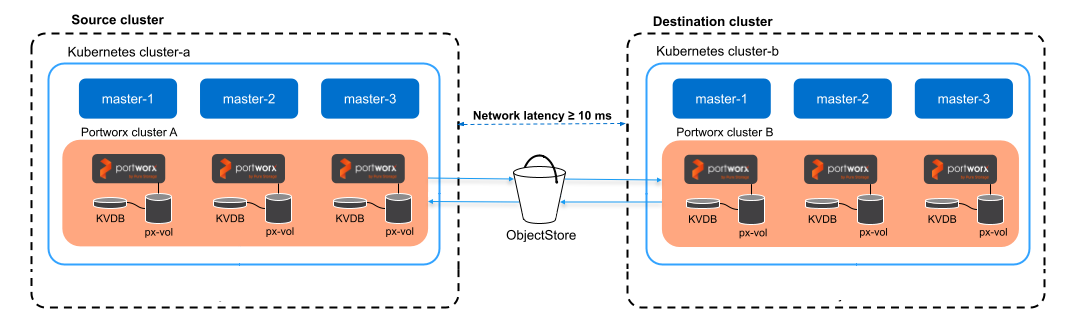
- Application data and supported Kubernetes resources are asynchronously replicated from a source to a destination cluster, which means there is a delay between data changes occurring on the source cluster and their replication to the destination cluster.
- Incremental changes from Kubernetes or OpenShift applications and Portworx data are continuously sent to the destination cluster.
- If the source cluster becomes unavailable, you can activate the applications in the destination cluster.
Perform the following steps to set up asynchronous DR:
📄 Prerequisites
Prerequisites for Async DR migration.
📄 Prepare your Portworx cluster
Prepare your Portworx cluster for asynchronous DR.
📄 Generate and apply a cluster pair spec
How to pair your clusters.
📄 Schedule a migration
How to set up asynchronous schedules.
📄 Failover an application
How to failover an application from one Kubernetes cluster to another.
📄 Failback an application
Learn how to failback an application from the backup Kubernetes cluster to the original one.