Asynchronous disaster recovery in OpenShift vSphere
In asynchronous disaster recovery setup, you can replicate Kubernetes applications and their data between two Kubernetes clusters. Here, a separate Portworx Enterprise cluster runs under each Kubernetes cluster.
The following diagram shows an asynchronous DR setup involving two clusters that are geographically apart:
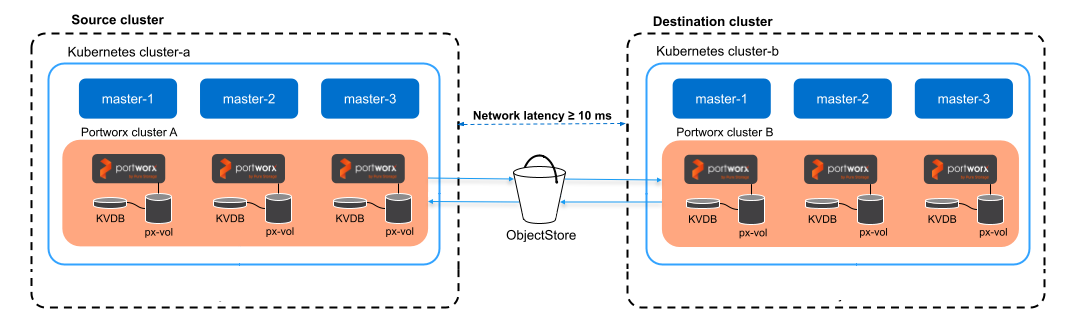
- Application data and supported Kubernetes resources are asynchronously replicated from a source to a destination cluster, which means there is a delay between data changes occurring on the source cluster and their replication to the destination cluster.
- Incremental changes from Kubernetes applications and Portworx data are continuously sent to the destination cluster.
- In case the source cluster becomes unavailable, you can activate the applications in the destination cluster.
Cluster-wide operators are not migrated as part of a DR migration if they are not installed in the same namespace as the applications you want to migrate (for example, in OpenShift, the operator installation defaults to the openshift-operators namespace). As a result, after migration, you will not be able to scale up or down your applications on the destination cluster using storkctl.
Perform the following steps to set up asynchronous DR:
Prerequisites
Prerequisites for asynchronous DR migration.
Prepare your Portworx cluster
Set up your Portworx cluster for asynchronous DR.
Create a ClusterPair
How to pair your clusters.
Rancher Projects
How to use Rancher Projects with ClusterPAir.
Schedule migrations
How to set up asynchronous schedules.
Failover an application
How to failover an application from one Kubernetes cluster to another.
Failback an application
Find out how to failback an application from the backup Kubernetes cluster to the original one.
Clean up disaster recovery objects
How to remove disaster recovery object.
Supported Resources
What are the supported Kubernetes resources.
Related videos
Useful video tutorials