Install Portworx on VMware vSphere
You can install Portworx Enterprise on a VMware vSphere environment using either a custom Kubernetes manifest or Helm chart, based on your infrastructure requirement. Portworx Enterprise supports clusters running on major cloud service providers and on-premises data centers in both air-gapped and connected environments. The installation process includes preparing the environment, configuring the Kubernetes cluster, and deploying Portworx with a generated specification.
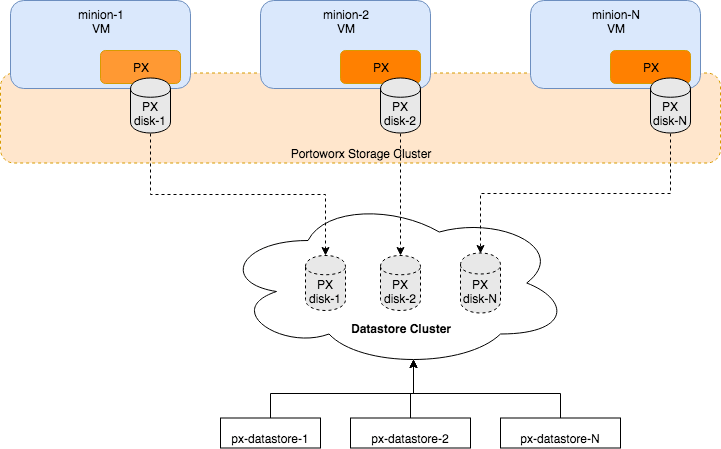
The following diagram gives an overview of the Portworx architecture on vSphere using shared datastores.
- Portworx runs on each Kubernetes minion/worker.
- Based on the given spec by the end user, Portworx on each node will create its disk on the configured shared datastores or datastore clusters.
- Portworx will aggregate all of the disks and form a single storage cluster. End users can carve PVCs (Persistent Volume Claims), PVs (Persistent Volumes) and Snapshots from this storage cluster.
- Portworx tracks and manages the disks that it creates. In a failure event, if a new VM spins up, Portworx on the new VM will be able to attach to the same disk that was previously created by the node on the failed VM.
Prerequisites
In addition to the System Requirements, ensure that your VMware vSphere cluster meets the following requirements before installing Portworx Enterprise:
- Use one of the following disk types:
- eagerzeroedthick
- lazyzeroedthick
- thin
- Allocate a dedicated disk for KVDB (internal or external) on at least three nodes. Each disk must have a unique device name across all KVDB nodes. For more information, see KVDB for Portworx.
- Any underlying nodes used for Portworx in OCP have Secure Boot disabled.
- For air-gapped installation, your OpenShift cluster must temporarily have its internal registry reachable externally to the cluster using the procedure here.
- For air-gapped installation, you must have a Linux host with internet access that has either Podman or Docker installed.
- For VMware Tanzu Kubernetes Grid Integrated Edition (TKGI), enable Workload Management according to VMware documentation.
Installation Options for Portworx Enterprise on VMware vSphere Clusters
To install Portworx Enterprise on a VMware vSphere cluster, see the following topics:
-
Openshift
-
Kubernetes
-
Other Supported Distributions
-
For information on how to deploy Portworx Enterprise on Google Anthos, Rancher Kubernetes Engine (RKE2), or VMware Tanzu Kubernetes Grid Integrated Edition (TKGI) in a non-air-gapped vSphere Kubernetes cluster, follow the steps in Installation on Non-Air-Gapped vSphere Kubernetes Cluster.
-
For information on how to deploy Portworx Enterprise on Google Anthos, Rancher Kubernetes Engine (RKE2), or VMware Tanzu Kubernetes Grid Integrated Edition (TKGI) in an air-gapped vSphere Kubernetes cluster, follow the steps in Installation on Air-Gapped vSphere Kubernetes Cluster.
noteEach Kubernetes distribution might require specific steps to prepare the VMware vSphere cluster before you deploy Portworx Enterprise.
-
-
For information on installing Portworx Enterprise on a VMware vSphere cluster using the Portworx helm chart, see Installation on vSphere Cluster using Helm.
Best practices
Prevent Accidental Deletion: If your virtualization software has a feature to prevent accidental deletion, you should enable it for the VMs hosting PX nodes. While PX is designed to handle the loss of some nodes without issue, losing a significant number of storage nodes due to VM deletion can result in a loss of quorum and an outage. For more information on how to prevent accidental deletion of VM, refer to Maintaining Health of vSphere Cluster Services.